

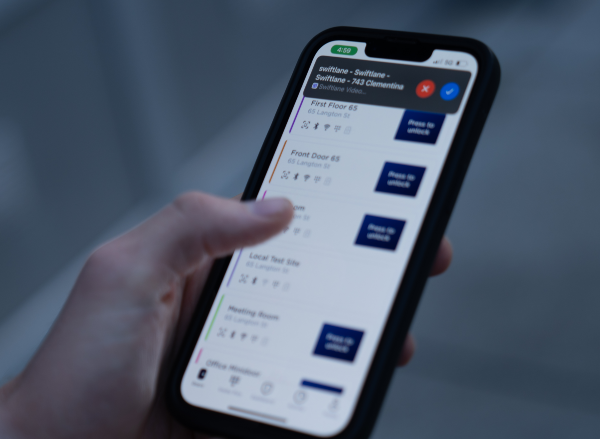
A mobile phone intercom system is a building entry system that routes visitor calls directly to a resident’s or tenant’s mobile device. Depending on the system, calls can reach users through a smartphone app or cellular voice call, eliminating the need for dedicated intercom handsets inside individual units.
For property owners and managers, the shift away from traditional telephone-based intercoms is also being driven by the aging infrastructure behind many legacy callboxes. Traditional systems can depend on dedicated telephone lines, on-site programming, and copper wiring that becomes increasingly difficult and expensive to maintain. Modern systems can instead combine mobile calling, video, remote unlocking, and cloud-based management.
How We Researched This
We reviewed current intercom architectures, retrofit approaches, connectivity options, pricing factors, and access control features to identify what matters when replacing or upgrading a building entry system. We also considered the practical requirements of multifamily and commercial properties, including resident accessibility, delivery management, tenant turnover, network connectivity, installation complexity, and ongoing system administration.
Key Takeaways
- What it is: A mobile phone intercom system routes visitor calls to a resident’s or tenant’s smartphone through an app or cellular voice call, rather than requiring dedicated in-unit intercom hardware.
- Why upgrade: Traditional telephone-based intercoms can depend on aging Plain Old Telephone Service (POTS) infrastructure, telephone service charges, and on-site hardware maintenance. Replacing those systems can reduce reliance on dedicated phone lines and simplify administration.
- Typical 2026 costs: Hardware runs $200 to $5,000+ per entry door depending on system tier, full project costs (hardware plus installation) typically range from $1,500 for small single-entry retrofits to $30,000+ for large multi-entrance properties, and cloud or cellular service commonly costs $5 to $15 per unit per month.
If you manage an apartment, office, or mixed-use property, the practical question isn’t simply whether an intercom can call a mobile phone. It’s how the system handles visitor verification, remote unlocking, connectivity, tenant changes, deliveries, and ongoing administration.
This guide explains how mobile phone intercom systems work, how they compare with traditional telephone callboxes and video intercoms, what features to evaluate, what a typical upgrade can cost, and which operational factors matter before you replace an existing system.
Table of Contents
- What Is a Mobile Phone Intercom System?
- Why Properties Are Replacing Legacy Intercoms in 2026
- How It Works: The 3 Core Architecture Types
- How to Connect an Existing Building Intercom to Cell Phones: Retrofit Guide
- Key Benefits of Cell Phone Intercoms for Property Teams
- 2026 Cost Breakdown: Hardware, Setup, and Service Fees
- Buyer Checklist: What to Look for Before Buying
- Swiftlane: The Modern Standard for Mobile Calling
- FAQs
Related Posts:
- Intercom Systems: Architectural Comparison, Types & How They Work (2026)
- Video Intercom Systems: 2026 Types, Costs & How They Work
- Intercom vs Access Control System
What is a Cell Phone Intercom System?
A cell phone intercom system is a building entry system that sends visitor calls to a resident’s or tenant’s mobile phone instead of a dedicated intercom handset mounted inside the unit. Depending on the system, the call can use a smartphone app over Wi-Fi or cellular data, or a standard cellular voice call.
This changes the architecture of the intercom. Instead of maintaining a physical indoor station in every apartment, the property uses an entry panel and access control hardware at the building entrance while the resident’s smartphone serves as the communication device.
How Modern Mobile Calling Replaces In-Unit Wall Buzzers
Traditional apartment intercom systems installed from the 1980s through the 2000s commonly used copper wiring to connect the entrance callbox to a dedicated handset or apartment buzzer system. When a visitor selected a unit, the call traveled through those physical connections to the resident’s wall-mounted device. Granting access meant pressing a button on that handset to release the door.
A mobile intercom removes the need for that dedicated in-unit hardware. The entry panel sends the visitor’s audio or video call through the property’s network, cellular connectivity, or both. The resident receives the call on an iOS or Android smartphone and can communicate with the visitor without being physically inside the apartment.
For property managers, this can also simplify changes when residents move in or out. There’s no in-unit intercom handset to install, replace, or reprogram for each resident. The resident’s mobile device becomes the endpoint for the communication service.
Mobile App Video Calling vs. Standard Phone Calling
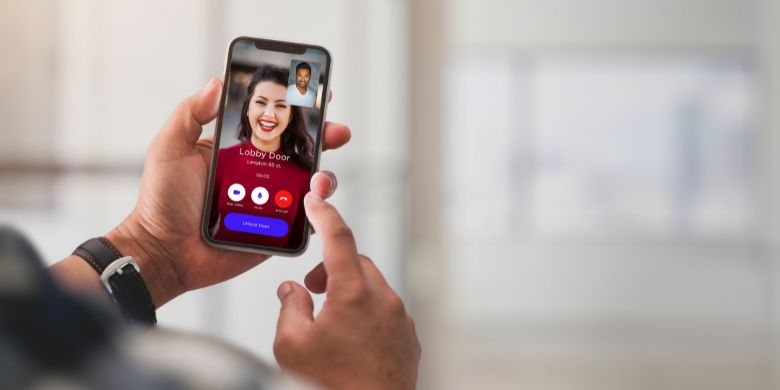
Modern mobile intercoms can use two different communication paths, and they serve different purposes.
- App-based calling: The resident receives a notification in the intercom app and can see and speak with the visitor using two-way video. If the system supports mobile unlocking, the resident can release the door directly from the app.
- Standard phone calling: The apartment intercom system places a conventional voice call to the resident’s phone number. The resident speaks with the visitor over the phone and can use a keypad command, such as pressing 9, to trigger the door release.
- App-first with voice fallback: Systems that support both methods give residents a primary video experience while retaining a conventional voice path when app access or data connectivity is unavailable or impractical.
For most properties, the combination is more useful than choosing between app-based and telephone calling. Video provides better visitor verification and a more direct mobile experience, while voice fallback provides another way to answer and release the door when the app can’t be used.
Why Properties Are Replacing Legacy Intercoms in 2026
For many properties, replacing a legacy intercom is no longer just a matter of adding video or giving residents a better way to answer the door. The underlying telephone and wiring infrastructure can also be becoming more expensive to maintain.
Telecom carriers are retiring portions of their legacy copper networks and moving customers toward fiber, wireless, and Internet Protocol (IP)-based services. AT&T, for example, says its traditional copper wire-based service is being replaced with fiber, while Verizon continues to publish copper-retirement notices across multiple states.
That transition creates three practical reasons for property owners and managers to evaluate an older telephone entry system.
The POTS Line Sunset and Telecom Surcharges
Traditional telephone callboxes can depend on POTS lines, which historically carried analog voice signals over copper. FCC Order 19-72 reduced certain regulatory obligations surrounding legacy copper loops, helping accelerate the industry’s migration toward newer wireline and wireless networks. But it didn’t establish a nationwide deadline requiring every POTS line to be shut down.
The more immediate issue for property managers is what individual carriers are doing in their service areas. AT&T says traditional copper service is being replaced with fiber, and Verizon continues to announce planned copper retirements and migrations to alternative services.
Where a property continues to maintain an analog line for a door-entry system, the owner may face higher service costs, limited support, or a requirement to migrate the line to a newer service. The actual monthly cost varies by carrier, market, and type of line, so property managers should review their current telecom bill rather than assume a standard POTS surcharge.
The Escalating Cost of In-Unit Wiring Repairs
Legacy intercoms can also create a maintenance problem inside the building.
A traditional system may have a dedicated low-voltage connection running from the entrance equipment to an individual apartment. If a copper pair becomes damaged, corroded, disconnected, or otherwise degraded somewhere along that path, troubleshooting can require tracing the circuit through walls, risers, conduits, or telecom closets before a technician can determine where the fault occurred.
The cost isn’t limited to replacing the failed handset. A technician may need to diagnose the wiring, access difficult-to-reach areas, repair or replace sections of cable, and test the connection from the apartment back to the entrance panel.
For a property with dozens or hundreds of units, those individual service calls can turn a seemingly minor intercom problem into a recurring maintenance expense.
Tenant Expectations: Package Deliveries and Remote Entry
Modern property operations also require residents to manage visitors when they’re not physically at home.
Package deliveries, food deliveries, contractors, and guests may arrive while a resident is at work, traveling, or elsewhere on the property. A mobile intercom lets the resident receive the visitor call on a smartphone rather than depending on an in-unit wall station.
With an app-based system, the resident can see and speak with the visitor and, when supported by the system, unlock the entrance remotely. A cellular voice fallback can provide another way to answer the call when the resident can’t use the app.
For property managers, the practical benefit is fewer dependencies on physical in-unit hardware while giving residents a way to handle building entry from wherever they are.
How It Works: The 3 Core Architecture Types
Not all mobile-enabled intercoms use the same architecture. The main difference is how the entrance hardware connects to the resident and where the communication and access control functions are handled. Understanding these three architectures can help property owners determine whether they’re buying a simple telephone replacement, a cellular callbox, or a full cloud-based video intercom.
Architecture 1: Legacy Telephone Entry Dialers (Landline-Based)
A legacy telephone entry system connects the entrance callbox to a dedicated telephone line. When a visitor selects a resident, the system dials that resident’s phone number through the telephone network, allowing the resident to answer the call and release the door using a keypad command when supported.
Architecture:
Front-door callbox → telephone line → resident’s phone
Advantages
- Familiar calling experience for residents
- Doesn’t require a smartphone app
- Can work with a conventional landline or mobile number
Tradeoffs
- Typically audio-only
- Requires ongoing telephone service
- Depends on legacy telephone infrastructure
- Doesn’t provide visual visitor verification
- Resident and directory changes may require more manual administration, depending on the system
This architecture can continue to serve a basic telephone entry function, but it provides fewer options for video, remote administration, and mobile-first visitor management.
Architecture 2: Cellular-Only Intercoms (SIM-Card Based)
A cellular intercom replaces the dedicated telephone line with a cellular connection. The entrance hardware contains a SIM card or cellular module and uses the carrier network to place voice calls directly to residents’ phone numbers.
Architecture:
Cellular callbox → 4G/5G network → resident’s phone
Advantages
- Doesn’t require a wired internet connection at the entrance
- Useful for remote entrances and vehicle gates where broadband is difficult to provide
- Can continue using conventional phone numbers rather than requiring an app
Tradeoffs
- Requires an ongoing cellular service plan
- Many systems focus primarily on voice calling rather than full video intercom
- Video capabilities, where available, depend on the specific hardware and cellular connection
- Cloud management and visitor features vary considerably by system
Cellular-only architecture can be a practical way to eliminate a dedicated telephone line without installing wired internet at an entrance. It’s important to distinguish this from a cloud video intercom that uses cellular connectivity as a backup or primary network path.
Architecture 3: Cloud IP Video Intercoms (Modern Standard)
Cloud IP video intercoms connect the entrance station to the property network, through Ethernet/PoE, or through cellular data where wired connectivity isn’t feasible. Many IP intercoms use Ethernet and Power over Ethernet (PoE), technologies standardized under the IEEE 802.3 family of standards. The system then sends an app notification to the resident’s smartphone, enabling two-way video and remote door release when supported.
Architecture:
Video intercom → Ethernet/PoE or cellular data → cloud platform → resident smartphone
Advantages
- Two-way video for visual visitor verification
- Smartphone calling and remote door unlocking
- Centralized cloud management
- Remote directory administration
- Visitor PINs and other temporary access options
- Can integrate with access credentials such as mobile access, key fobs, PINs, or facial recognition
- Can support cellular voice fallback on systems designed with that capability
Tradeoffs
- Requires reliable network connectivity at the entrance
- Wired deployments may require Ethernet infrastructure and PoE
- Cellular deployments depend on carrier coverage and data service
- Ongoing cloud, software, and connectivity costs may apply
For properties replacing a legacy telephone entry system, the important distinction is that a cloud IP video intercom isn’t simply a newer telephone dialer. It combines the entrance hardware, network connection, cloud software, resident smartphone experience, and access control functions into a single architecture. For a broader look at how video intercom systems work, including how IP, analog, and cellular setups compare on cost, see our full guide.
Quick Architecture Comparison Table
| Architecture Type | Primary Connection | Two-Way Video? | Remote Unlock from Anywhere? | In-Unit Handsets Required? | Ongoing Monthly Fees | Best For |
| Legacy Telephone Entry Dialers | Telephone line (POTS / landline) | No, audio only | Only during an active call, via keypad command | No | Telephone service charges | Residents who want a familiar phone-call experience without an app |
| Cellular-Only Intercoms | Cellular network (4G/5G, SIM-based) | Limited / varies by hardware | Only during an active call, via keypad command | No | Ongoing cellular service plan | Remote entrances and vehicle gates where wired internet isn’t practical |
| Cloud IP Video Intercoms | Ethernet/PoE or cellular data → cloud platform | Yes | Yes, app-based, independent of an active call | No | Cloud / software subscription (see cost breakdown) | Properties wanting full video verification, mobile access, and centralized management |
How to Connect an Existing Building Intercom to Cell Phones: Retrofit Guide
If you already have a building intercom and want to connect it to cell phones, you have two retrofit paths: add a cellular or VoIP interface to the existing system, or replace the entrance station with a modern mobile-enabled intercom.
The right approach depends on the condition of the existing wiring, entrance hardware, power supply, door-release mechanism, and telephone entry system. Before buying an adapter, determine which parts of the existing system you can realistically reuse.
Can You Connect an Old Analog Buzzer to a Cell Phone?
Yes, but with significant technical limitations.
A third-party telephone dialer or gateway can sometimes connect an older analog intercom to a cellular or VoIP service. The interface effectively bridges the building’s existing telephone entry equipment to a modern phone network, allowing the callbox to dial a resident’s phone number instead of ringing an in-unit handset.
This can be useful when the existing entrance hardware is still functional and the immediate goal is simply to eliminate a dedicated POTS line. But it doesn’t turn an analog intercom into a modern video system.
The building may still have:
- An aging exterior callbox
- Audio-only communication
- Limited visitor identification
- Existing in-unit wiring and handsets
- On-site hardware that requires maintenance
- No centralized cloud management or mobile app
For that reason, a telephone or cellular gateway is often better viewed as a bridge between an older system and newer communications infrastructure, rather than a complete modernization.
Retrofit Option 1: Cellular Adapter Retrofit
A cellular adapter can replace the traditional telephone connection while allowing much of the existing door-entry hardware to remain in place.
Depending on the equipment, the adapter connects to the building’s low-voltage power supply and the intercom’s telephone interface or relay contacts. Some systems can work with 12V or 24V DC power and use dry-contact inputs or outputs to interface with the existing door-release circuit.
The basic architecture is:
Legacy callbox → cellular adapter → cellular network → resident’s phone
This approach can address the immediate problem of maintaining a dedicated POTS line. It can also avoid extensive rewiring if the existing entrance equipment and door-release hardware are still serviceable.
The tradeoff is that the property retains much of the legacy intercom architecture. The exterior panel may still be outdated, the system remains primarily audio-based, and residents may not get video verification or app-based unlocking.
A cellular adapter therefore makes the most sense when the objective is to extend the useful life of an otherwise functional system, rather than modernize the entire visitor-entry experience.
Retrofit Option 2: Full Front-Door Station Replacement
For properties ready for a longer-term modernization, replacing the exterior intercom station while abandoning the old in-unit wiring can be a cleaner approach.
The new entrance station can handle visitor communication, video, and access control at the building entrance. Calls then travel over the property’s Ethernet connection, Wi-Fi where supported, or cellular connectivity to the resident’s smartphone.
This changes the architecture from:
Entrance panel → copper wiring → apartment handset
to:
Mobile-enabled entrance panel → IP/cellular network → resident’s smartphone
The key retrofit advantage is that installers may not need to enter every apartment or replace every in-unit handset. If the new system doesn’t depend on the old apartment wiring, the work can be concentrated at the entrance, network location, and door hardware.
For a straightforward installation, this can reduce disruption compared with replacing an individual intercom station in every unit. A one- to two-day installation is possible for some retrofit projects, but the actual schedule depends on the number of entrances, electrical work, network availability, door hardware, and site conditions.
Basic Wiring and Infrastructure Checklist
Before selecting a retrofit system, verify the following:
- Power: Check the existing power supply and the new equipment’s requirements. Many systems use low-voltage DC power, while some IP intercoms use PoE+ (802.3at).
- Door release: Confirm whether the entrance uses an electric strike, magnetic lock, or another release mechanism. The intercom or access controller will operate the lock through relay contacts.
- Network: For IP-based systems, plan for a reliable Ethernet connection, using Cat6, between the entry equipment and the network. Where wired connectivity is impractical, a 4G/5G cellular connection may be an alternative.
- Existing wiring: Determine whether old telephone and low-voltage wiring can be reused, bypassed, or removed. Don’t assume legacy intercom cable is suitable for an IP-based system.
- Access control hardware: Identify the existing lock, request-to-exit device, door position sensor, and access controller before replacing the entrance station.
- Backup connectivity and power: If the entrance must remain operational during an internet or power outage, evaluate cellular backup and battery or other backup-power requirements as part of the retrofit.
For most properties, the decision comes down to whether you want to preserve the existing intercom and simply replace its telephone connection, or use the retrofit as an opportunity to replace the entrance station and move resident communication to mobile devices. The first option can defer a larger capital project; the second can eliminate more of the legacy infrastructure that created the maintenance problem in the first place.
Key Benefits of Cell Phone Intercoms for Property Teams
For property teams, the value of a cell phone intercom goes beyond giving residents another way to answer the door. The biggest operational benefits come from eliminating in-unit hardware, reducing service calls, simplifying tenant administration, and giving staff better visibility into building entry.
Zero In-Unit Maintenance
Because residents use their smartphones instead of dedicated wall-mounted handsets, property teams no longer need to schedule apartment access to troubleshoot or replace an intercom handset. This can reduce maintenance coordination and avoid replacing aging in-unit hardware when residents move out.
For larger properties, eliminating hundreds of individual handsets can also simplify long-term system maintenance. The entrance equipment and software become the primary components that staff and installers need to manage.
Remote Unlock From Anywhere
Mobile intercoms let residents answer visitor calls and unlock the door from their smartphones, whether they’re at home, at work, or away from the property. This is useful when residents need to give access to family members, cleaners, contractors, or other authorized visitors without being physically present.
For property teams, remote access can also reduce situations where residents ask staff to let a visitor into the building on their behalf.
Seamless Delivery Management
Mobile intercoms can make deliveries easier to manage by giving residents a way to respond to drivers while they’re away from home. Depending on the system, residents may be able to use the intercom app to communicate with a driver and unlock the entrance remotely, while some systems also support temporary or scheduled access credentials.
This can reduce the need for residents to share permanent entry credentials with delivery personnel and can help keep delivery activity out of restricted areas. But the exact workflow depends on how the intercom, access control system, and delivery credentials are configured.
Visual Audit Trails
Video-enabled intercoms can provide more information than an audio-only callbox. When supported by the system, property teams can review event records showing when an entry event occurred and associate it with a visitor image, resident interaction, or access credential.
That additional context can be useful when investigating an incident or determining what happened at a building entrance. Property teams should check what event data the system actually records, how long it’s retained, and who can access it.
Cloud Tenant Directory
A cloud-managed tenant directory lets authorized property staff update resident information through a web browser instead of manually reprogramming an on-site callbox. When a resident moves in or out, staff can update the directory without printing new labels or coordinating a technician visit for a simple directory change.
For properties with frequent turnover, this can turn a recurring administrative task into a routine software update. It can also make managing multiple entrances or properties easier when directory administration is centralized.
Case Study: How 2B Living Reduced the Work of Managing 26 Properties
The challenge: Senior Property Manager Nelly Litovskaya was managing access across 26 San Francisco properties using legacy intercom systems. The systems required on-site programming, depended on telephone lines, and gave the management team little ability to handle access remotely.
The change: After deploying Swiftlane, Nelly could manage building access from her phone or dashboard, respond to visitors through video, and update resident access through the property-management integration. Residents could also use the mobile app to see who was at the door and grant access to guests and deliveries.
The result: 2B Living reported lower maintenance costs and fewer property visits, reducing the operational work associated with managing access across multiple buildings. The company also eliminated the need to rely on the previous copper-line intercom setup at the properties that transitioned to Swiftlane.
“It also reduced the time that our team visits the property, which essentially reduces operating costs for the ownership group.” — Nelly Litovskaya, Senior Property Manager, 2B Living
2026 Cost Breakdown: Hardware, Setup, and Service Fees
Upgrading to a video intercom with wireless calling involves three cost categories: entry hardware, installation, and ongoing cloud or cellular service. Pricing is most useful when broken down per entry door, since that’s the unit vendors actually quote against. A single-entry property and a multi-entrance property scale very differently.
Hardware Costs
The type of intercom you choose has the biggest effect on the initial equipment cost, per entry door:
- Audio-only intercoms: $200 to $800 per door. These systems support two-way audio only and remain the lowest-cost option, but offer no visitor verification beyond voice.
- Standard wireless or IP video intercoms: $1,000 to $3,000 per door. These add two-way video and mobile calling without the in-unit wiring that traditional systems require.
- Cloud-managed video intercoms with built-in access control: $2,000 to $5,000 or more per door. These systems add remote administration, visitor logs, and integration with access credentials such as mobile unlock or facial recognition, which pushes hardware cost toward the higher end of the range.
Actual equipment pricing depends on the number of entrances, required access control hardware, and system configuration.
Installation Labor
Installation labor for wireless and IP video intercoms tends to run lower than for traditional wired systems, since work is concentrated at the entrance rather than run to every apartment unit. For a typical mid-size retrofit (one to two entries, video intercom with mobile access, door release, and admin setup), combined hardware and installation costs commonly fall in the $8,500 to $34,000 range for the full project. Small, single-entry retrofits with limited integration can come in as low as $1,500 to $6,000 total; large or multi-entrance properties with elevator or security integrations can run $30,000 or more.
A site assessment is important before comparing quotes, because two properties with the same number of entrances can have very different wiring conditions and installation requirements.
Ongoing Cloud and Software Subscriptions
Cloud-based systems commonly add a recurring service fee for software, connectivity, and system management. A typical range for video intercom platforms is $5 to $15 per unit per month, or $30 to $100 per entry door per month, depending on the platform and feature tier. Cloud-managed systems with access control and admin tools tend to sit at the higher end of that range.
These fees may cover services such as:
- Cloud video hosting
- Resident mobile app licenses
- Tenant directory management
- Cellular connectivity or carrier voice minutes
- Remote system administration
When comparing systems, check whether connectivity and voice usage are included in the subscription or billed separately.
For a more detailed explanation of cost breakdowns, read our 2026 costing guide.
Compare Total Cost of Ownership, Not Just the Upfront Price
The initial purchase price is only one part of the financial case for replacing a legacy intercom. Property teams should also account for recurring telephone service, repairs to aging in-unit handsets and wiring, technician visits, and the administrative work required to maintain older systems. The right comparison is the three- to five-year total cost of ownership, not simply the upfront equipment quote.
Buyer Checklist: What to Look for Before Buying
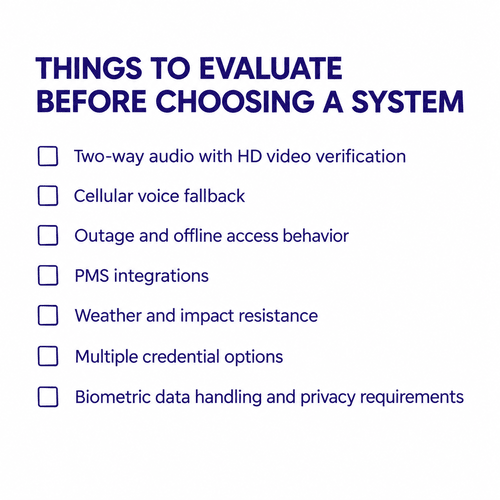
Not every mobile phone intercom offers the same combination of calling, video, access control, and property management features. Before choosing a system, evaluate how it’ll work for residents, visitors, and the property team in everyday situations. If you’re shortlisting vendors for a multifamily building, our apartment video intercom buyer’s guide compares specific systems and models side by side. The checklist below focuses on the mobile-calling features to confirm with any of them.
Two-Way Audio With HD Video Verification
Look for an intercom that combines two-way audio with video rather than relying on audio alone. Video lets residents see who’s requesting access before unlocking the door, which can provide more information when dealing with unfamiliar visitors, deliveries, or other access requests.
The system should provide clear two-way communication and a video feed that residents can access from their smartphones.
Cellular Voice Fallback
A mobile intercom should have a fallback for situations where a resident can’t use the app. For example, an older resident may prefer conventional phone calls, or a tenant may have unreliable mobile data at a particular location.
With cellular voice fallback, the intercom can place a direct phone call to the resident. The resident can speak with the visitor and, on systems that support it, use a keypad command such as pressing 9 to release the door.
For properties with a broad range of residents, an app-first system with conventional voice calling as a fallback can provide more flexible access to the intercom.
Outage and Offline Access Behavior
Ask what the intercom and access control system do when internet connectivity, cellular service, or building power is interrupted. A mobile intercom should have a defined fallback path rather than assuming the primary network connection will always be available.
Check whether the system supports cellular backup, local credential validation, offline door access, backup power, and conventional telephone calling when app-based communication is unavailable. Also determine which functions stop during an outage, such as video calling, remote unlocking, cloud administration, or event synchronization, and which functions continue operating locally.
For multifamily properties, test the failure scenarios before deployment. A useful site assessment should cover internet loss, cellular loss, power interruption, and loss of connectivity to the cloud so property teams understand exactly how residents, visitors, and authorized credentials are handled in each situation.
Property Management Software Integrations
Check whether the intercom can integrate with the property’s property management system (PMS). Integrations with platforms such as Yardi, RealPage, Entrata, and AppFolio can synchronize resident information and reduce the need for staff to update the intercom directory manually.
This matters most in multifamily properties with frequent move-ins and move-outs. Before purchasing, verify exactly what the integration automates, including whether resident additions, removals, and contact information are synchronized automatically.
Weather and Impact Resistance
For an entrance-mounted device, durability matters as much as software. Look for an enclosure rated for outdoor exposure and physical impact.
An IP65 rating indicates protection against dust ingress and water projected by jets, while IK07 or IK08 indicates resistance to specified levels of mechanical impact. Check the manufacturer’s published rating and confirm that it applies to the complete installed device, not just an individual component.
Also consider the property’s climate and entrance conditions when evaluating temperature ratings, sunlight exposure, rain, and potential vandalism.
Multiple Credential Options
A modern intercom should support more than one way for authorized residents to enter. Depending on the property and system, useful options can include:
- Touchscreen entry for resident or visitor interaction
- Mobile app tap-to-unlock for smartphone-based access
- PIN codes for residents, guests, or temporary access
- Facial recognition for residents who want touchless entry
- Physical credentials where key cards or fobs are still needed
Multiple credential types give property teams flexibility when resident preferences, accessibility requirements, or operating conditions differ. The goal isn’t to replace every credential at once, but to provide an access system that can support the property’s actual mix of residents and use cases.
Biometric Data Handling and Privacy Requirements
If you plan to use facial recognition for building access, evaluate how the system collects, stores, processes, and deletes biometric data before deployment. Requirements can differ by jurisdiction and by how the system handles facial templates, images, consent, retention, and disclosure.
For properties subject to Illinois’ Biometric Information Privacy Act (BIPA), Texas’ Capture or Use of Biometric Identifier Act (CUBI), or Washington’s biometric privacy requirements, review the applicable rules before enabling facial recognition. These laws can impose requirements around notice, consent, disclosure, retention, or handling of biometric identifiers and biometric information.
Ask the provider whether facial recognition data is stored locally or in the cloud, whether the system retains source images or only biometric templates, how long data is retained, who can access it, and how data is deleted when a resident leaves the property. Property teams should also document their biometric-data policy and confirm that their deployment and consent practices align with applicable state and local requirements.
Swiftlane: The Modern Standard for Mobile Calling
Swiftlane combines video intercom calling, mobile access, and access control in a single platform for multifamily and commercial properties. Residents can receive two-way video calls on iOS and Android devices, see and speak with visitors, and unlock the door from their smartphones.
For residents who don’t use the mobile app, Swiftlane can also provide automatic telephone voice fallback, allowing the intercom to place a conventional phone call. This gives properties an alternative communication path when app-based calling isn’t practical for a particular resident.
The intercom also connects with access control credentials including mobile unlock, facial recognition, PINs, and key fobs. Property teams can manage these access methods through a centralized cloud dashboard rather than maintaining separate systems for intercom communication and door access.
For multi-door or multi-property deployments, the dashboard provides remote administration and access-event visibility, including door unlock logs. This allows authorized property staff to manage the system and review access activity without being physically present at each entrance.
Explore Swiftlane today and see how its mobile phone intercom system can simplify operations and enhance security.
FAQs
Can I convert my existing wired intercom to work with cell phones?
Yes. Cellular adapters and telephone gateways can sometimes connect an existing analog intercom to cellular or VoIP service, allowing calls to reach residents’ phones. But older systems may still retain limitations such as audio-only communication, aging door stations, and in-unit wiring.
What happens if the internet goes down?
Systems with cellular connectivity can use LTE or 4G/5G as an alternative communication path when the wired internet connection is unavailable. Property teams should also evaluate backup power and local door-release functions, since connectivity and power failures are separate issues.
Are video intercom systems secure?
Security depends on the system’s architecture, authentication, encryption, access control configuration, and installation. Buyers should evaluate how the system protects communications, manages credentials, records access events, and handles administrative permissions rather than relying on the presence of video alone.
Do residents need a smartphone to receive calls?
No. Through telephone voice fallback, the system can dial a standard landline, flip phone, or mobile number, so residents don’t necessarily need a smartphone or app to receive intercom calls. The resident answers the call and can press a key, such as 9, to unlock the door when supported by the system.
Can an apartment intercom call multiple cell phones at once?
Yes. Modern cloud-based systems can be configured to ring multiple authorized residents or household members simultaneously. The first person to answer can communicate with the visitor and control the door release, depending on the system’s configuration.
What happens if a resident’s phone is dead or they don’t have cell reception?
Residents can use other authorized entry methods when their phone is unavailable, such as a PIN, physical key fob, or facial recognition at the entrance panel. Property teams should make sure residents have an appropriate backup credential rather than relying entirely on smartphone access.
Can a cell phone intercom control vehicle gates as well as pedestrian doors?
Yes. Intercom systems with multiple relay outputs can control different access points independently, including vehicle gates, pedestrian gates, and interior lobby doors. The exact configuration depends on the gate operator, door hardware, and intercom’s relay capabilities.
Does the building need Wi-Fi at the front door?
No. A mobile intercom can connect through hardwired Ethernet, such as Cat6, or through a dedicated cellular connection using 4G/5G. A wired network or cellular modem can be preferable to relying on resident or building Wi-Fi at the entrance, but the appropriate connection depends on the site’s infrastructure and coverage.
How long does installation take?
Installation can range from several hours for a straightforward retrofit to multiple days for projects involving several entrances, new wiring, gate work, or other infrastructure changes. The installation schedule depends more on site conditions and the amount of construction required than simply on the number of residents.
Can residents unlock the door remotely from anywhere?
Yes. Mobile video intercoms can allow residents to answer visitor calls and unlock connected doors remotely through the app, provided the system and door hardware support remote release. This lets residents provide access to guests, family members, contractors, or delivery personnel even when they’re away from the property.
Get a Quote
Please share more details about your building so we can find the perfect solution for you!


