Access Control Readers for Seamless and Secure Property Access
Give tenants, employees, and vendors multiple secure ways to unlock doors.
- Five unlock methods in one reader
- Works with existing wiring
- No per-user fees for Bluetooth mobile unlock
- Managed remotely from anywhere


Serving Thousands of Clients Nationwide


A Fob Shouldn’t Be the Only Way to Get Into Your Building
Lost fobs. Shared credentials. Former employees still with access.
Traditional access systems create security gaps and constant operational overhead.
Swiftlane gives tenants and employees secure mobile access with:
- Mobile unlock and PIN access
- Encrypted fobs when needed
- Wallet credentials
- Centralized access management


Built for Modern Building Access
-
Stop relying on outdated fobs and badges
-
Upgrade readers without replacing wiring
-
Give tenants and employees mobile-first entry
-
Manage access remotely across every property
Five Ways In. One System to Manage.
Different buildings, and different users, need different ways to unlock doors.
01.
Bluetooth Mobile Unlock
When you're at the door (within Bluetooth range), open the Swiftlane app and tap Unlock. The phone talks directly to the reader over Bluetooth — no per-user mobile credentials required.
02.
PIN Access
Type a code at the reader's touch keypad. Useful for guests, deliveries, temporary access, or as a backup when no phone or fob is handy.
03.
Encrypted Fobs
Modern, secure key fobs for buildings that still issue physical credentials. Supports all DESFire generations (EV1, EV2, EV3). Keep existing fobs in use during retrofits, new fobs get the latest encryption.
04.
Wallet Credentials
Users enroll their access card directly in their digital wallet and tap their phone to unlock. No app to open, no physical badge required. Tap-and-go convenience for residents and employees.
05.
Remote Unlock
When you're not on-site, authorized users can unlock doors from the Swiftlane app or cloud dashboard. The command travels through the cloud — perfect for letting in deliveries, contractors, or visitors when no one is at the door. Admins control which users have Remote access vs Nearby-only.


One Cloud Dashboard to Manage It All
Every Swiftlane access control reader is managed from a single browser-based dashboard. No add-on hardware, no disconnected tools, no separate system to learn.
From the dashboard, property managers and admins can:
- Configure permissions for every tenant, employee, vendor, building, floor, amenity, and schedule
- Set whether each user has Remote access (unlock from anywhere) or Nearby-only access (unlock only when in Bluetooth range)
- Trigger remote unlocks for visitors, contractors, deliveries, or emergencies
- Monitor entry activity in real time with full audit logging
- Sync users automatically from your PMS or identity provider, no manual provisioning
SOC 2 Type 2 certified.
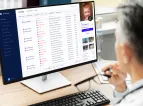
Works With the Systems You Already Use
Sync residents, employees, and vendors automatically from your PMS or identity provider. No spreadsheets, no manual provisioning.
- PMS: Yardi, AppFolio, Entrata, RealPage, Buildium, Rent Manager
- SSO: Okta, Azure AD, Google Workspace


8 of the Top 10 Property Management Companies Use Swiftlane
JOIN THE LEADERS
70%Fewer door-entry support calls
3× fasterVisitor entry
24/7Verified entry logs
100%Automated delivery access
Real Buildings. Real Results.
The overall user management is top tier without question. It's so easy to add new users, maintain users, and revoke access instantly.

The best way to know a property is running right is if you can step back and not touch anything — and for a few days everything just goes smoothly
Our vendor recommended Swiftlane for our front door, and I was pleasantly surprised by how intuitive it was. From day one, it's done exactly what we needed it to do.

Upgrade Your Access System Without Rewiring Your Building
Swiftlane access control readers are designed to work with that existing infrastructure, helping buildings modernize access control without opening walls or replacing cabling. If and when your team decides to move to OSDP, the same readers can be upgraded without replacing hardware.
Designed for Retrofit-Friendly Installation
- Works with existing wiring
- No major rewiring projects
- Faster deployment across occupied buildings
- Easier modernization path
- No forced rip-and-replace upgrade
Your building isn’t stuck on yesterday’s system. Upgrade when your team is ready.


Why Buildings Choose Swiftlane Smart Readers
Swiftlane Smart Readers
Traditional Readers
Unlock methods
Swiftlane Smart Readers:
Five unlock methods in one reader
Traditional Readers:
Usually 1–2 methods
Wallet credentials
Swiftlane Smart Readers:
Supported
Traditional Readers:
Rare
Remote unlock
Swiftlane Smart Readers:
Included
Traditional Readers:
Limited or not available
Retrofit support
Swiftlane Smart Readers:
Works with existing infrastructure
Traditional Readers:
Often requires hardware replacement
Vandal-resistant rating
Swiftlane Smart Readers:
IK07 (Z10) / IK10 (Z20)
Traditional Readers:
Varies
Indoor + outdoor deployment
Swiftlane Smart Readers:
Both supported: Z10 (IP66) and Z20 (IP68)
Traditional Readers:
Often separate indoor and outdoor models
PMS + SSO integrations
Swiftlane Smart Readers:
Yardi, AppFolio, Entrata, Okta, Azure AD, Google Workspace
Traditional Readers:
Often manual user management
Security certifications
Swiftlane Smart Readers:
SOC 2 Type 2 certified
Traditional Readers:
Varies
GET INSTANT PRICING
See your building’s custom quote instantly • Take the first step toward upgrading your building
OR


A Form Factor that Fits Every Door
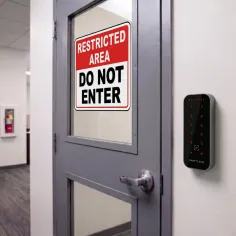
From narrow glass entryways to outdoor gates, the Swiftlane Access Control Readers are designed for retrofit-friendly deployment across different property types.
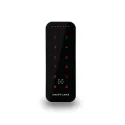
Z10 Card Reader
Built for narrow door frames, glass doors, and retrofit projects with limited mounting space.
- Mullion-style reader
- Touch keypad with PIN support
- Indoor/outdoor rated
- Vandal-resistant design
- Wiegand today, OSDP-ready
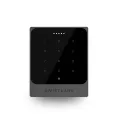
Z20 Card Reader
Designed for standard single-gang installations and demanding outdoor environments.
- Single-gang form factor
- Touch keypad with PIN support
- All-weather outdoor protection
- Higher vandal-resistance rating
- Wiegand today, OSDP-ready

Ready to Modernize Building Access?




Frequently Asked Questions
Almost never. Wiegand drops onto the 5–10 conductor cable most U.S. buildings already have. If you eventually move to OSDP, the same reader supports it. No rewiring required, no hardware swap.
Yes. Both Swiftlane access control readers Z10 and Z20 support NFC mobile credentials with Google Wallet, plus Bluetooth unlock through the Swiftlane mobile app.
Both. The Z10 is rated IP66 (water and dust). The Z20 is purpose-built for all-weather outdoor with IP68 protection. Both are IK07 (Z10) / IK10 (Z20) vandal-resistant.
Yes. Access permissions and remote unlock can be managed from the Swiftlane dashboard and mobile app. Admins choose whether each user gets Remote access (unlock from anywhere) or Nearby-only access (unlock only when in Bluetooth range).
Bring them in early. Swiftlane is SOC 2 Type 2 certified, with role-based admin, full audit logging, and encrypted data in transit and at rest. We're happy to do a security review call before any install.
Get a Tailored Quote for Your Building
Tell us about your building and we’ll recommend the right setup for your doors, infrastructure, and property type.


