

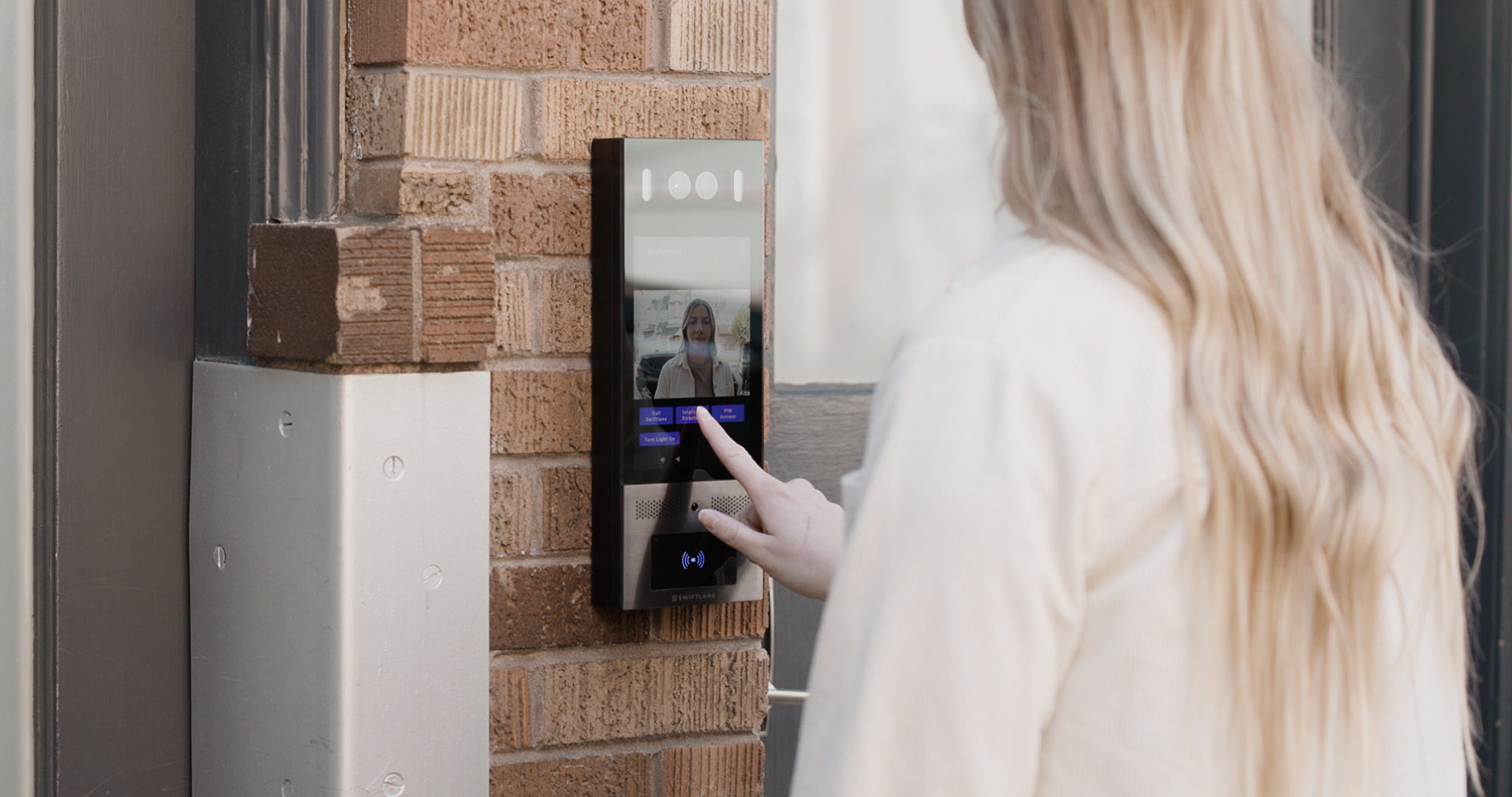
Biometric access control verifies identity using a physical characteristic such as a fingerprint, face, or iris to grant building entry. Unlike keys or cards, the credential cannot be lost or shared, but it requires privacy-law compliance in states like Illinois, Texas, and Washington.
What is Biometric Access Control?
Biometric access control uses unique physical traits: facial recognition, fingerprints, or iris scans, to verify identity and grant entry to a building. The global biometric access control market is projected to grow at a CAGR of 8.4% through 2029, according to Technavio, reflecting rising adoption across commercial and residential properties.
Unlike key fobs or PIN codes, biometric credentials can’t be shared, lost, or stolen, making them the highest-security access method available for multifamily and commercial buildings.
The question for most building operators today isn’t whether to upgrade. It’s which modality best fits their property, what it costs to install, and what their state’s compliance requirements actually mean for them. This guide answers all three.
How We Researched This
This guide draws on Swiftlane’s experience deploying biometric access control across multifamily and commercial properties throughout the United States, including the Gateway Park Apartments case study referenced above. Cost ranges reflect 2026 installer pricing cross-referenced against published vendor pricing from Kisi and EntegritySmart. Biometric accuracy benchmarks (FAR/FRR) are based on NIST IREX 10 test results.
Compliance information was reviewed against current state statutes and the IAPP Westin Research Center tracker as of Q2 2026, and should not be construed as legal advice. Consult a qualified attorney before deploying biometric access control in regulated jurisdictions. Market size data is sourced from the Biometric Update and Goode Intelligence 2026 Biometric Physical Access Control Market Report.
Key Takeaways
- Access control systems typically rely on possession/knowledge factors. Biometrics = identity-based factor.
- Biometric systems also introduce risks, including data privacy concerns, regulatory requirements, environmental sensitivity, and the potential for false acceptance or rejection.
- When properly implemented, they can improve convenience and entry speed, particularly in high-traffic properties.
- Upfront costs are typically higher due to hardware, installation, integration, and user enrollment requirements.
- Cloud-based deployments may support centralized permission management, audit trails, and remote access updates.
- Biometrics uses facial recognition, fingerprints, iris scans, or voice to grant entry, reducing risks associated with lost, stolen, or shared credentials.
- Clear policies, secure template storage, and fallback authentication methods are essential for responsible deployment.
Also, read
- Intercom vs Access Control System: A Complete Guide
- Best Facial Recognition Access Control Systems to Buy in 2025
- Biometric Access Control: What It Is and Why You Need It
Table of Contents
- What Is Biometric Access Control?
- How It Works + Modality Table
- Biometric Access Control by Building Type
- Cost in 2026
- Compliance: Is Biometric Access Control Legal in Your State?
- Biometric vs. Key Fob vs. Mobile: Which Is Right for Your Property?
- Gateway Park Apartments: From Shared Codes to Full Access Visibility
- Secure Your Building With Swiftlane
- Frequently Asked Questions
How It Works + Modality Table
Biometric access control works by capturing a physical identifier at enrollment, converting it into an encrypted template, and comparing that template against a live scan at the point of entry. If the scan matches, the door releases. The whole process takes under two seconds for most modern systems, and unlike a key fob, the credential never leaves the person.
Three modalities are in active use across commercial and residential buildings. Here’s how they compare:
Modality Comparison
| Facial recognition | Fingerprint | Iris recognition | |
| Accuracy (FAR) | ~0.001% (with liveness detection) | ~0.001% | ~0.0001% |
| Touchless | Yes | No | Yes |
| Outdoor use | Yes (IR-capable hardware required) | Limited | Limited |
| Speed (avg per user) | ~0.5 sec | ~1–2 sec | ~1 sec |
| Cost per door | $2,500–$6,000 | $800–$2,500 | $4,000–$10,000+ |
| Liveness / anti-spoofing | Yes — required for secure deployment | Yes (pulse detection) | Yes |
| Privacy compliance risk | High (BIPA, GDPR) | Medium | High |
| Best for | Multifamily entrances, commercial lobbies | Interior doors, server rooms, labs | Government, healthcare, high-security |
FAR = false acceptance rate. Benchmarks based on NIST IREX 10 test results. Cost ranges reflect 2026 installer pricing.
A note on liveness detection: Any facial recognition deployment without certified liveness detection has a meaningful security gap. The system can be defeated with a printed photo. For multifamily and commercial properties, liveness detection should be a baseline requirement, not an optional upgrade. Swiftlane’s SwiftReader X includes liveness detection as standard.
Biometric Access Control by Building Type

Not every building is the same deployment. The right modality, the compliance exposure, and the operational challenges all shift depending on what you’re managing. Here’s how biometric access control maps to the five most common property types:
| Building type | Best modality | Key consideration | Compliance watch |
| Multifamily residential | Facial recognition at main entrance; PIN or mobile backup | High resident turnover; outdoor exposure; opt-out must be available | Illinois BIPA, NYC Local Law 144, Texas CUBI |
| Commercial office | Facial recognition or fingerprint at entrance; PIN for visitors | Badge admin elimination; SOC 2/ISO 27001 for data-sensitive tenants | State biometric laws; GDPR if EU-based employees |
| Healthcare | Fingerprint for staff-only areas; facial for general access | Gloves affect fingerprint accuracy; touchless preferred in clinical areas | HIPAA + applicable state biometric laws |
| Mixed-use / retail | Facial recognition with zone-based access tiers | Multiple tenant types at different security levels on one system | Varies by tenant jurisdiction |
| Government / high-security | Iris recognition or multi-factor (biometric + PIN) | Highest accuracy threshold; FIPS 201 / PIV standards required | Federal biometric standards; FIPS 201 |
In Swiftlane’s multifamily deployments, facial recognition at the main entrance is the most requested configuration, and the question we hear most in the first few weeks isn’t about accuracy. It’s about enrollment: how do we get 200 residents set up without making move-in weekend a bottleneck?
Cost in 2026
Biometric access control costs more upfront than a key fob system, but the comparison changes when you factor in ongoing fob replacement, lost credential management, and admin overhead. For most multifamily properties, the TCO gap closes within 18–24 months.
Here’s what to budget by system type:
| System Type | Cost Per Door (Hardware + Install) | Annual Cloud/Software |
| Fingerprint reader (basic) | $800–$2,500 | $200–$600/door |
| Facial recognition reader | $2,500–$6,000 | $400–$1,200/door |
| Iris recognition system | $4,000–$10,000+ | $600–$2,000/door |
| Multi-factor (facial + PIN) | $3,000–$8,000 | $500–$1,500/door |
Ranges reflect 2026 installer pricing. Sources: Kisi 2026 access control pricing guide and EntegritySmart installer quotes. Actual costs vary by region, infrastructure complexity, and integration requirements.
Real-project estimates:
- 50-unit apartment building, 2 entry points: $5,000–$15,000 installed
- 200-unit multifamily, 4–6 entry points: $15,000–$40,000 installed
- Commercial office, 10 doors: $25,000–$80,000 installed
What drives cost up:
- Outdoor-rated hardware (weatherproofing and IR capability for facial recognition)
- Liveness detection adds to hardware cost, but should be non-negotiable for security
- Integration with existing access control platforms or property management systems
- Enrollment support for large resident or employee populations at launch
Compliance: Is Biometric Access Control Legal in Your State?
Biometric data is legally classified as sensitive personal information in a growing number of U.S. states. For property managers, the compliance question is practical: Illinois BIPA alone has generated thousands of class-action lawsuits, and a 200-unit apartment building carries the same legal exposure as a Fortune 500 employer if enrollment occurs without proper consent.
Active Biometric Privacy Laws — Q2 2026:
| State / Jurisdiction | Law | Key requirement | Private right of action |
| Illinois | BIPA (740 ILCS 14) | Written or electronic consent before enrollment; retention + destruction policy required (3 years max) | Yes; $1,000–$5,000 per violation + attorneys’ fees |
| Texas | CUBI | Informed consent before collection; 1-year retention limit. 2026 TRAIGA adds AI exemptions, but core consent requirement unchanged | No, Attorney General (AG) enforcement only |
| Washington | RCW 19.375 + MHMDA | Notice and consent before enrollment; written destruction policy required. MHMDA (2024) adds a limited private right of action for health-adjacent biometric data | Limited; actual damages only, no statutory damages |
| New York City | Biometric Identifier Law + TDPA | Commercial buildings: public notice required. Multifamily (TDPA): tenant consent + data destruction within 90 days | No, AG and NYC enforcement |
| New Jersey | Data Act (2024) | Consent and data minimization for biometric data; active enforcement since 2025 | No, AG enforcement only |
| Maryland | Online Data Privacy Act (Oct 2025) | Strict data minimization; biometrics require consent | No, AG enforcement only |
| California | CCPA / CPRA | Right to know, delete, and opt out of the sale of biometric data | Limited; data breach claims only |
Verify current status at the IAPP US State Privacy Legislation Tracker before deployment.
Illinois BIPA carries the highest risk. It’s the only law with a direct private right of action for residents. Individuals can sue without waiting for a regulator to act. A 2024 amendment (SB 2979) limited damages to once per violation type, thereby reducing aggregate class-action exposure. The requirement itself is unchanged: written or electronic consent must be in place before the first enrollment scan.
NYC multifamily note: The Biometric Identifier Law applies to commercial establishments only. Residential buildings fall under the TDPA, stricter on one key point: biometric data must be destroyed within 90 days.
EU / UK — GDPR Article 9: Biometric data requires both a lawful basis (Article 6) and an explicit Article 9 condition, most commonly explicit consent. A DPIA is required where processing is high-risk, which biometric access control at scale typically triggers. Applies to any EU or UK-based tenant or employee.
Compliance Checklist for Property Managers:
- Identify which state and city laws apply — multifamily and commercial buildings may fall under different laws in the same city
- Draft a written consent form; get legal review before use
- Set a written data retention and destruction policy — BIPA: 3 years max; NYC TDPA: 90 days
- Train staff on enrollment procedures and resident opt-out rights; always offer a PIN or mobile backup
- Confirm your vendor stores biometric templates in encrypted form and holds SOC 2 Type II certification. Ask for documentation
This section is for informational purposes only and should not be construed as legal advice. Consult a qualified attorney before deploying biometric access control in any regulated jurisdiction.
Biometric vs. Key Fob vs. Mobile Credential
Biometric access control sits alongside two other modern credentials in most building deployments. Here’s how the three compare on the factors that actually drive the decision:
| Biometric | Key fob/card | Mobile (BLE/NFC) | |
| Can be shared | No | Yes — security risk | Technically possible |
| Can be lost | No | Yes — $5–$25/fob replacement | No (phone remotely lockable) |
| Touchless | Yes (facial recognition) | No | Yes |
| Enrollment time | Medium — 45–90 sec per person | Low — issue and activate | Low — app download and activate |
| Works during power outage | With battery backup only | With battery backup only | With battery backup only |
| State compliance burden | High — biometric privacy laws apply | Low | Low |
| Upfront cost | High | Low | Medium |
| Best for | High-security entry points; eliminating credential sharing | Legacy systems; low-budget upgrades | Modern multifamily and commercial as a primary or backup credential |
Most properties don’t choose one credential type and eliminate the others. The most common configuration in modern multifamily buildings is facial recognition at the main entrance, with mobile or PIN as a backup, covering residents who opt out of biometric enrollment for privacy reasons, have a medical condition that affects recognition accuracy, or are in a temporary access situation, such as a move-in or maintenance visit.
Gateway Park Apartments: From Shared Codes to Full Access Visibility
Gateway Park Apartments, a 436-unit garden-style community managed by Apartment Management Consultants (AMC), was running on a legacy fob-and-shared-code system that gave the management team no visibility into who was actually entering the property. Shared codes meant unmanaged access; when a resident moved out, there was no reliable way to know how many people still had working entry credentials.
AMC replaced the entire system with Swiftlane’s cloud-based access control, mobile credentials, and face recognition across gates and common areas. The upgrade eliminated unmanaged credentials entirely, introduced event-level access tracking across every entry point, and streamlined both resident and visitor workflows. All managed remotely through the Swiftlane dashboard without on-site IT support.
Read the full Gateway Park case study →
Secure Your Building with Swiftlane
For multifamily and commercial properties, biometric access control works best as part of a unified building access system, not as a standalone reader bolted onto an existing setup.
Swiftlane’s SwiftReader X brings facial recognition, liveness detection, and cloud-based credential management into a single device, managed remotely through the Swiftlane dashboard. No on-premise servers. No IT overhead. No locked-in vendor hardware.
Key Capabilities:
- Facial recognition with certified liveness detection: Standard on every SwiftReader X
- Cloud-managed permissions: Add, remove, or modify resident access remotely in real time
- Multi-credential support: Residents can use biometric, mobile app, or PIN on the same door
- Integrates with Yardi, RealPage, Entrata, and other major property management systems. Resident access is automatically activated at move-in and deactivated at move-out
- Supports multifamily residential, commercial office, and mixed-use properties
If you’re evaluating biometric access control for your property, request a consultation to get a quote scoped to your building size, entry points, and compliance requirements.
Frequently Asked Questions
What is biometric access control?
Biometric access control uses unique physical traits, such as fingerprints, face geometry, or iris patterns, to verify identity and control building entry. Unlike key fobs or PINs, biometric credentials are tied to the individual and cannot be shared, copied, or stolen. It is the highest-security access method available for commercial and residential buildings.
Is biometric access control legal in my state?
It depends on your state and, in some cases, your city. Illinois (BIPA), Texas (CUBI), Washington (WBPA), New York City (Local Law 144), and California (CCPA/CPRA) all have active biometric privacy laws with specific consent and data handling requirements. Consult a qualified attorney before deploying biometric access control in any of these jurisdictions — and check the compliance section above for a full state-by-state breakdown.
What is the difference between facial recognition and fingerprint access control?
Facial recognition is touchless, faster at roughly 0.5 seconds per person, and better suited to high-traffic apartment building entrances and commercial lobbies. Fingerprint access control costs less per door but requires physical contact, limiting its usefulness outdoors and at high-volume entry points. For most multifamily properties, facial recognition at main entrances with PIN or mobile backup is the recommended starting configuration.
How much does biometric access control cost?
Facial recognition systems run $2,500–$6,000 per door installed; fingerprint systems are $800–$2,500 per door. A 200-unit apartment building with four entry points should budget $15,000–$40,000 for hardware and installation, plus $400–$1,200 per door annually in cloud and software fees. See the cost section above for a full breakdown by system type and building size.
How long does biometric enrollment take for apartment residents?
Facial recognition enrollment takes 45–90 seconds per resident via the mobile app or at-door reader. For a 200-unit building, full enrollment across a move-in weekend takes roughly 3–6 hours when done in batches. Residents who prefer not to enroll should always be offered a PIN or mobile credential alternative.
Can biometric data be hacked or stolen?
Modern systems store biometric data as encrypted mathematical templates, not photographs or raw fingerprint images, so a breach would not expose usable biometric identifiers. The risk isn’t zero, but it’s significantly lower than the risk of a stolen key fob or a compromised PIN.
Before signing with any vendor, ask three questions: Where are biometric templates stored — on device or in the cloud? Who has access to them? Does the vendor hold SOC 2 Type II certification? Request written documentation on all three before contract signing.
What is liveness detection, and why does it matter?
Liveness detection verifies that a biometric scan comes from a live person, not a photo, video, or silicone replica. Without it, facial recognition systems can be defeated using a printed photograph, a known attack vector that has been publicly demonstrated. Any facial recognition deployment in a multifamily or commercial building should treat liveness detection as a baseline requirement, not an optional feature. Swiftlane’s SwiftReader X includes liveness detection as standard.
Can biometric access control work alongside existing key fobs or mobile credentials?
Yes. Most modern access control platforms, including Swiftlane, support multi-credential configurations, allowing residents to use biometric, mobile, or PIN access on the same door. This is the recommended setup during transition periods and for residents who opt out of biometric enrollment for privacy reasons. It also provides a fallback if hardware goes offline or a resident forgets to enroll.
Get a Quote!
Learn more about Swiftlane's biometric access control


