

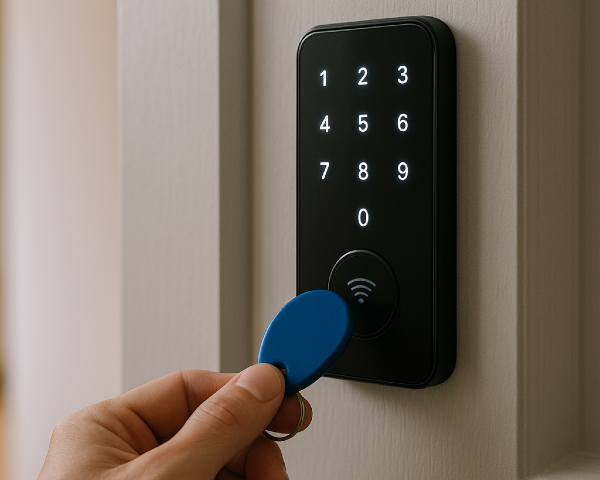
A key fob door lock isn’t just a modern key. It’s a solution that can change how you manage access and security in your building.
Usually, key fob door locks are part of a bigger access control system. But if you’re looking to know more about the hardware level, this guide is for you.
Swiftlane has nearly a decade of experience deploying keyless entry systems and can help you understand if a key fob door lock makes sense for your property, how it works, and basically everything else you need to know before you implement them.
Key Takeaways
- With key fob door locks, you can issue and deactivate credentials without rekeying doors.
- You can install standalone models that work for one door, or a networked system for multi-unit properties.
- When you’re managing buildings with amenity restrictions and fast tenant turnover, key fob door locks can make property management more efficient.
- The software also matters just as much when you’re planning to scale in the future.
Table of Contents
- What Is a Key Fob Door Lock?
- How Key Fob Door Locks Work
- Types of Key Fob Door Locks
- Use Cases for Key Fob Door Locks
- Benefits of Key Fob Door Locks
- Limitations of Key Fob Door Locks
- Key Fob Door Locks vs Traditional Locks
- What to Consider Before Installing Key Fob Door Locks
- Are Key Fob Door Locks Enough, Or Do You Need More?
- Cost Considerations
- Final Thoughts: Choosing the Right Key Fob Door Lock
- Frequently Asked Questions
Related Posts
- What Is a Fob System and How to Choose One
- Guide to Apartment Key Fob Systems
- Commercial Key Fob Entry Systems
What Is a Key Fob Door Lock?
A key fob door lock is an electronic lock that allows users to unlock a door by tapping or holding a small credential (the key fob) near a reader.
Instead of inserting a metal key, users can just:
- Tap their fob against a reader
- The system verifies their credentials
- The lock disengages
- The door opens
From a property manager’s perspective, the biggest difference is this:
- Traditional locks rely on physical key control
- Key fob door locks rely on digital credential management
How Key Fob Door Locks Work
A typical key fob door lock system includes:
1. The Key Fob
Most fobs use RFID (Radio Frequency Identification) or NFC (Near Field Communication) technology.
Inside the fob is a small chip with a unique identifier. When tapped against a reader, it transmits that identifier wirelessly. You can assign, track, and deactivate each fob individually.
2. The Reader


Mounted near the door, the reader:
- Detects the fob
- Sends the credential information to the control system
- Signals the lock to engage or disengage after verifying the credential
Some readers are built directly into the lock. Others are external.
3. The Electronic Locking Mechanism
This is the component that physically secures and releases the door when access is granted. Instead of relying on a traditional key and cylinder, the locking mechanism is triggered electronically after a valid credential is verified.
The actual locking hardware may be:
- An electric strike (releases the latch)
- A magnetic lock (maglock)
- An electronic cylindrical or mortise lock
- A smart lock retrofit
4. The Control Unit
This is the “brain” behind the lock. In standalone systems, the control logic may live inside the lock itself. In networked systems, however, the credentials are verified through on-premise or cloud-based software.
Types of Key Fob Door Locks
1. Standalone Key Fob Door Locks
These are designed for individual doors.
How they work:
- Credentials are programmed directly into the lock.
- Management often requires being physically present at the door.
- Limited storage capacity for users.
Best for:
- Small offices
- Storage rooms
- Low-traffic doors
- Single-location properties with minimal turnover
Limitations:
- No centralized management
- No real-time reporting
- Scaling becomes difficult
2. Networked Key Fob Door Locks
These locks connect to centralized software, which allows you to control and monitor access across multiple doors from a single system.
Instead of managing each lock individually, you can handle everything remotely. This makes it easier for property teams to deal with tenant turnover, lost fobs, and day-to-day access changes without being on-site.
Benefits:
- Add or remove users remotely
- Real-time access logs
- Multi-door management
- Scheduling by time and date
- Scalable across properties
Best for:
- Multifamily properties
- Office buildings
- Mixed-use spaces
- Properties with frequent tenant turnover
3. Smart Locks With Key Fob Capability


Some modern smart locks support multiple credential types:
- Key fobs
- Mobile credentials
- PIN codes
- Physical key override
This flexibility can be valuable if:
- Some tenants strictly prefer fobs
- Others prefer smartphone access
- You want future-proofing without replacing hardware
These locks tend to offer better long-term adaptability.
Use Cases for Key Fob Door Locks
Key fob door locks are used across different property types to manage access more efficiently. For property managers, they’re very valuable in areas where controlling who can enter and when is critical to security and daily operations.
Here are the most common applications of key fob door locks:
Multifamily Buildings
- Main entry doors
- Amenity spaces (like gyms and lounges)
- Package rooms
- Storage units
- Parking garages
Office Buildings
- Lobby entrances
- Individual office suites
- Shared conference rooms
- IT rooms
- After-hours access points
Access scheduling is often critical in commercial settings.
Mixed-Use Properties
- Separate access levels for residential and retail tenants
- Restricted service corridors
- Loading docks
Key fob locks simplify segmented access control.
Benefits of Key Fob Door Locks
1. Eliminate Rekeying
With traditional locks, tenant turnover often means:
- Changing cylinders
- Rekeying
- Distributing new keys
With key fob door locks, you simply deactivate the old credential and issue a new one.
2. Quick Deactivation of Lost Fobs
Lost keys are a security risk. But what happens if you lose a fob? You simply disable them instantly. No need to call the locksmith.
3. Scheduling Access
You can:
- Restrict access to business hours
- Allow vendor access during specific windows
- Limit amenity usage to residents only
4. Audit Trails
Many networked systems provide:
- Timestamped entry records
- User identification
- Door-specific tracking
5. Preventing Key Duplication
Physical keys can be copied. Digital credentials, however, can’t be copied the same way. And if they ever get compromised, they can be disabled immediately.
6. Tenant Experience
Tenants nowadays expect convenience. Key fobs:
- Replace bulky keychains
- Speed up entry
- Make move-ins easier
Limitations of Key Fob Door Locks
Fobs Can Still Be Lost
While deactivation is easy, lost fobs still require replacement costs. Say, you’re managing a 200-unit multifamily property with fast tenant turnover. Even a small percentage of lost fobs each month can quietly add up and cost you hundreds of dollars.
Cheap Systems Create Administrative Headaches
Low-cost standalone locks may:
- Require manual programming at each door
- Lack audit capabilities
- Offer limited storage
- Create syncing issues
Initial savings can lead to long-term inefficiencies.
Power Considerations
Electronic locks require power. Your options include:
- Hardwired power
- Battery-operated locks
- Hybrid systems
Scalability Issues
Some locks are fine for 1 to 2 doors, but struggle beyond that. If you anticipate growth, you’ve got to plan ahead.
Software Quality Matters
A key fob door lock is only as strong as the management platform behind it. Without intuitive software:
- Access updates become time-consuming
- Reporting becomes limited
- Errors increase
Key Fob Door Locks vs Traditional Locks
| Feature | Traditional Lock | Key Fob Door Lock |
| Rekey required after turnover | Yes | No |
| Remote user management | No | Yes (networked) |
| Audit trail | No | Yes |
| Access scheduling | No | Yes |
| Key duplication risk | High | Low |
| Scalability | Limited | High (networked systems) |
What to Consider Before Installing Key Fob Door Locks
1. Door Type
- Metal
- Glass
- Wood
- Aluminum storefront
- Fire-rated doors
The type of door will directly impact installation cost, timeline, and hardware options.
For example, metal and aluminum storefront doors are often easier to retrofit in commercial buildings, while glass doors may require specialized mounting that increases labor costs.
Fire-rated doors add another layer of complexity. Any modification must preserve the fire rating to stay compliant.
Bottom line: Always confirm compatibility to avoid delays or unexpected installation expenses.
2. Power and Wiring
- Is wiring feasible?
- Will battery maintenance be manageable?
- Is there backup power?
3. Number of Doors
Are you upgrading:
- One entry point?
- An entire building?
- Multiple properties?
This affects whether standalone or networked locks make sense.
4. Internet Connectivity
Networked locks may require:
- Ethernet
- Wi-Fi
- Cellular backup
5. Tenant Turnover Rate
Frequent-turnover buildings benefit significantly from remote credential management. Is your team processing multiple move-ins and move-outs on a weekly basis? Being able to instantly deactivate old fobs and issue new ones can save hours of your staff time. Plus, you won’t need to rekey every time.
6. Compliance Requirements
Ensure compatibility with:
- ADA accessibility standards
- Local fire codes
- Life safety regulations
7. Future-Proofing
Even if you’re starting small, ask:
- Will I add more doors later?
- Will I integrate a video intercom?
- Will I need mobile credentials?
Are Key Fob Door Locks Enough, Or Do You Need More?
A standalone key fob lock may be enough when you’re upgrading:
- One office suite
- A storage room
- A single entry door
A single key fob door lock may not be enough when you’re managing business at scale, such as:
- Multiple buildings
- High tenant turnover
- Amenity spaces
- Vendor access schedules
- After-hours security concerns
In those cases, a centralized access control solution often delivers far more operational value than isolated door locks. The key is thinking beyond the hardware.
Cost Considerations
Costs vary widely based on:
- Hardware type
- Installation complexity
- Wiring requirements
- Software licensing
- Number of users
- Support and maintenance
Let’s break that down further. A single key fob typically costs $20 to $50, depending on the brand and technology. Installation for one door can range from $200 to $500, while upgrading a 30-unit building may run $5,000 to $15,000 for hardware and basic setup alone (that’s not including ongoing software subscriptions yet).
While electronic locks have higher upfront costs than mechanical locks, they often reduce:
- Rekeying expenses
- Locksmith calls
- Administrative labor
- Security risk exposure
Final Thoughts: Choosing the Right Key Fob Door Lock
When choosing a key fob door lock, focus on what will make property management simpler and more secure:
- Simplifies access management – deactivate lost fobs and issue new ones instantly.
- Variety of options – standalone, networked, or smart locks for different building sizes and tenants.
- Installation factors matter – door type, wiring, and software impact costs.
- Operational efficiency outweighs upfront cost – higher initial investment can save time, labor, and security risk over time.
- Scales with your property – choose a system that grows with tenant turnover and future expansion.
At the end of the day, it’s not just about replacing a lock. It’s about simplifying access without ever sacrificing security.
Frequently Asked Questions
Can key fob locks be installed on any door?
Most doors can accommodate key fob locks, but glass and fire-rated doors may require special hardware or compliance checks. Always confirm compatibility before purchasing.
What happens if a key fob is lost?
Lost fobs can be deactivated instantly through the software, eliminating security risk without changing the lock. Replacement fobs are inexpensive and easy to issue.
How much do key fob door locks cost?
Single fobs range from $20 to $50, with installation per door typically $200 to $500. Upgrading a small building of at least 20 units can cost $5,000 to $15,000 in hardware and setup.
Do I need networked locks for my property?
Standalone locks work for single doors, but networked locks are ideal for multi-unit buildings with high turnover or shared amenities. They allow remote management, audit trails, and scheduling.
Can tenants use both fobs and mobile credentials?
Yes, some smart locks support multiple credential types for flexibility and future-proofing. This accommodates tenant preferences without replacing hardware.


![Guide to Apartment Key Fob Systems [2025]](/static/38e0e833c81a96186ffdb81ec5a99252/4c247/keyfob-2.webp)


