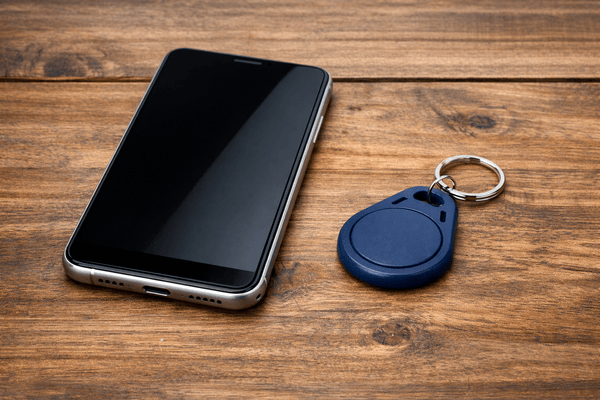
More and more residential and commercial properties are adopting access control systems that balance security with everyday convenience. When comparing key fob vs mobile access, both options serve the same purpose. But they do differ in the technology they use, where they work best, and how they’re managed day to day.
Swiftlane has supported property managers across residential and commercial deployments, giving us firsthand insight into how both systems perform in real-world conditions. This guide breaks down the differences between key fobs and mobile access, helping you choose the right solution based on your property’s workflow, user needs, and long-term goals.
Key Takeaways
- Key fobs are tried and tested, but they also need to be manually managed and physically replaced.
- Mobile access offers scalability, as well as remote management and immediate deactivation.
- Stable residential properties may prefer using key fobs, while quick-turnover buildings may benefit more from mobile access
- Key fob or mobile access, the credential type you choose should still have encryption and multi-factor authentication.
- A hybrid approach can support both key fobs and mobile access, giving you flexibility and redundancy.
Table of Contents
- What Is a Key Fob?
- What Is Mobile Access?
- Key Fob vs Mobile Access: A Direct Comparison
- Use Cases: Which Credential Works Best for Your Property
- Cost Comparison: Key Fob vs Mobile Access
- How to Choose Between Key Fob and Mobile Access
- Biometric Access: An Additional Credential Option
- Combining Both Key Fob and Mobile Access
- Swiftlane’s Centralized Solution Can Support Both Key Fobs and Mobile Access
- Frequently Asked Questions
Related Posts
- Key Fob Entry Systems – A Complete Guide
- Guide to Mobile Access Control
- Biometric Access Control for Modern Properties
What Is a Key Fob?
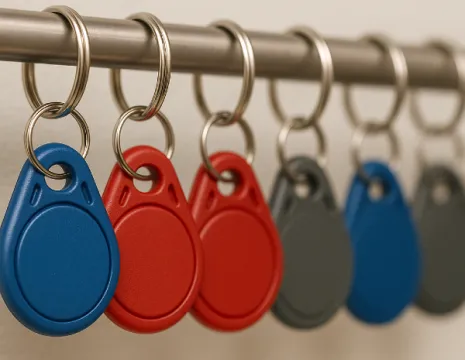
A key fob is a portable electronic device that can unlock doors wirelessly through the use of Radio Frequency Identification (RFID) or near-field communications (NFC). By waving or tapping the fob on a reader, users can gain entry to their homes or offices.
Key fobs have been around for decades now. They remain popular because they’re handy and durable.


Passive vs Active Key Fobs
Key fobs can vary depending on how they communicate with a reader and what power source they use:
- Passive key fobs don’t have a power source. They rely entirely on the reader’s signal to operate, which means users need to tap or hold the fob close to a reader to gain access. They’re most commonly used for access control in residential and office buildings.
- Active key fobs carry their own internal battery and can transmit signals over longer distances. In some cases, users may need to press a button to unlock a door or gate, while in others, the system can detect the fob automatically from a distance. Because of their long-range capabilities, they’re ideal for large commercial buildings and parking areas.
Common Use Cases
Because of their versatility, key fobs can be used in:
- Residential buildings. A single fob can provide access to lobbies, gyms, and parking lots.
- Office buildings. Office employees can enter specific areas depending on their job roles or work schedules.
- Gyms and facilities. Members can use gyms and amenities (swimming pools, sports facilities, etc) on their own without needing staff to give them access.
Security Features
Modern key fobs typically come with the following security features:
- Encryption. Most fobs today feature advanced encryption to prevent cloning or unauthorized access.
- Anti-duplication. Each fob carries a unique code that can’t be easily replicated.
- Access logs. For audit purposes, you can track entries, exits, and attempted breaches by checking access logs.
Familiar and reliable as they are, key fobs do have some limitations. When they’re lost or stolen, they can pose security risks. They can also incur costs when they need to be replaced and reprogrammed.
What Is Mobile Access?
A mobile access credential is a digital key stored on a smartphone. It can work through a dedicated app or QR code. It can use NFC, Bluetooth, or cloud-based technology.The use of mobile access has rapidly grown in recent years. According to a report by Research and Markets, the market for smartphone door access systems will reach $5.6 billion by 2032. Some industry experts are projecting mobile access adoption to hit 94% before the decade ends.
How Mobile Credentials Work
Mobile credentials work by leveraging encrypted digital keys stored in users’ smartphones. The credential is verified through the use of either:
- Bluetooth. The user’s smartphone connects to a reader via Bluetooth at close range.
- NFC. Like contactless payments, NFC tech allows tap-to-enter functionality.
- Cloud management. With a cloud-based platform, mobile credentials can be quickly issued or deactivated.
Integration With Existing Systems
One advantage of mobile access is that it can integrate with your existing doors, elevators, and access control systems. You won’t need to install new hardware when shifting to mobile credentials.
Advantages
- No need to issue a physical device. Most users already own a smartphone, which they can use as their personal access credential.
- Remote management: You can give or deny access without having to manually configure users’ smartphones.
- Immediate deactivation: When credentials are lost or hacked, you can deactivate them instantly.
Mobile access is best for large properties with quick tenant turnover. Its remote management capabilities allow you to track access across easily, even if you’re managing hundreds of units. Meanwhile, with immediate deactivation, you can revoke credentials easily when tenants end their lease.
If you want to learn more, read our guide to explore more reasons to choose mobile access.
Key Fob vs Mobile Access: A Direct Comparison
| Feature | Key Fob | Mobile Access |
| Security | Strong, but can be stolen | Strong, with support for multi-factor authentication (MFA) |
| Convenience | Fobs are easy to carry | Using smartphones, something that users already own and are familiar with |
| Cost | Hardware and replacement cost | Minimal hardware cost, but may need a software subscription |
| Scalability | Needs to be manually distributed | Easier to distribute through a cloud-based platform |
| User Experience | Simple and familiar | Modern, typically only requires users to download an app |
Bottom line: Key fobs are familiar and have been a reliable standard for many decades now. Mobile access is a more modern solution that’s more flexible (any smartphone will do as long as it can download the app) and scalable (users can get their credentials without having to claim a physical device).
Use Cases: Which Credential Works Best for Your Property
Different properties have different operational needs, and the right credential often depends on how your building is used day to day.


Bottom line:
Because they’re familiar and easy to use, key fobs work well in environments where users prefer something straightforward and consistent.
If you’re frequently adding or removing users, mobile access reduces the need to physically distribute and collect credentials.
Cost Comparison: Key Fob vs Mobile Access
Cost is more than just the initial setup. It also includes ongoing management and long-term scalability.
Key fob costs typically involve:
- Upfront cost for each physical fob (about $5 to $25 per fob, depending on the type)
- Ongoing replacement costs for lost or damaged fobs, which can add up over time
- Labor involved in issuing, tracking, and collecting credentials
Mobile access costs usually include:
- Lower hardware costs, since users rely on their own smartphones
- Subscription or software fees (commonly charged per door or per user, depending on the provider)
- Reduced administrative overhead due to remote credential management
In smaller properties, key fobs may seem more cost-effective upfront, especially if turnover is low. But in larger or high-turnover buildings, mobile access often becomes more efficient over time by reducing manual work and minimizing replacement costs.
How to Choose Between Key Fob and Mobile Access
Here’s a step-by-step process you can follow when determining if key fobs or mobile access is right for your property:
Step 1: Assess Your Property’s Needs
Consider the size and scope. How many users are you managing? How often does that user list change? A 40-unit condo is one thing. A 300,000-square-foot commercial property is another.
If you’re always issuing new credentials, mobile access might be the more ideal option.
Step 2: Consider User Convenience
What are your users more comfortable with? Class A office employees will most likely prefer smartphones (hence, mobile access). But if the majority of your tenants are older, key fobs may be the more familiar and favored option.
Step 3: Evaluate Integration and Scalability
Look at your current setup. Can key fobs or mobile access integrate easily into your existing doors, elevators, and visitor management platform? When a tenant moves out, can you revoke their credential instantaneously, or are you chasing down fobs?
Step 4: Factor in Security Features
Must-have security features to look for are encryption, multi-factor authentication, quick credential deactivation, and audit logs.
Step 5: Budget and Future-Proofing
Start by comparing the upfront hardware costs versus the subscription or software fees. As for future-proofing, you have to accommodate your existing users while planning for upgrades. In many cases, a hybrid approach is ideal.
Biometric Access: An Additional Credential Option
Beyond key fobs and mobile access, some properties are starting to adopt biometric credentials, such as facial recognition or fingerprint scanning.
Biometric systems use unique physical traits to grant access. This makes them difficult to duplicate or share. These systems can improve security, especially in high-security environments.
However, biometrics also come with a few considerations. They typically involve higher upfront costs, and may raise privacy and compliance concerns depending on how data is handled.
Also, they’re not always necessary for standard residential properties where simpler credential types are sufficient. For most properties, biometrics work best as a complementary layer rather than a full replacement for key fobs or mobile access.
Combining Both Key Fob and Mobile Access
Here are the benefits of a system that combines key fobs and mobile access:
- Flexibility for tenants. Some users prefer the familiarity of a key fob, while others go for the convenience of mobile access.
- Redundancy. If a smartphone dies or gets lost, a key fob can still serve as a backup key (and vice versa).
- Gradual adoption. You may have current tenants that aren’t willing to let go of their key fobs. However, you can still start deploying mobile access for users who are open to new options.
If you’re taking the hybrid path, a centralized access control solution may work best in supporting both key fobs and mobile access, while making your job easier.
Swiftlane’s Centralized Solution Can Support Both Key Fobs and Mobile Access


Swiftlane’s centralized access control solution is built to simplify how properties manage multiple entry methods. You won’t need to juggle separate systems for each credential type.
As a property owner/ manager,you get:
- Support for multiple credential types, including key fobs and mobile access, while also accommodating modern entry methods like PINs and biometric authentication
- A single centralized dashboard that allows you to manage every credential
- High-level security features such as encryption and multi-factor authentication that provide better protection than legacy systems
- A scalable solution that lets you add new users or deactivate credentials instantly for key fob or mobile access users
- A user-friendly UI that’s convenient for your staff
With support for multiple entry methods, you’re not locked into a single approach. You can adapt your access control system based on tenant preferences, security requirements, and how your property evolves over time.
See how Swiftlane’s platform works in action today and evaluate whether it’s the right fit for your property.
Frequently Asked Questions
Can a phone mimic a key fob?
Yes. Mobile access systems allow smartphones to function as digital credentials using technologies like Bluetooth or NFC, eliminating the need for a physical fob.
Which is more secure: key fob or mobile access?
Both can be secure, but mobile access often supports additional layers like multi-factor authentication and instant credential revocation.
What happens if a key fob or phone is lost?
Lost key fobs must be manually deactivated and replaced, while mobile credentials can typically be revoked instantly through a centralized system.
Is mobile access more expensive than key fobs?
Mobile access reduces hardware and replacement costs but may involve subscription fees, depending on the platform.
Can properties use both key fobs and mobile access at the same time?
Yes. Many properties adopt a hybrid approach to provide flexibility while maintaining a backup access method.