

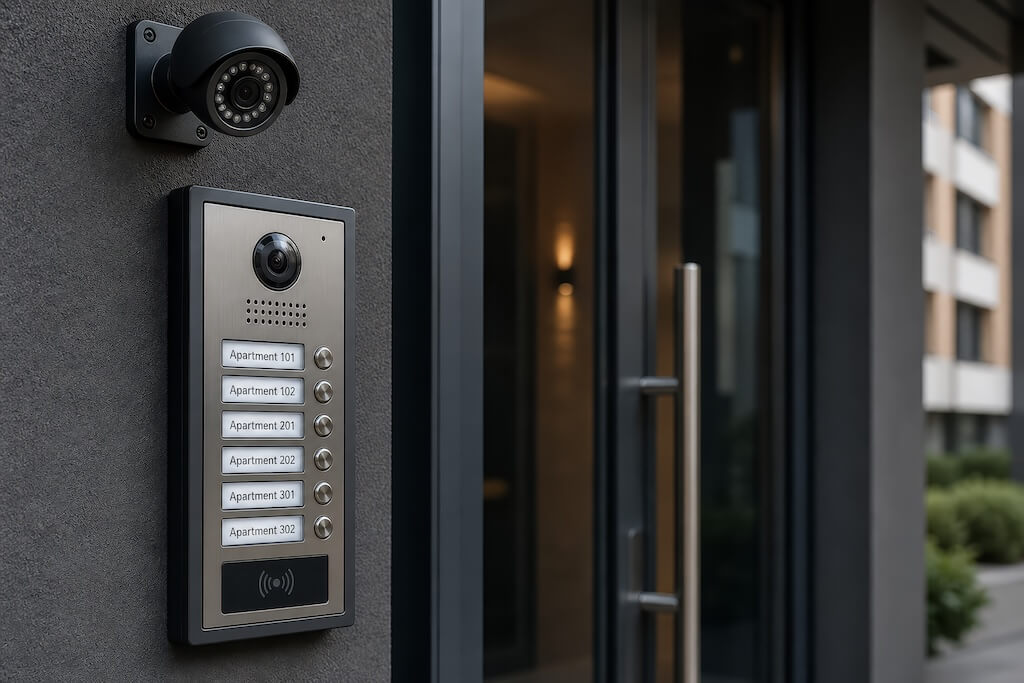
An apartment building entry system is the hardware and software that controls who gets through a building’s doors and gates: the intercom reader at the entrance, the credentials residents use, the door-release mechanism, and the dashboard that manages it all remotely.
Today’s systems fall into seven main types: video intercom, telephone entry, key fob and card, mobile app access, PIN keypad, face recognition, and gate and vehicle entry.
This guide compares all seven, with real cost ranges, honest trade-offs, and a checklist for matching a system to a building’s size, turnover rate, and resident expectations, so property managers, building owners, and facilities leads can walk into a vendor conversation already knowing what fits.
How We Researched This Guide
Cost benchmarks in this guide are drawn from published third-party industry pricing sources, cited inline throughout, rather than Swiftlane’s own installer or customer data. System-type comparisons and tradeoffs reflect general industry patterns for how each entry system category is typically deployed and evaluated.
Sources last checked: September 2026.
Key Takeaways
- Cloud-based, wireless systems are the operational standard for most apartment buildings today.
- Physical credentials, such as key fobs, are reliable but create administrative overhead in high-turnover buildings.
- Most modern systems work with existing door hardware. Full rewiring is rarely necessary.
- Total cost of ownership matters more than the upfront price.
- Evaluate audit logs, offline behavior, and offboarding speed before committing to any vendor.
Table of Contents
- Types of Apartment Building Entry Systems
- Wired vs. Wireless Entry Systems: How to Choose
- What to Expect When Upgrading an Existing Entry System
- How to Choose the Right System: A Checklist for Property Managers
- Security and IT Considerations
- Cost and Lifecycle
- Implementation: From Decision to Rollout
- Why Property Managers Choose Swiftlane
- Final Thoughts
- FAQs
Types of Apartment Building Entry Systems
Not every entry system fits every building. The best choice depends on your building size, resident profile, security requirements, and how much ongoing administration your team can realistically handle. The table below covers the most common system types side by side. For a broader look at how these systems fit into a full building security strategy, see Swiftlane’s access control system guide.
| System Type | Best For | Cost (per entry point, installed) | Key Tradeoff | Install Complexity | Security Level |
| Key Fob/Key Card | Mid to Large buildings needing reliable physical credentials | $1,000–$3,000 | Lost or shared credentials; manual revocation | Low | Medium |
| Telephone Entry | Small buildings; tight budget | $1,000–$4,000 | No visual verification; no audit logs | Low | Low |
| Video Intercom | Most buildings; high delivery or visitor volume | $2,000–$8,000 | Higher upfront cost; needs a stable internet connection | Low to Medium | High |
| Mobile App Access | Buildings prioritizing resident experience | $700–$2,500 | Needs backup credentials for edge cases | Low | High |
| Face Recognition | Luxury multifamily; high-traffic entry points | $2,500–$10,000 | Higher hardware cost; biometric privacy considerations | Medium | Very High |
| PIN-Based Access | Visitor and delivery management | $500–$1,500 | PINs can be shared; time-limited use recommended | Low | Medium |
| Gate Entry | Gated communities; parking security | $5,000–$15,000 | Requires vehicle detection or RFID setup; physical gate/operator hardware is a separate cost | Medium | Medium to High |
Sources
- Key Fob/Card: Access Control System Pricing: 2026 Average Cost (Per Door), Key Fob and Card Access System for Business Cost
- Telephone Entry: Telephone Entry Systems (2026 Buyer’s Guide)
- Video Intercom: How Much Do Intercom Systems Cost? (2026 Pricing Guide)
- Mobile App Access: Average Cost Per Door for Access Control
- Face Recognition and PIN-Based Access: Access Control Systems: How Much Do They Cost and Why Do I Need Them?
- Gate Entry: Community Gate Access Systems: A Buyer’s Guide
1. Video Intercom
A video intercom station sits at the building entrance and lets a visitor see and be seen by whoever they’re calling. The resident, or staff for shared entrances, answers on a smartphone app or an in-app unit panel, confirms who’s there, and remotely releases the door. Most modern systems run over WiFi or Ethernet rather than dedicated intercom wiring, so they don’t require a local server or on-site controller.
Cost: Video intercom systems for apartment buildings typically run $2,000 to $8,000 per installed entry point, according to Honor Security’s 2026 pricing guide, with the low end covering basic single-entrance setups and the high end reflecting multi-unit buildings with in-unit hardware.
Pros:
- Visual verification before granting access, a meaningful upgrade over audio-only entry
- Cloud-managed systems support remote administration and mobile answering from anywhere
- Handles high delivery and visitor volume more gracefully than fob-only systems
Cons:
- Higher upfront cost than telephone entry or PIN-based systems
- Needs a stable internet connection at the entry point
- Older buildings with limited conduit can face higher installation costs
Best for: Buildings with high delivery or visitor traffic that want visual verification without requiring someone on-site to grant access in person.
A related option, a QR code intercom, adds a printed QR code at the entry station that a visitor scans with their own phone to start the video call, skipping the visitor directory entirely. It suits multi-site landlords who want to minimize hardware at each entrance, though it depends on the visitor having a smartphone on hand. See Swiftlane’s QR code intercom page for how this works in practice.
For a full breakdown of video intercom options and vendor considerations, see Swiftlane’s video intercom guide for apartments and buyer’s guide.
2. Telephone Entry
Telephone entry systems let visitors call a resident directly from an entry panel and unlock the door remotely, without any video component. A visitor selects the resident’s name or unit number at the panel. In most modern installations, the call connects over cellular or the internet rather than a dedicated phone line, and the resident presses a button on their phone to grant access.
Cost: Audio-only telephone entry hardware typically runs $1,000 to $4,000 per installed entry point, according to Swiftlane’s own telephone entry systems guide, with total cost depending on entry count, existing wiring, and door hardware.
Pros:
- Lower upfront cost than video intercom or mobile access systems
- Simple for visitors and residents to use without an app or account
- Works over cellular connections where a stable internet line isn’t available
Cons:
- No visual verification; residents grant access based on voice alone
- No audit logs on most basic systems
- Legacy landline-based (POTS) systems are increasingly hard to service as carriers phase out that infrastructure
Best for: Small buildings and tight budgets where visual verification isn’t a priority and the goal is a straightforward, low-maintenance entry point.
For buildings weighing telephone entry against a video upgrade, see Swiftlane’s apartment intercom with door release guide.
3. Key Fob/Key Card
A key fob or key card system uses a physical credential, a small fob or a card, that a resident holds up to a reader mounted at the door. The reader checks the credentials against an access list and releases the lock if it’s valid. Property managers add and remove credentials from a central system, though issuing a physical card or fob still requires either an on-site handoff or mailing one out.
Cost: Key fob and card systems typically run $1,000 to $3,000 per installed door, according to Entegrity Smart’s access control pricing guide, with individual fob or card replacements adding $5 to $25 each, per Mammoth Security’s cost breakdown.
Pros:
- Reliable, well-understood technology with a long track record
- No dependence on a smartphone or app
- Straightforward for residents who prefer a physical credential
Cons:
- Lost or shared fobs require manual revocation, and re-issuing a new one takes staff time
- High-turnover buildings accumulate ongoing credential costs
- No remote issuance; someone has to hand over or mail the physical credential
Best for: Mid to large buildings that want a reliable physical credential and don’t need the fastest possible turnaround on issuing or revoking access.
For a deeper look at fob systems and vendor considerations, see Swiftlane’s key fob systems guide.
4. Mobile App Access
Mobile app access lets residents unlock doors using a smartphone app instead of a physical credential, typically over Bluetooth, NFC, or a cloud-based digital key. The resident opens the app and either taps their phone to a reader or unlocks the door remotely through the app itself. Because the credential lives on a phone residents already carry, there’s no separate fob or card to issue, lose, or replace.
Cost: Mobile-capable door readers and hardware typically run $700 to $2,500 per installed door, according to Ackerman Security’s cost breakdown, with the higher end reflecting full installation rather than hardware alone.
Pros:
- Nothing physical to issue, lose, or replace; credentials live on a device residents already have
- Access can be granted or revoked instantly and remotely; no on-site handoff required
- Residents typically already understand how to use their own phone
Cons:
- Needs a backup credential for residents without a smartphone, a dead battery, or an app that won’t load
- Onboarding requires residents to download an app and set up an account
- Bluetooth and NFC ranges can behave inconsistently depending on phone model and door hardware
Best for: Buildings prioritizing resident experience, particularly Class A and luxury properties where a touchless, app-based entry is a leasing differentiator.
For more on mobile and keyless options, see Swiftlane’s keyless entry system guide.
5. PIN-Based Access
A PIN-based system lets a visitor or resident enter a numeric code at a keypad mounted near the door to unlock it. Codes can be permanent for residents or time-limited for a single delivery or a scheduled visitor window. Most modern keypads connect to a cloud dashboard so property managers can issue and expire codes remotely rather than reprogramming the keypad in person.
Cost: PIN-based keypad systems typically run $500 to $1,500 per installed door, according to Access Professionals’ pricing breakdown.
Pros:
- Lowest upfront cost of any credential type
- No physical credential or app for visitors to manage
- Well suited to short-term or one-time access, deliveries, contractors, scheduled visitors
Cons:
- Codes can be shared, written down, or guessed if not time-limited
- Frequently used numbers can visibly wear on physical keypads, hinting at the code
- Changing a shared code without cloud management typically means someone has to be on-site
Best for: Visitor and delivery management, especially scheduled or one-time access where issuing a full credential doesn’t make sense.
6. Face Recognition
Face recognition systems use a camera-based reader that verifies a resident’s identity from a face scan and unlocks the door in under a second, no card, fob, or phone tap required. The reader compares the live scan against an enrolled profile stored in the system rather than a photo, and most modern systems process the match at the device itself.
Cost: Face recognition and other biometric access systems typically run $2,500 to $10,000 per installed door, according to Access Professionals’ pricing breakdown, reflecting higher hardware and enrollment costs than card or fob readers.
Pros:
- Fastest unlock experience of any credential type; nothing to carry or present
- Nothing to lose, share, or forget; the credential is the resident
- Strong deterrent against credential sharing since a face can’t be handed to someone else
Cons:
- Higher hardware cost than fob, PIN, or mobile readers
- Biometric data handling carries state-level privacy compliance obligations; buildings in Illinois, Texas, and Washington face specific statutory requirements: Illinois BIPA (740 ILCS 14), Texas CUBI (Tex. Bus. & Com. Code § 503.001), and Washington’s RCW 19.375. Requirements vary by state, so confirm applicable obligations with legal counsel before deploying
- A leasing differentiator in luxury properties, but can read as an unnecessary cost in workforce housing
Best for: Luxury multifamily and high-traffic entry points where a fast, frictionless unlock is a leasing amenity.
For more on biometric access and vendor considerations, see Swiftlane’s face recognition access control page.
7. Gate & Vehicle Entry
A gate entry system controls access at a community’s vehicle and pedestrian gates, not a building’s front door. Vehicles typically use an RFID sticker or tag read at a distance so the gate opens without the driver stopping, while pedestrian gates commonly pair a keypad, card reader, or intercom with the same access list used for the rest of the property.
Both usually route through the same cloud dashboard as the building’s other entry points, so a resident’s credential works at the gate and the lobby door alike.
Cost: Gate access systems with credentialed entry, such as key fob or RFID at the gate, typically run $5,000 to $15,000 per entry point, according to Gate Sentry’s community gate access guide. This covers the access control hardware and installation only. The physical gate and motor operator are separate costs, and older estimates for that hardware alone commonly range from $3,000 to $13,000, depending on gate size and type.
Pros:
- Extends the same credential system residents already use at their building’s front door to vehicle and pedestrian gates
- RFID vehicle tags don’t require the driver to stop or roll down a window
- Strong deterrent for unauthorized vehicle entry into gated communities
Cons:
- Requires vehicle detection hardware or RFID setup in addition to the gate itself
- Outdoor installation means weatherproofing and durability requirements that indoor door readers don’t face
- Gate operator maintenance, the mechanical motor and safety sensors, is a separate ongoing cost from the access control system
Best for: Gated communities and properties with dedicated parking that need to control vehicle entry alongside pedestrian and building access.
For a deeper look at gate intercom options and vendor considerations, see Swiftlane’s gate intercom systems guide.
Wired vs. Wireless Entry Systems: How to Choose
The choice between wired and wireless is less about preference and more about what a building can support.
Wired systems run physical cables to a controller, typically in the electrical room. They’re reliable and don’t depend on WiFi, but need on-site maintenance and a physical visit for any change.
Wireless systems connect over IP through a cloud dashboard. Updates and access changes take effect immediately from any device. The main dependency is a stable internet connection at each entry point.
For most buildings today, wireless and cloud-managed is the stronger choice. Wired makes sense mainly where internet reliability is a genuine concern.
What to Expect When Upgrading an Existing Entry System


Most buildings aren’t starting from scratch. More often it’s a legacy system, wired telephone intercoms, standalone fob systems, or older video panels that have outlived their usefulness.
Upgrades are usually triggered by end-of-life hardware, a security incident or ownership change, an expiring maintenance contract, or competitive pressure from nearby buildings offering mobile access.
Compatibility is usually better than expected: most modern wireless systems work with existing electric strikes and magnetic locks, so full rewiring is rarely necessary. Residents moving to a mobile app or smartphone-based system need brief onboarding, a short notice period, and a simple instruction sheet, which go a long way.
How to Choose the Right System: A Checklist for Property Managers
The right system depends on a mix of building-specific factors, so work through these before talking to any vendor.
- Building Size and Entry Points: How many doors, gates, and access points need coverage. Systems that scale under one dashboard are easier to manage than per-door solutions.
- Resident Turnover Rate: High-turnover buildings need fast, remote credential management; an on-site visit to issue or revoke access adds up in cost.
- Visitor and Delivery Volume: Heavy package traffic needs a system that handles unattended access gracefully, via PIN or QR codes.
- Staffing Model: On-site staff can handle issues in person; a remotely managed building needs strong mobile admin capabilities.
- Resident Expectations: Luxury properties have different amenity expectations than workforce housing; a face recognition reader can be a differentiator in one and an unnecessary cost in another.
- IT Infrastructure: Reliable internet at every entry point and compatibility with any existing property management system.
- Budget: Weigh upfront capital cost against ongoing SaaS or maintenance fees; the lowest upfront cost rarely means the lowest total cost of ownership.
Security and IT Considerations
Entry systems are infrastructure. Before committing to a platform, ask any vendor these security and IT questions. See Swiftlane’s apartment security system guide for more on how access control fits into that picture.
- Audit Logs: A complete, exportable record of who entered, when, and through which door.
- Role-Based Permissions: Different access levels for residents, staff, vendors, and administrators, not one shared permission level.
- Offboarding Speed: Access should be revocable immediately and remotely when a resident moves out, no on-site visit required.
- Offline Behavior: A clear answer for what happens if the internet goes down, and whether residents can still enter.
- Data Privacy: Where access data is stored and who can access it. Face recognition carries state-level biometric obligations, including Illinois BIPA (740 ILCS 14), Texas CUBI (Tex. Bus. & Com. Code § 503.001), and Washington’s RCW 19.375; confirm applicable requirements with legal counsel.
- Integrations: Whether the system connects with property management software already in use, such as Yardi, RealPage, or Entrata.
Cost and Lifecycle
Entry system costs have two parts buyers often conflate: upfront hardware and installation, and ongoing platform fees.
Upfront cost mainly depends on entry point count, credential type, and hardware tier. Face recognition readers cost more per door than fob readers, and older buildings with limited conduit add installation cost.
Most cloud-based systems run on a SaaS model with monthly or annual per-door fees. On-premises systems avoid those fees but require ongoing server maintenance.
A lower sticker price on telephone entry or fob systems can lose to a cloud-managed system on total cost of ownership within a few years. As a benchmark, cloud-based video intercom deployments typically run $2,000 to $8,000 per installed entry point, according to Honor Security’s 2026 pricing guide.
Implementation: From Decision to Rollout
A successful deployment is less about the technology and more about the process.
- Audit entry points first: Count every door, gate, and access point before talking to vendors.
- Run a single-entrance pilot: Deploy on one entrance, typically the main lobby, for 30 to 60 days to surface issues early.
- Plan resident onboarding before install day: Credential distribution and app setup should be ready the moment the system goes live.
- Train the management team first: Staff should be comfortable with the admin dashboard before residents start asking questions.
- Ask before signing: What’s the uptime SLA? What happens to access if servers go down? What does offboarding look like when switching vendors?
Why Property Managers Choose Swiftlane
Swiftlane is a cloud-based access control and video intercom platform for multifamily properties, combining video intercoms, face recognition, mobile credentials, QR code entry, and smart locks into a single dashboard.
Instead of juggling separate vendors for intercoms, key fobs, and gate access, everything runs through one platform with one support line. SwiftReader X face recognition unlocks in under a second, and residents can choose face recognition, the mobile app, a key fob, or a PIN.
In one deployment, a 120-unit Class B community in the Mid-Atlantic replaced a wired telephone intercom that required a 48- to 72-hour vendor visit per credential change, cutting turnaround to under five minutes and completing onboarding over a single weekend. (Composite example based on Swiftlane customer deployments; details anonymized.)
Final Thoughts
Apartment building entry systems have moved well beyond keys and buzzers. The right system reduces administrative overhead and gives property managers real-time visibility into building access.
The best starting point is an honest assessment of a building’s needs, using the checklist above, before evaluating any vendor.
Ready to Upgrade Your Building’s Entry System?
Swiftlane works with property managers and building owners to find the right access control setup. Get a personalized quote based on entry point count, size, and system requirements.
FAQs
What are the different types of door entry systems?
Apartment buildings typically choose from seven main entry system types, each suited to different building profiles:
- Video intercom, visual verification, best for high-traffic buildings
- Telephone entry, audio-only calling, best for small buildings and tight budgets
- Key fob or key card, physical credential, best for mid- to large buildings
- Mobile app access, smartphone-based, best for resident-experience-focused properties
- PIN keypad, numeric code, best for visitor and delivery management
- Face recognition, biometric, best for luxury multifamily
- Gate and vehicle entry, best for gated communities and parking security
QR code intercom is also common as an add-on to an existing video intercom rather than a standalone system. See the comparison table above for cost ranges and tradeoffs across all seven.
What entry systems work best for condo buildings?
Condo buildings typically follow the same entry system options as apartment buildings, but the buying decision usually runs through an HOA board rather than a single property manager, so consensus and long-term maintenance costs tend to weigh more heavily than they do for a professionally managed rental building.
Video intercom and key fob systems are common choices since both work well under shared board oversight, and mobile app access is gaining ground for its lower ongoing administrative burden. See Swiftlane’s residential access control solutions for HOA and condo-specific considerations.
What are the most secure entry systems for flats?
Video intercom and face recognition offer the strongest security among common entry systems for flats, also called door entry systems for flats in the UK and parts of Europe, because both verify identity beyond a credential that could be lost, shared, or stolen.
Face recognition adds the strongest deterrent against credential sharing, while video intercom offers strong security at a lower cost. PIN-only or unmanaged buzzer systems offer the least security since codes are easy to share.
What’s the best app for opening apartment doors?
There’s no single best app since mobile access is tied to whichever platform a building’s entry system runs on, but the strongest mobile access experiences share a few traits: instant remote credential issuance and revocation, a backup credential option for dead batteries or app issues, and reliable Bluetooth or NFC range at the door.
See the Mobile App Access section above for a fuller breakdown of what to look for.
How much does a key fob entry system for buildings cost?
Key fob systems typically run $1,000 to $3,000 per installed door, according to Entegrity Smart’s access control pricing guide, with individual fob replacements adding $5 to $25 each. See the Key Fob/Key Card section above for the full cost and tradeoff breakdown.
What is the best entry system for a small apartment building?
A cloud-based video intercom or QR code intercom offers the best balance of security and low maintenance for small buildings. Key fob systems work too, but require more credential management.
How much does an apartment building entry system cost?
Costs vary by system type and hardware tier. Cloud-based video intercom deployments typically run $2,000 to $8,000 per installed entry point, according to Honor Security’s 2026 pricing guide, plus monthly platform fees.
Can I upgrade my entry system without rewiring the entire building?
In most cases, yes. Modern wireless systems connect over existing network infrastructure; full rewiring is rarely required.
What is the difference between a video intercom and a telephone entry system?
A telephone entry system places an audio-only call to the resident. A video intercom adds a live video feed and runs through a cloud dashboard rather than a local controller.
How do I manage access for delivery drivers and visitors?
Most modern systems support time-limited PINs or QR codes for one-time or scheduled visitor access, issued remotely.
What happens to building access if the internet goes down?
This depends on the vendor. Most cloud-based systems store recent credentials locally on the reader, allowing normal access during brief outages.
How do residents unlock doors without a key fob?
Modern systems support multiple credential types. Residents can use a mobile app, face recognition, or a PIN instead of a fob.
Upgrade Your Building Security
Get in touch with a Swiftlane specialist for more information on the best access control and video intercom solution for your building.


