

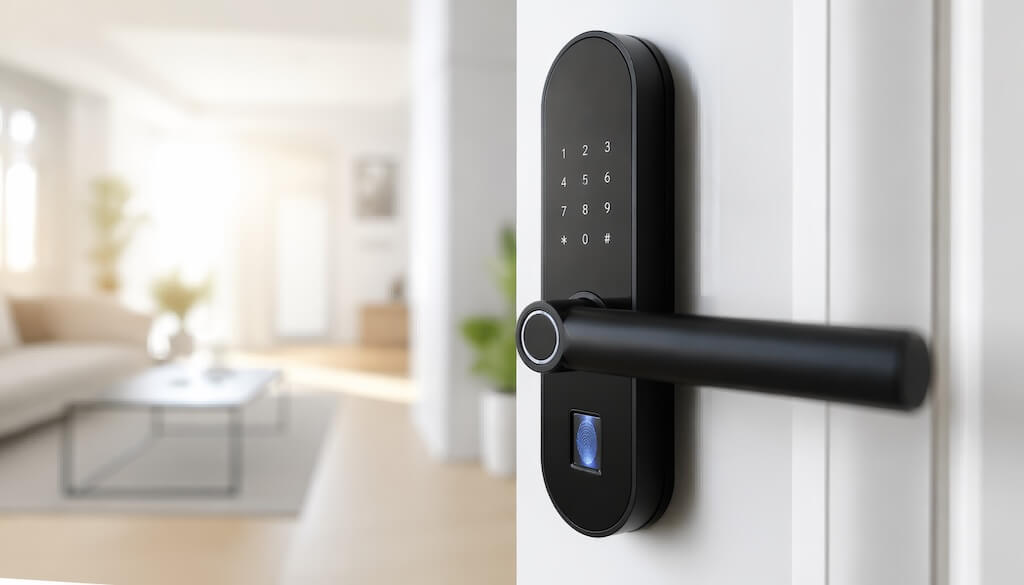
What Are the Best Fingerprint Door Locks for Buildings?
The best fingerprint door locks for buildings depend on scale and use case. For apartment-unit doors with centralized access management, the Yale Assure Lock 2 Touch, paired with Swiftlane, leads the category. For small commercial offices, the Schlage Encode Plus handles 1–4 doors without additional hardware.
Mid-size multifamily deployments scale well with the Dormakaba Ambiance. For commercial deployments with audit-trail requirements across 2–10 doors, the Suprema BioEntry W2 is the strongest performer. Budget-conscious warehouse and industrial operators favor the ZKTeco GL300 for its low cost per door.
Introduction
Fingerprint door locks have moved well past the consumer market. Property managers overseeing multifamily buildings and commercial spaces are now deploying biometric entry systems on unit doors, in common areas, and in secured zones. Not because it’s novel, but because it solves real operational problems: rekeying costs, lost fobs, and the administrative overhead of managing physical credentials at scale.
The challenge is that most “best fingerprint door lock” roundups are written for homeowners buying a single lock off Amazon. That’s not your buying context. For property managers overseeing a mid-rise lobby or a commercial office with multiple access points, the product requirements differ — fingerprint capacity, audit logging, remote management, and integration with your broader access control stack all matter in ways they don’t for a bedroom door.
This guide covers the five best fingerprint door locks for apartment buildings and commercial properties in 2026, with a comparison table, a use-case-based selection framework, and a checklist for evaluating any lock before you buy.
How We Researched This Guide
This guide was developed through a structured review of vendor specifications, installer documentation, and customer feedback across fingerprint lock deployments in multifamily and commercial properties. Product recommendations were validated against real-world performance data from Swiftlane’s network of 3,000+ building deployments.
Key Takeaways
- Consumer fingerprint locks are not built for multifamily or commercial use. Capacity, integration, and audit logging requirements are fundamentally different.
- Match template capacity to the actual user count, and choose the next tier to accommodate growth and temporary credentials.
- A fingerprint lock on the unit door does not solve the building-wide access. Lobby, parking, and common area entries need to be on the same stack.
Table of Contents
- What Are the Best Fingerprint Door Locks for Buildings?
- Introduction
- How Fingerprint Door Locks Work
- Best Fingerprint Door Locks for Apartment Buildings and Commercial Properties
- How to Choose a Fingerprint Door Lock for Your Building
- Checklist: Evaluating a Fingerprint Door Lock for Your Property
- When You Need More Than a Fingerprint Lock
- Frequently Asked Questions
How Fingerprint Door Locks Work


Fingerprint door locks capture a scan of your fingerprint and convert it into a digital template stored locally on the device. When someone presents their finger at the reader, the lock compares the live scan against stored templates and triggers the door release if there is a match. The entire process takes under a second on modern hardware.
For building operators, the more relevant technical details are what happens beyond that basic read-and-match cycle. Enterprise-grade locks store anywhere from 100 to 10,000 fingerprint templates depending on the hardware tier, assign individual access permissions per user, log every entry attempt with a timestamp, and push that data to a cloud dashboard or on-premises server. That audit trail is what separates a building-grade fingerprint lock from a consumer one.
Modern sensors also account for real-world conditions: slightly wet or dirty fingers, minor cuts, and finger placement at different angles. Liveness detection, available on higher-end units, adds a layer that rejects spoofed fingerprints by confirming blood flow and tissue response.
Fingerprint vs. Keypad vs. Fob: Which Is Right for Your Building?
No single credential type fits every door in a building. Most operators end up running a mix, and fingerprint locks are strongest in specific positions within that stack.
Fingerprint is the right call for unit doors and secured interior zones where eliminating physical credentials is the goal. Residents never lose a fingerprint, and you never rekey. The limitation is throughput: fingerprint readers process one person at a time, which makes them a poor fit for high-traffic lobbies during peak hours.
Keypads work well as a backup method and for temporary visitor access, but PIN sharing is a genuine security risk in multi-tenant buildings. Fobs and key cards remain the standard for high-traffic common-area doors because of their speed, but they entail the costs and management overhead of physical issuance and replacement.
The strongest building access setups pair fingerprint locks on unit doors with a video intercom or a face-recognition reader at the lobby and common-area entries, giving you credential-free access throughout the building without bottlenecking the front door.
Best Fingerprint Door Locks for Apartment Buildings & Commercial Properties
Not every fingerprint lock is built for building-scale deployment. Here are the five best options by use case, from apartment unit doors to multi-door commercial installations.
1. Yale Assure Lock 2 Touch — Best for Apartment Unit Doors
The Yale Assure Lock 2 Touch is the strongest option for apartment unit doors, particularly when paired with Swiftlane. Residents unlock their unit with a fingerprint while Swiftlane manages the lobby intercom, parking gate, and package room from a single cloud dashboard. The lock connects via Bluetooth or Wi-Fi, supports up to 20 fingerprints, includes a keypad backup, and stores all data locally. Physical key backup is included.
- Best for: Apartment unit doors in multifamily buildings that run Swiftlane for common-area access.
- Fingerprint capacity: 20 templates
- Price: $259.99
- Pros: Native Swiftlane integration, multiple access methods, local storage, compact form factor.
- Cons: 20-fingerprint cap limits shared-access scenarios. Wi-Fi requires an additional bridge.
2. Schlage Encode Plus — Best for Small Commercial Offices
Built-in Wi-Fi, no hub required. The Schlage Encode Plus supports up to 100 fingerprints and 100 access codes, connects directly to the Schlage Home app for remote management, and carries a Grade 1 ANSI/BHMA durability rating. A solid one-to-four door solution for small offices that need reliable biometric entry without a full access control platform.
- Best for: Small commercial offices and co-working suites with one to four access points.
- Fingerprint capacity: Up to 100 templates
- Price: Approximately $299
- Pros: Built-in Wi-Fi, Grade 1 durability rating, 100 fingerprints and codes simultaneously, Apple HomeKit and Alexa compatible.
- Cons: Not designed for multi-door enterprise deployments. No native integration with commercial access control platforms.
3. Dormakaba Ambiance — Best for Multifamily Unit Doors at Scale
Dormakaba builds for multifamily operators, not the consumer market. The Ambiance supports RFID, PIN, and fingerprint credentials in a single device, integrates with property management systems, and is designed for standardized volume deployment across large residential portfolios. Remote access management means credential changes happen without physical visits to each unit.
- Best for: Multifamily operators deploying fingerprint locks across 20 or more unit doors.
- Fingerprint capacity: Varies by configuration
- Price: Contact Dormakaba for portfolio pricing
- Pros: Built for multifamily scale, PMS integration, multi-credential support, and standardized installation.
- Cons: Not available through retail channels. Portfolio-based pricing requires direct vendor engagement.
4. Suprema BioEntry W2 — Best for Commercial Multi-Door Deployments
The Suprema BioEntry W2 stores up to 100,000 fingerprint templates, supports OSDP integration with third-party access control panels, and includes liveness detection and tamper alerts. It functions as a biometric reader within an existing access control platform rather than as a standalone lock, giving commercial operators flexibility that consumer-grade products cannot match. IP67/IK09 weather and impact resistance for exterior installations.
- Best for: Commercial properties with two to ten secured doors and an existing access control platform.
- Fingerprint capacity: Up to 100,000 templates
- Price: Approximately $400 to $600 per unit
- Pros: 100,000-template capacity, OSDP support, IP67/IK09 rated for exterior and vandal-resistant installations, liveness detection, and tamper alerts.
- Cons: Requires an existing access control panel. Installation needs a certified integrator.
5. ZKTeco GL300 — Best Budget Option for Warehouse and Industrial Properties
The ZKTeco GL300 delivers reliable biometric access at a price point that makes multi-door rollouts financially viable. It supports up to 300 fingerprint templates across 100 users, connects to ZKTeco’s software for centralized user management, and carries an IP65 rating for most indoor and outdoor industrial environments.
- Best for: Warehouses, light industrial facilities, and budget commercial deployments.
- Fingerprint capacity: Up to 300 templates
- Price: Approximately $100 to $150 per unit
- Pros: Low cost per door, 300-template capacity suits small commercial deployments, IP65 rating, centralized management.
- Cons: Basic feature set. ZKTeco software has mixed usability reviews. Less suitable for compliance-heavy environments.
How to Choose a Fingerprint Door Lock for Your Building
Use this table to compare all five picks at a glance, then the checklist below to pressure-test whichever option fits your building type:
| Lock | Best For | Fingerprint Capacity | Price | Standalone | Integration | Swiftlane Compatible |
| Yale Assure Lock 2 Touch | Apartment unit doors | 20 | $259.99 | Yes | Swiftlane, HomeKit, Alexa | Yes |
| Schlage Encode Plus | Small commercial offices | 100 | ~$299 | Yes | HomeKit, Alexa | No |
| Dormakaba Ambiance | Multifamily at scale | High (varies) | Portfolio pricing | Yes | PMS platforms | No |
| Suprema BioEntry W2 | Commercial multi-door | 100,000 | ~$400–$600 | No | OSDP, third-party ACS | No |
| ZKTeco GL300 | Warehouse/industrial | 300 | ~$100–$150 | Yes | ZKTeco software | No |
Checklist: Evaluating a Fingerprint Door Lock for Your Property
Before committing to any lock, run through these eight criteria against your building’s requirements.
Fingerprint Capacity and User Management
Match template capacity to the building’s actual user count, with room to grow. A 20-fingerprint cap works for a single-unit door, not for a shared commercial entry. Confirm whether user management runs on-device, via mobile app, or through a centralized dashboard.
Integration with Your Access Control Stack
A lock that operates in isolation creates a management gap. Confirm compatibility with existing access control platform, PMS, or intercom. For Swiftlane operators, the Yale Assure Lock 2 Touch is the only unit-door lock with native platform integration.
Credential Backup Options
Biometric readers can fail. Wet fingers, sensor wear, and power interruptions are real building scenarios. Confirm the backup method is one that the building team can administer remotely.
Audit Logging and Reporting
Timestamped access logs are not optional if your property has compliance requirements or security incidents to investigate. Confirm log retention period, export format, and whether failed-attempt alerts are available.
Installation and Door Compatibility
Some locks require certified integrators; others can be installed on standard door prep with basic tools. Confirm door thickness, backset, and prep compatibility before ordering, especially on older multifamily stock.
Weather and Durability Ratings
Require IP65 minimum for exterior doors, IP67 for exposed installations in harsh climates. Check the operating temperature range for buildings with extreme seasonal variation.
Power Source and Failure Mode
Confirm the lock’s failure mode on power loss. Fails open or closed have direct implications for security and life safety compliance.
Total Cost of Ownership
Hardware is only part of the cost. Factor in installation, hubs or bridges, software licensing, and battery replacement. Portfolio-priced products like Dormakaba often carry lower per-door costs at scale than retail alternatives.
When You Need More Than a Fingerprint Lock
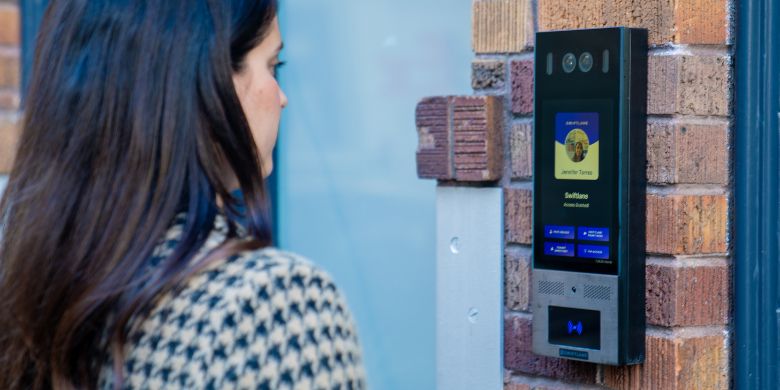
Fingerprint locks solve the unit door problem. They do not solve the building.
A resident who unlocks their apartment with a fingerprint still needs to get through the lobby, the parking gate, and the package room. If those entry points run on separate systems, separate credentials, and separate dashboards, the result is not simplified access management; it’s an additional layer.
Swiftlane connects all of it. The SwiftReader X video intercom handles lobby and common-area entry with face recognition, mobile unlocking, and two-way video calling. Yale smart locks on unit doors integrate directly with the same platform. Every door, every credential type, and every access event is managed from a single cloud dashboard.
For property managers running mid-rise multifamily or commercial buildings, that means one system to configure, one audit log to review, and one vendor to call when something needs attention.
If you are evaluating fingerprint locks for a building with multiple access points, talk to Swiftlane before specifying the hardware. The unit door decision affects the whole stack.
Frequently Asked Questions
What is the difference between a fingerprint door lock and a biometric access control system?
A fingerprint door lock is a self-contained unit that replaces or supplements a standard deadbolt. It handles authentication and door release in a single device, typically for one door. A biometric access control system is a platform: it connects multiple readers across multiple doors, manages credentials centrally, logs access events, and integrates with other building systems.
For single-unit doors, a standalone lock is sufficient. For buildings with multiple secured entry points, a full access control system is the most appropriate solution.
How many fingerprints can a commercial fingerprint lock store?
It varies significantly by product tier. Consumer and light commercial locks typically store 20 to 100 fingerprints. Mid-range commercial readers like the ZKTeco GL300 handle up to 300 fingerprints across 100 users. Enterprise hardware like the Suprema BioEntry W2 stores up to 100,000 templates. Match capacity to your user count and choose the next tier up to accommodate growth and temporary access credentials.
Can fingerprint door locks integrate with property management systems?
Some can. Dormakaba’s Ambiance is designed specifically for PMS integration in multifamily portfolios. Swiftlane integrates with leading property management platforms and connects Yale unit locks to a shared dashboard for managing common-area access. Most consumer-grade locks do not offer PMS integration.
Do fingerprint locks work on exterior building doors?
Yes, with the right hardware. Look for a minimum rating of IP65 for exterior installations and IP67 for exposed or harsh-climate environments. The Suprema BioEntry W2 and ZKTeco GL300 both carry IP67 and IP65 ratings, respectively, and are suitable for exterior commercial doors. Consumer-grade locks are generally not rated for exterior building use.
What happens if a fingerprint lock loses power?
Most battery-powered locks include a low-battery alert sent to the admin dashboard or mobile app before the battery is fully depleted. In the event of full power loss, locks are configured to fail open or closed, depending on the door’s security and life-safety requirements. Confirm the failure mode before specifying any lock on a fire egress or emergency exit door, as local codes may dictate the requirement.
Are fingerprint door locks suitable for ADA compliance?
Fingerprint readers mounted at standard handle height generally meet ADA reach range requirements, but the full compliance picture depends on installation height, door hardware, and local code. If ADA compliance is required for your property, confirm the specifications with your installer and the local authority having jurisdiction before finalizing the hardware selection.
Sources & Citations
- ANSI/BHMA Grading Standards — What Do ANSI Grade Levels Mean?, ANSI Blog
- Suprema BioEntry W2 — BioEntry W2 Product Page, Suprema
- ZKTeco GL300 — GL300 | Glass Door Lock with Fingerprint
- IEC 60529 IP Ratings — Ingress Protection (IP) Ratings, IEC
Tell Us About Your Building
Our team will reach out with a bespoke quote


