

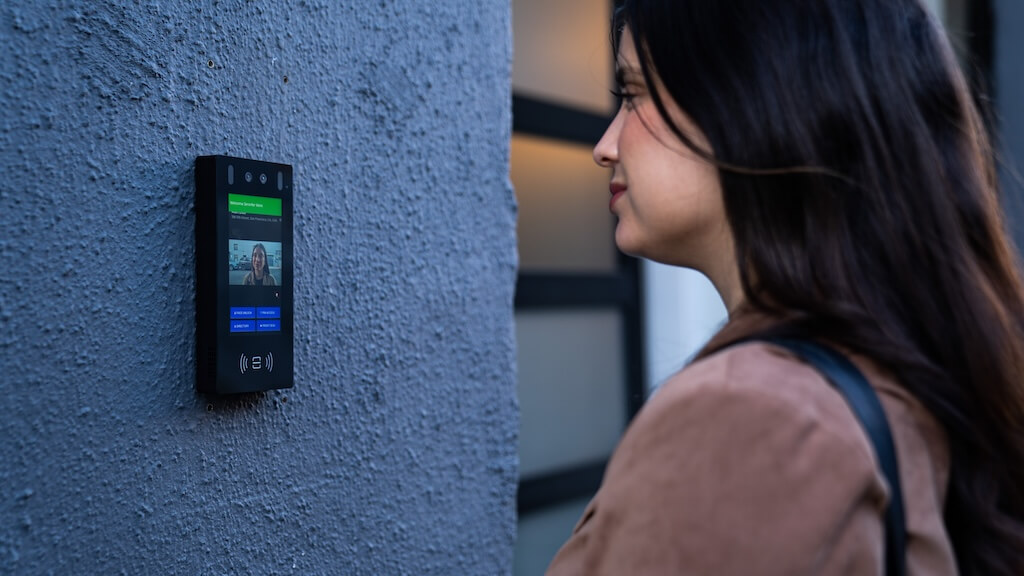
A door intercom with a camera, also called a front door intercom system with a camera, is the primary access layer. It lets residents, staff, and administrators see, speak with, and remotely unlock the door for visitors without being physically present at the entry point.
The right system does more than stream video: it manages a multi-tenant directory, logs every access event, enforces role-based permissions, and integrates with the rest of your building’s access control infrastructure.
If you need a single-family video doorbell, this guide isn’t for that category.
This guide is for property managers, building owners, and facilities teams evaluating intercom systems for buildings with multiple units, multiple users, or multiple entry points. It covers what actually separates systems in practice: wiring and retrofit constraints, admin and management depth, integration requirements, and total cost of ownership, so that you can make a decision based on real criteria rather than feature checklists.
How We Researched This Guide
This guide is based on a review of publicly available product documentation, installer pricing data, and deployment patterns across multifamily and commercial properties.
Vendor capabilities were assessed against real-world buyer requirements, not feature lists alone. Where specific cost ranges are cited, they reflect commonly reported figures across the industry and should be treated as planning estimates rather than quotes. Actual costs vary by region, building type, and project scope.
Key Takeaways
- If your building has existing 2-wire cabling, check system compatibility before shortlisting vendors. Reusing it can significantly reduce installation cost, but most cloud-based systems don’t support it.
- If you manage multiple units or frequent tenant turnover, you need a cloud-based admin with remote user management. On-site-only systems become a maintenance burden fast.
- If your building has a single entry point and a stable tenant base, a wired or wireless system with a fixed panel is often sufficient and lower cost than a full cloud platform.
- If access needs to work across multiple entry points or integrate with existing keycard or mobile credential systems, choose a platform built for access control from the ground up.
- For a single-entry retrofit in a small multifamily building, expect $1,500–$5,000 all-in for the first year. For a mid-size property with multiple entry points, budget $8,000–$25,000+ depending on infrastructure and integration requirements.
- Audit logs and access reporting are not optional in commercial buildings. If a system doesn’t export access events or integrate with your security platform, it will create a compliance gap.
Table of Contents
- What Is a Door Intercom with Camera?
- Types of Door Intercom Systems with Cameras
- Key Features to Look For
- Modern Door Intercom Systems to Consider
- How Much Does a Door Intercom with Camera Cost in 2026?
- Security + Privacy Pitfalls
- Decision Framework: How to Choose the Right System for Your Building
- Requirements Checklist
- Common Mistakes When Choosing A Door Intercom
- Final Thoughts
- FAQs
What Is a Door Intercom with Camera?
A door intercom with a camera is a building entry system that combines video, two-way audio, and remote door release into a single unit installed at an entry point. When a visitor arrives, they select a unit or contact from the directory.
The system calls the resident or staff member through a mobile app or indoor station. The user sees a live video feed, speaks with the visitor, and unlocks the door remotely if access is approved.
In multifamily and commercial buildings, this interaction happens dozens to hundreds of times a day. The system needs to handle that volume reliably, log every event, and give administrators visibility into who entered and when.
How It Works in Practice
A visitor arrives and selects a contact from the panel directory. The system places a call to the assigned user via mobile app, phone line, or indoor station. The user views the live feed, communicates with the visitor, and grants or denies access. If approved, the door release is triggered through a connected electric strike or maglock.
The entire interaction is logged with a timestamp and, on most modern systems, a snapshot or short clip.
For property managers, the more important flow is the admin side: adding and removing users, setting access schedules, pulling access reports, and managing permissions across entry points. All without being on-site.
Key Components of a Video Intercom System
- An entry panel with a built-in camera, microphone, speaker, and directory or keypad
- A receiving device — mobile app, indoor station, or both
- A door release mechanism connected to an electric strike, maglock, or existing lock hardware
- A cloud or on-premise software platform for user management, access permissions, and activity logs
- Optional integrations: keycard readers, mobile credentials, property management software, or building automation systems
Types of Door Intercom Systems with Cameras
Not all intercom systems are built for the same environment. The right type depends on your building’s existing infrastructure, how many users and entry points you’re managing, and how much administrative flexibility you need over time.
Choosing the wrong category is one of the most common and costly mistakes in intercom procurement.
Wired Intercom Systems


Wired systems connect components through physical cabling. Most legacy installations use 2-wire systems, which carry both power and signal over a single pair. Newer wired deployments typically use Cat5e, Cat6, or Power over Ethernet (PoE), which support higher video quality and IP-based management.
Wired systems are generally the most stable option and the least dependent on network conditions. The trade-off is installation complexity. In retrofit projects, where new cabling needs to run through finished walls, conduit, or risers, wiring is often the single biggest cost driver and schedule risk.
Best for: New construction where cabling is planned from the start, or buildings with existing structured cabling that can be reused.
Not ideal for: Retrofit projects in older buildings where running new cable is impractical or cost-prohibitive.
Wireless Intercom Systems


Wireless systems use Wi-Fi or cellular connections to reduce cabling requirements. This makes them faster and cheaper to install, particularly in buildings where running new wire is not practical.
Performance depends heavily on network coverage and reliability. In larger buildings or high-traffic environments, inconsistent Wi-Fi can cause call drops, video lag, or failed door releases. All of which create real operational problems. Before choosing a wireless system, assess signal strength at every entry point.
Best for: Retrofit projects in small to mid-size buildings with strong, consistent Wi-Fi coverage at entry points.
Not ideal for: High-traffic buildings, properties with poor network infrastructure, or any entry point with intermittent connectivity.
Cloud-Based Video Intercom Systems

Cloud-based systems manage access, users, and activity through an online platform rather than on-site hardware. Administrators can add or remove users, update permissions, and review access logs remotely through a web dashboard or mobile app, without being on-site.
This is the most operationally practical option for multifamily and commercial properties with frequent tenant turnover, multiple entry points, or distributed management teams. It also makes integration with other access control tools, such as keycards, mobile credentials, and property management software, significantly easier to implement and maintain.
Best for: Multifamily properties, commercial offices, and any building where remote administration and scalability matter.
Not ideal for: Buildings with unreliable internet connectivity, or operators who prefer fully on-premise systems for data or compliance reasons.
Mobile App-Based Intercom Systems


Mobile-based systems route calls directly to a smartphone rather than to a dedicated indoor station. Users receive notifications, view live video, and unlock the door from their phone from anywhere.
This approach eliminates the need for per-unit hardware, reducing upfront costs and simplifying installation. It also aligns with how most residents and staff prefer to manage access today. The dependency, however, is that every user needs a smartphone and a reliable data or Wi-Fi connection. In buildings with older resident populations or inconsistent connectivity, this can create access friction.
Best for: Modern multifamily buildings, distributed teams, and properties where residents or staff are frequently away from their units.
Not ideal for: Buildings where a significant portion of users are unlikely to adopt app-based access, or where indoor-station backup is required.
Key Features to Look For
Features only matter when they translate into day-to-day usability for the people who manage and use the system. The list below focuses on features that have a measurable impact on security, operations, and resident or staff experience, and what “good enough” actually looks like for each.
Video Quality and Visibility
Why it matters: Poor video quality creates hesitation at the point of entry. In shared-entry buildings, residents need to confidently identify visitors, even in low light, at night, or in direct sunlight. Uncertainty slows decisions and increases the likelihood of tailgating.
Minimum acceptable standard: 1080p resolution, wide-angle lens (at least 120°), and automatic low-light adjustment or infrared night vision. If the panel is in a location with direct sunlight or backlight, HDR support is worth prioritizing.
Remote Access and Mobile Control
Why it matters: Residents and staff are not always on-site. A system that requires physical presence to grant access, or that only works through a fixed indoor station, creates friction and increases the burden on property staff to handle access manually.
Minimum acceptable standard: Mobile app with push notifications, live video viewing, and remote door release. The app should work over both Wi-Fi and cellular. Response time from notification to unlock should be under 5 seconds in normal conditions.
Multi-Tenant Directory Management
Why it matters: In multifamily and commercial buildings, the directory is a live document. Tenants move in and out, staff changes, and temporary access needs arise constantly. A directory that requires on-site updates or manual intervention for every change becomes a recurring operational cost.
Minimum acceptable standard: Cloud-based directory that administrators can update remotely, in real time. Should support bulk imports, temporary access profiles, and the ability to hide or anonymize unit listings for resident privacy.
Door Release and Access Permissions
Why it matters: Granting access is the core function, but how permissions are structured determines whether the system scales. A flat permission model, where every user has the same access to the same doors at all times, breaks down quickly in buildings with multiple entry points, shared amenity spaces, or mixed-use layouts.
Minimum acceptable standard: Role-based access permissions with time-based scheduling. Administrators should be able to restrict access by user type, entry point, and time of day without needing to contact a vendor or technician.
Audit Logs and Access Reporting
Why it matters: In commercial buildings, access logs are often required for compliance. In multifamily properties, they’re the first thing a property manager needs after a security incident. A system with no exportable logs, or with logs that are only accessible through the vendor’s support team, creates a serious operational and liability gap.
Minimum acceptable standard: Timestamped access logs for every entry event, including failed attempts. Logs should be searchable, filterable by date and entry point, and exportable in a standard format (CSV at minimum). The retention period should be clearly stated in the service agreement.
Integration with Access Control Systems
Why it matters: Most buildings already have some form of access control, like keycards, fobs, or mobile credentials. An intercom that operates as a completely separate system means two sets of user records, two admin platforms, and two sources of truth for access activity. That creates extra work and increases the chance of permissions falling out of sync.
Minimum acceptable standard: Native or API-based integration with at least one major access control platform. Should support unified user management so that adding or removing a tenant updates both the intercom directory and the access control system simultaneously.
Visitor Management and Delivery Access
Why it matters: Package deliveries and recurring service providers are a daily reality in most multifamily and commercial buildings. A system with no structured way to handle them pushes the burden onto residents or staff, or results in propped doors and tailgating.
Minimum acceptable standard: Support for one-time or recurring access codes for delivery carriers and service providers. Ideally, it includes integration with major delivery platforms or a virtual key feature that doesn’t require a resident to be available in real time.
Modern Door Intercom Systems to Consider
The systems below represent the most commonly evaluated options for multifamily and commercial properties in 2026. This list is based on a review of deployment patterns, buyer feedback, and publicly available product documentation. It is not exhaustive, but it covers the main categories a serious buyer will encounter on a shortlist.
Swiftlane
Swiftlane is built for multifamily and commercial properties that need centralized cloud-based admin across multiple entry points. It supports PoE, wireless, and cellular installations, offers remote user management, role-based access, and audit logs, and integrates with major access control and property management platforms.
What sets Swiftlane apart:
- Face unlock for hands-free, keyless entry at the front door
- Loitering detection and alerting for proactive deterrence before incidents occur
- Video recording with a full audit trail at every entry event
- IK10-rated hardware — the highest vandalism resistance rating available
- Direct sunlight and extreme temperature performance for reliable outdoor operation
- Cellular internet built in; no dependence on building Wi-Fi at the entry point
- Offline support so the door continues to operate during network outages
- Apple and Google Wallet support for frictionless mobile credentials
- 24/7 phone support with a single point of contact for hardware, installation, and ongoing needs
- Over-the-air updates that deliver new features without hardware replacement
Aiphone
Aiphone is a long-established provider suited to new construction and structured installations where hardware stability is the priority. Its systems are wired or IP-based and integrate with existing security infrastructure via dry contact or IP. Less suited to properties that need frequent remote directory updates or have high tenant turnover.
Akuvox
Akuvox offers IP- and cloud-enabled systems with flexible credential support, including mobile, PIN, and biometric options, and strong smart building integration via SIP and API. A good fit for technically capable teams managing complex access environments. Not ideal for operators who want a simple, low-maintenance setup.
Doorbird
Doorbird is a reliable IP-based option for smaller multifamily and boutique commercial properties that want local control and straightforward installation via PoE or Wi-Fi. It lacks the enterprise admin depth needed for large or multi-site deployments.
Comelit
Comelit is one of the strongest options for buildings with existing 2-wire infrastructure. Its systems are purpose-built to run on legacy wiring, making it the most practical retrofit choice when 2-wire cabling is in good condition. Less suited to cloud-first operators or properties starting from scratch with no existing wiring.
Quick Vendor Comparison (What Each is Best For)
| System | Best for | Strength | Limitation |
| Swiftlane | Multifamily + commercial, cloud admin | Remote management, building-scale workflows | Best as a full platform, not a legacy swap |
| Aiphone | Structured installs, fixed infrastructure | Proven reliability, planned wiring | Confirm cloud and mobile admin depth upfront |
| Akuvox | IP-based, flexible credentials | Broad hardware lineup, configuration flexibility | Validate support and admin UX by the installer |
| Doorbird | Small multifamily, local control | Simple PoE or Wi-Fi install, reliable | Not suited for large or multi-site deployments |
| Comelit2-wire retrofits | Buildings reusing 2-wire cabling | Lowers retrofit labor and complexity | Confirm cloud and mobile capabilities per system line |
How Much Does a Door Intercom with Camera Cost in 2026?
Cost varies significantly based on building size, wiring infrastructure, and system type. Rather than a single figure, it helps to understand the main cost drivers and rough ranges.
For small properties with a single entry point, total first-year costs, hardware, installation, and software typically range from $1,500 to $5,000. Mid-size multifamily or commercial buildings with multiple entry points generally range from $8,000 to $25,000 or more, depending on infrastructure requirements and integration complexity.
These ranges are consistent with installer pricing commonly reported across the industry, but quotes vary by region and project scope. (see: HomeAdvisor, Security Gate & Intercom Install Cost; Swiftlane, Wireless Intercom System Cost).
The most common cost adders that buyers miss are: electric strike or maglock replacement ($150–$700 per door), new network drops ($150–$400 per drop), conduit and cable runs in older buildings (variable, often the largest single line item in a retrofit), and permits where required by local code.
Ongoing costs typically include a software or platform subscription. Pricing structures vary by vendor. Some charge per unit, others per entry point, and some bundle software into the hardware cost. Confirm what’s included before signing.
For an accurate estimate, request a quote based on your specific entry point count, existing wiring type, door hardware, and user volume.
Retrofit + Wiring Reality
Wiring is the factor most likely to determine whether a retrofit project comes in on budget, and the one most commonly underestimated at the planning stage.
If your building has existing 2-wire cabling, check compatibility before shortlisting vendors. Some systems, particularly Comelit and certain Aiphone configurations, are designed to run on legacy 2-wire infrastructure. Most cloud-based and IP-based systems are not. Discovering this incompatibility mid-installation is one of the most common and costly mistakes in intercom retrofits.
If your building has Cat5e/Cat6 Ethernet cabling or Power over Ethernet (PoE) infrastructure, you’re well-positioned for a modern IP or cloud-based system. PoE standards vary (802.3af/at/bt), so confirm your switch or injector supports the panel’s power requirement before purchasing.
If there’s no usable wiring at entry points, wireless or cellular systems are the practical path. Test Wi-Fi signal strength at every entry point before committing. A signal adequate for a smartphone may not reliably support video streaming and door release under load.
Cellular-based systems eliminate Wi-Fi dependence and are worth considering in areas with marginal coverage.
The failure modes that most often derail retrofit projects are: wiring discovered to be incompatible after installation has begun; entry points with no nearby power or network connections; door hardware mismatches requiring frame modifications; and underestimated cable-run complexity in older buildings.
All are avoidable with a thorough pre-installation survey before vendor selection.
Security + Privacy Pitfalls
A door intercom improves building security, but only if it’s configured and managed correctly. The most common vulnerabilities aren’t hardware failures. They’re operational gaps outlined in NIST IoT security guidelines and the OWASP IoT.
Tailgating
No intercom system eliminates it on its own. Look for systems with door prop alerts, entry logging, and camera snapshots at the point of access. If tailgating is a known concern, ask vendors specifically how their system supports detection.
Directory Privacy
A publicly visible directory that exposes resident names and unit numbers poses a personal data risk. Most systems support anonymous or unit-number-only listings, but it’s rarely the default. Confirm how the directory displays publicly before deployment.
PIN Sharing
Shared codes are convenient but create access that can’t be attributed or easily revoked. Systems relying heavily on PINs need clear offboarding policies. Mobile credentials reduce this risk but require app adoption.
Video Quality as a Security Decision
Poor night vision, backlight issues, or a narrow field of view lead residents to grant access without proper verification. Camera placement and image quality are security choices, not just usability ones.
Audit Logs and Data Retention
In a security incident, access logs are the first thing requested. Confirm retention period, whether logs are exportable, and who owns the data. Some vendors offer no export option, which is a significant liability for commercial operators.
Resident Data Handling
Directory information, access history, and footage are personal data. Confirm the vendor’s storage and privacy practices are consistent with regulations in your jurisdiction, and that your service agreement clearly states who owns resident data.
Decision Framework: How to Choose the Right System for Your Building
Most intercom procurement decisions go wrong because buyers evaluate systems before they’ve defined their own requirements. This framework puts requirements first.
Step 1: Audit Your Infrastructure
Before looking at any system, document the following at every entry point:
- Existing wiring type (2-wire, Cat5e/Cat6, none)
- Proximity of power and network connections
- Current door hardware and lock type
- Building construction type (affects cabling complexity)
This single step eliminates a significant portion of systems from consideration immediately and prevents the most common retrofit mistakes.
Step 2: Define Your Access Model
Answer these questions before talking to any vendor:
- How many users need access, and how often does that list change?
- Do different user groups need different permissions or access hours?
- Who is responsible for managing access day-to-day, and do they need to do it remotely?
- How will you handle guests, deliveries, and temporary access?
If your answers involve frequent changes, multiple user types, or remote management, you need a cloud-based platform with strong admin depth.
Step 3: Set Your Non-Negotiables
From the features section, identify the three to five capabilities your building genuinely cannot operate without. Common non-negotiables for multifamily properties include:
- Remote directory management
- Mobile access for residents
- Audit log exports
- Integration with existing access control or property management software
For commercial properties, add role-based permissions, time-based scheduling, and visitor management.
Write these down before vendor calls. Any system that can’t meet all of them is off the list, regardless of price or other features.
Step 4: Assess Total Cost of Ownership
Use the cost section of this guide to build a rough budget before requesting quotes. Include hardware, installation, software subscription, and the cost adders most relevant to your building type.
A system that appears cheaper upfront often costs more over three years once software fees and infrastructure upgrades are factored in.
Step 5: Evaluate Vendors On Fit, Not Features
Request demos or walkthroughs from two to three shortlisted vendors. In each session, focus on:
- How the admin platform handles your specific access model
- Whether the system has been deployed in buildings comparable to yours
- What the onboarding and support process looks like after installation
- How updates and new features are delivered, and whether they cost extra
Ask for at least two references from properties of similar size and construction type. A vendor who hesitates on references is a signal worth taking seriously.
Requirements Checklist
Copy this into your next vendor call or RFP.
Infrastructure
- Wiring type confirmed at all entry points
- Power and network availability confirmed at all entry points
- Door hardware compatibility confirmed
- Cabling quote obtained as a separate line item (if new runs required)
Access Model
- User count and turnover rate defined
- Permission structure mapped (roles, schedules, entry points)
- Remote admin requirement confirmed
- Guest, delivery, and temporary access workflow defined
Features
- Non-negotiable features list finalized
- Audit log export capability confirmed
- Directory privacy settings reviewed
- Mobile access requirements confirmed
Cost
- Hardware cost obtained
- Installation quote obtained separately from hardware
- Software subscription terms confirmed (per unit, per entry point, or flat fee)
- Cost adders identified and quoted
Vendor
- References from comparable properties obtained
- Data ownership and retention policy reviewed
- Support and SLA terms confirmed
- Upgrade and expansion path discussed
Common Mistakes When Choosing a Door Intercom
Choosing based on hardware alone. The entry panel is the most visible part of the system, but the software platform determines how well it works day to day. A panel that looks solid can become a burden if the admin side is limited or difficult to manage without vendor support.
Underestimating installation complexity. Retrofit projects almost always cost more and take longer than initial estimates. Wiring incompatibilities, missing power or network at entry points, and door hardware mismatches are discovered during installation unless a proper pre-installation survey is done first.
Not planning for growth. A system sized for today’s needs may not scale cleanly as the building changes. Adding users, entry points, or integrations to a system not built for flexibility is often expensive and disruptive.
Overlooking mobile access expectations. Most residents and staff expect to manage access from their phones. Systems that rely heavily on fixed indoor stations quickly feel limiting, particularly when occupants are frequently away from their units.
Ignoring integration with existing systems. An intercom that operates separately from your access control or property management platform creates duplicate records, inconsistent permissions, and extra administrative work, an operational cost that compounds over time.
Skipping the vendor reference check. A system that works well in new construction may perform poorly in a retrofit. Ask for references from properties of comparable size, age, and construction type before committing.
Final Thoughts
The right door intercom system is the one that fits how your building actually operates, not the one with the longest feature list.
For smaller properties with stable tenants and a single entry point, a straightforward wired or wireless system is often enough. For multifamily and commercial buildings with frequent turnover, multiple entry points, or distributed management, a cloud-based platform with strong admin depth and integration capability will deliver significantly more long-term value.
The decisions that matter most happen before vendor selection: understanding your wiring infrastructure, defining your access model, and setting non-negotiable requirements. Get those right, and the vendor evaluation becomes straightforward.
If you’re evaluating cloud-based options for a multifamily or commercial property, a walkthrough with sample quote assumptions for your building size is a practical next step. Book a walkthrough with Swiftlane.
FAQs
Can I use my phone to answer a door intercom?
Yes. Most modern systems route calls directly to a mobile app, allowing you to view live video, speak with visitors, and unlock the door remotely. This works over both Wi-Fi and cellular and doesn’t require you to be on-site.
Are door intercom systems with cameras secure?
Yes, when properly configured. The most common vulnerabilities are operational, weak PIN policies, publicly visible directories, and missing audit log exports, rather than hardware failures. See the Security + Privacy Pitfalls section for a full breakdown.
What is the best door intercom system with a camera?
For multifamily and commercial properties, the best system is the one that matches your wiring infrastructure, access model, and admin requirements. Cloud-based systems with remote management and integration capabilities, such as Swiftlane or Akuvox, are generally the strongest fit for buildings with multiple users or frequent turnover.
Wired options like Aiphone or Comelit are well-suited for stable installations or 2-wire retrofits.
What’s the difference between a video doorbell and a building intercom system?
Video doorbells are consumer devices designed for single-family homes. Building intercom systems is designed for multi-tenant environments. They support directory management, role-based access, audit logging, and integration with access control infrastructure.
If you’re managing a multifamily or commercial property, a consumer doorbell is not a substitute.
Do I need a professional installer?
For most multifamily and commercial deployments, yes. Wiring, door hardware integration, and network configuration require professional installation to ensure reliability and avoid voiding warranties. Some wireless systems support partial self-installation of the panel, but a qualified installer should handle door-release hardware and network setup.


