

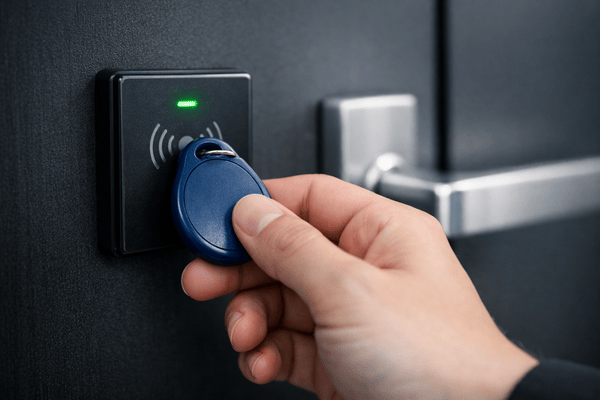
What is a key fob system for condos? A key fob system for condos is an electronic access control system that lets owners, residents, and approved staff open building doors, garage gates, elevators, and amenity spaces with a small RFID credential instead of a metal key. The association can limit, schedule, and cancel each fob individually from the access control software, and the system logs every use.
Quick answer: In 2026, condo associations should budget $1,500 to $5,000 per door installed for a key fob system. High-traffic perimeter entrances and vehicle gates run $5,000 to $6,000 or more. Cloud software typically adds $5 to $10 per door per month. Across a whole property, that comes to roughly $4,500 for a small low-rise and $55,000 or more for a high-rise tower with garage and elevator control.
The matrix below breaks those totals down by condo profile, so boards can bring a working number to their next meeting.
2026 Condo Key Fob Turnkey Budget Matrix
| Condo property profile | Doors and access points covered | Typical credential mix | Estimated turnkey cost (hardware + install) | Ongoing monthly software |
| Boutique low-rise (10 to 29 units) | 2 to 3 doors (main lobby, rear gate, trash or storage) | 20 to 60 encrypted fobs, with mobile access as an option | $4,500 to $9,500 | $10 to $30 per month (0 for on-premise systems with no subscription) |
| Mid-rise community (30 to 79 units) | 4 to 6 access points (perimeter doors, garage gate, fitness center, package room) | 60 to 160 encrypted fobs plus visitor PINs | $12,000 to $26,000 | $20 to $60 per month |
| Urban high-rise / HOA tower (80 to 200+ units) | 8 to 15+ access points (exterior doors, parking barrier arms, elevator cabs, pool/roof deck) | 160 to 400+ credentials: encrypted fobs, mobile (BLE/NFC) credentials, and visitor PINs | $25,000 to $55,000+ | $40 to $150+ per month |
Ranges are based on Swiftlane’s 2026 key fob entry system cost guide: $1,500 to $5,000 per standard door, $5,000 to $6,000 or more for perimeter entrances and gates, and $5 to $10 per door per month for cloud software. Credential counts assume about two fobs per unit. Labor runs higher in major metro markets. Elevator integration and vehicle gate costs vary widely with the number of cabs, the floors served, and whether existing gate operators can be reused. Get a site-specific quote before taking a number to a board vote.
Key Takeaways
- Budget $1,500 to $5,000 per door installed, plus $5 to $10 per door per month for cloud software. Gates and high-traffic perimeter doors cost more.
- How you fund the project matters as much as what it costs. Replacing an existing system is usually a reserve expense; new scope may need a special assessment and, above state limits, an owner vote.
- Legacy 125 kHz proximity fobs can be copied in seconds. Specify encrypted 13.56 MHz credentials such as MIFARE DESFire EV3 or HID iCLASS SE.
- Cloud management takes volunteer board members out of fob administration: lost fobs, move-ins, and contractor access are handled from a phone or browser.
- Elevator floor lockout and amenity schedules protect common elements, but fire service recall and your governing documents always take precedence.
- The strongest setup for most condos is mobile-first, with encrypted fobs for every resident who wants or needs one.
How We Researched This
This guide draws on Swiftlane’s access control deployments in condo and multifamily buildings, Swiftlane’s published 2026 cost data, and primary sources: state condo and HOA statutes, Fannie Mae’s condo project standards, life safety and elevator codes, and credential manufacturers’ documentation. Legal and code references are examples, not legal advice. Confirm requirements for your building with association counsel and your local authority having jurisdiction (AHJ).
Table of Contents
- How Key Fob Access Systems Work in Condominium Communities
- 2026 Condo Key Fob System Costs: Hardware, Installation, and Maintenance
- How Condo Boards Fund and Approve Access Control
- Overcoming the Fob Cloning Vulnerability: Why Encryption Matters
- Solving the HOA Administrative Burden: Cloud vs. Legacy Systems
- Elevator and Amenity Protection for Condo Communities
- The Hybrid Model: Combining Key Fobs with Mobile Access and Video Intercoms
- HOA Board Procurement Checklist: 8 Questions to Ask Vendors
- Where Swiftlane Fits In: Unified Access Control for Condos and HOAs
- FAQs
Related Posts
- Key Fob Systems – A Complete Guide
- What Is a Fob System and How to Choose One
- Commercial Key Fob Entry Systems
How Key Fob Access Systems Work in Condominium Communities
Every key fob system has the same four parts: a credential, a reader, a controller that makes the access decision, and the electrified lock it releases. A key fob is a passive RFID tag with no battery. The reader’s field powers it long enough to send its credential ID.
When a resident taps a fob:
- The reader captures the fob’s credential and passes it to the access controller.
- The controller checks that credential against the permissions the association assigned: which doors, which floors, which hours.
- If the credential is authorized, the controller releases the lock and logs the entry. If not, the door stays locked and the denied attempt is logged too.
The credential’s technology matters more than the reader’s brand. Older fobs use 125 kHz proximity technology, which transmits a fixed number with no encryption. Newer fobs use 13.56 MHz smart card technology, which can encrypt the exchange between fob and reader. Smartphones use Bluetooth Low Energy (BLE) or NFC instead of a fob, and many current readers accept both.
Where Condo Systems Go Beyond the Front Door
A condo’s access points usually include more than the lobby. The same credential can cover:
- Front-door and perimeter readers at the lobby, side entrances, and pedestrian gates.
- Garage vehicle gates and barrier arms, where a reader or long-range receiver signals the gate operator. Confirm early whether the existing gate operator can be reused.
- Elevators, where a reader in the cab enables only the floor buttons a resident is authorized to use. This requires integration with the elevator controller and the elevator contractor.
- Amenity and service spaces such as the fitness center, pool, package room, trash room, and storage.
Stationary Controller vs. Cloud-Managed Architecture
The bigger architectural choice is where the system is managed.
| Stationary (on-premise) system | Cloud-managed system | |
| Where permissions live | Software on a PC or server in the building | A web dashboard and mobile app, synced to controllers on site |
| Issuing or canceling a fob | Someone at the on-site PC and enrollment reader | Any authorized admin, from a phone or browser |
| Access logs | Viewed on site, often exported manually | Viewed remotely in real time |
| Updates | Manual, often by a technician visit | Pushed remotely by the vendor |
| Recurring cost | Often a one-time license, plus service calls | Monthly subscription, typically $5 to $10 per door |
| If the internet drops | No effect on daily access | Controllers keep working from locally stored credentials; remote changes wait until the connection returns |
2026 Condo Key Fob System Costs: Hardware, Installation, and Maintenance
Installation labor, not hardware, is usually the largest line in a condo key fob project. A standard door runs $1,500 to $5,000 installed, and labor alone is $1,000 to $3,000 of that.
Per-door hardware and installation
| Component | Typical 2026 cost | Priced per | What drives the range |
| Reader | $150 to $500 | Door | Legacy 125 kHz reader (low end) vs. encrypted 13.56 MHz reader with mobile support (high end) |
| Locking hardware | $100 to $400 | Door | Electric strike or magnetic lock; electrified crash bars and mortise locks cost more |
| Access controller | $200 to $800 | Door | Controller capacity and features |
| Installation labor | $1,000 to $3,000 | Door | Cabling, door prep, code compliance, and commissioning |
| Cloud software | $5 to $10 | Door, per month | Remote administration, audit logs, mobile access |
Source: Swiftlane’s 2026 key fob entry system cost guide. Older condo buildings often land at the high end of labor, because walls, conduit, and door hardware have to be brought up to current electrical and life safety codes.
Replacement Credential Economics
An encrypted 13.56 MHz fob costs the association $5 to $15 when bought in bulk. The real cost of a lost fob is higher once staff time and lockout coordination are counted: about $35 to $50 per replacement, according to the same cost guide.
That adds up even in a stable building. The cost guide estimates that 5% to 10% of fobs are lost, damaged, or not returned each year. For a 100-unit condo with 200 fobs, that’s 10 to 20 replacements and $350 to $1,000 a year. Expect fewer if most units are owner-occupied and more if many units are rented.
The association decides who pays. Your rules or governing documents should state whether owners pay a reissue fee for lost fobs, how many fobs each unit gets, and what happens to fobs at a sale or lease turnover.
Turnkey Budget Tiers: What the Matrix Assumes
The turnkey matrix at the top of this guide multiplies these per-door ranges by a typical access-point count for each condo profile. In a mid-rise, the garage gate is usually the most expensive single point. High-rise budgets add elevator integration, which depends on the number of cabs and floors and requires the elevator contractor.
Readers, controllers, and door hardware typically last 7 to 15 years with maintenance, per the cost guide. That useful life matters for the next section: it’s what puts an access system into a reserve study.
How Condo Boards Fund and Approve Access Control
In a condo, an access control upgrade passes or stalls on its funding route and its approval path, not its spec sheet. The decision runs through a volunteer board, the association’s budget, and sometimes an owner vote.
Reserve Studies vs. Special Assessments
Most associations pay with some mix of three sources. Which applies depends on your state’s condo or HOA statute, your governing documents, and how your reserve study treats the system. Confirm the route with your manager, reserve specialist, and association counsel before you budget.
Reserve funds: replacing an existing system. A reserve study lists the major components the association must repair or replace, with each one’s remaining useful life and replacement cost. An existing access system with a 7- to 15-year life may already be listed. If it is, replacing it on schedule is exactly what reserves are for.
Reserve spending is often restricted by law. In California, for example, the board may spend reserve funds only on repairing, restoring, replacing, or maintaining the major components the reserve was established for (Civil Code § 5510). New capabilities, such as elevator floor control or readers on new amenity doors, may not count as replacement. Ask your reserve specialist how to classify them.
Special assessments: when reserves fall short or the scope is new. Many states cap how large an assessment a board can levy without owner approval. In California, a board can’t impose special assessments totaling more than 5% of the association’s budgeted gross expenses for the year without approval from a majority of a quorum of members (Civil Code § 5605).
Operating budget: recurring costs. Cloud software, support plans, and replacement fobs recur every year, so they generally belong in the operating budget. At $5 to $10 per door per month, a 6-door system adds about $360 to $720 a year.
Why the funding route matters to lenders. For a unit to qualify for a loan sold to Fannie Mae, the association’s budget currently has to allocate at least 10% of assessment income to replacement reserves. That rises to 15% for loan applications dated on or after January 4, 2027, unless the association funds reserves at the level its current reserve study recommends (Fannie Mae Lender Letter LL-2026-03). Special assessments don’t count toward that allocation. Planning the access system’s replacement in the reserve study, rather than assessing owners after the old system fails, is the kind of reserve planning lenders look for.
How to Present the Upgrade to Owners
Owners hear “access control upgrade” as a new expense. The stronger framing is that the association is maintaining a building system it already owns. A proposal that gets through a board vote usually covers five points:
- Asset preservation. The access system is a common element with a finite life, like the roof or elevators. Replacing it on schedule avoids emergency repairs and unplanned assessments.
- A documented security record. Audit logs show who entered common areas and when, and they document how lost or unreturned fobs were revoked. Ask your insurance broker how your master policy’s underwriter views access control and security records before telling owners to expect any effect on premiums.
- Financing and resale. Funding the replacement through reserves supports the reserve test lenders apply when owners sell or refinance.
- Total cost and funding source. Bring the turnkey estimate, the funding route, and the recurring operating line together in one place.
- Resident impact and approval path. Explain when owners switch credentials and who to call with problems. State whether the board can approve the project alone or needs an owner vote.
Overcoming the Fob Cloning Vulnerability: Why Encryption Matters
If your condo still uses 125 kHz proximity fobs, anyone holding one can copy it in seconds. Those fobs broadcast a fixed number with no encryption, so a copy is indistinguishable from the original at the reader.
How Easy Copying Has Become
Copying no longer takes technical skill. Self-service key kiosks in retail stores advertise duplication of non-encrypted proximity fobs for apartments, offices, gyms, and shared amenities. Handheld 125 kHz duplicators sell online for less than a dinner out.
A copied fob carries the same credential as the original, so the access log records every entry under the original owner’s name.
Why This Worries Condo Boards
Condos have more people passing through on temporary terms than most boards realize. Each one is a potential copy:
- Short-term rental guests. Where your governing documents or local rules restrict short-term rentals, unauthorized guests often receive a copied fob rather than an association-issued one, with no record of who holds it.
- Former service providers. Dog walkers, cleaners, and caregivers who received an owner’s fob can keep a working copy after the relationship ends.
- Contractors and movers. A fob lent for a renovation or a move can be copied before it’s returned.
Deactivating the original fob doesn’t help if the board doesn’t know copies exist. Once cloning is suspected, the only real fix is reissuing every affected fob, and if copying is widespread, replacing readers and credentials.
The 2026 Benchmark: Encrypted 13.56 MHz Credentials
No code requires encrypted credentials. But for a condo board choosing a system in 2026, encrypted 13.56 MHz smart credentials should be the baseline, and two families are widely supported:
- MIFARE DESFire EV3 (NXP). Uses mutual three-pass authentication between fob and reader, 128-bit AES, and encrypted data on the radio channel. The reader and the fob each prove they hold the right keys before any credential data moves.
- HID iCLASS SE and Seos (HID). Uses HID’s Secure Identity Object (SIO) data model, which binds credential data to the specific key card or fob to inhibit cloning. Seos credentials add mutual authentication and secure messaging between the credential and the reader.
Two cautions when comparing quotes. First, “13.56 MHz” alone isn’t enough: older MIFARE Classic fobs use encryption that has been broken and can be copied. Second, multi-technology fobs that also carry a 125 kHz chip keep the weak credential alive. Use them only as a short migration step, then disable 125 kHz reads.
Encryption also needs a matching reader. Specify readers that support your chosen credential and Open Supervised Device Protocol (OSDP), so the link from reader to controller isn’t the weak point.
Solving the HOA Administrative Burden: Cloud vs. Legacy Systems
In many self-managed and lightly managed condos, the person issuing fobs is a volunteer board member. A cloud-managed system turns that job from a trip to the building into a few taps on a phone.
The Pain of On-Site Desktop Programming
On many legacy systems, fobs are encoded at a desktop enrollment reader connected to an on-site PC. Every lost fob, sale, or new tenant means someone has to be at that PC. In practice, that someone is often a board member driving over on a weeknight to program a replacement for a neighbor.
The arrangement also breaks at board turnover. When the one volunteer who knows the basement PC leaves the board, the association can lose track of who holds which fob.
What Changes With Cloud Management
With a cloud-managed system, any authorized administrator can:
- Deactivate a lost fob from a phone or laptop as soon as it’s reported.
- Issue a mobile credential to a new owner or approved tenant remotely, with no handoff.
- Set scheduled, expiring access for contractors, cleaners, and caregivers.
- Review entry logs without visiting the building.
- Hand administration to a management company or an incoming board member by changing user permissions.
Physical fobs still have to be handed over in person. Deactivation, permissions, and mobile credentials no longer do.
Resident Owners vs. Rented Units
Most condos mix owner-occupied units with units rented by off-site investor owners. Their needs pull in different directions:
| Resident owner | Investor owner with a rented unit | |
| Main concern | Quiet enjoyment, security, and property value | Fast tenant turnover with minimal travel |
| Credential friction | Lost fobs and guest access | Collecting fobs at move-out, issuing them at move-in, unreturned fobs |
| What cloud access solves | Remote deactivation and scheduled guest access | Remote issuance and revocation tied to lease dates |
With remote issuance, the association can let an investor owner or their property manager request access for a new tenant. The board or manager approves it and the tenant receives a mobile credential, with no fob changing hands. At move-out, revoking access takes seconds, and no unreturned fob keeps working.
Who may request or approve credentials is a policy decision for the board. Write it into your rules, including how many credentials each unit receives.
Moving Day Without a Staff Member on Site
Moves are where condos lose control of fobs. Instead of lending a fob to a moving crew, the administrator can issue time-limited access that covers only the loading door, the service elevator floors, and the move window. When the window closes, access ends automatically.
Exclusive use of a service elevator during a move is usually handled by the elevator’s own independent service mode, operated by staff or the elevator key holder. Confirm with your vendor and elevator contractor how access control and elevator scheduling work together in your building.
Elevator and Amenity Protection for Condo Communities
Amenities and elevators are where a condo’s access rules get specific: who can use the roof deck, when the pool closes, and which floors each resident can reach. A fob system enforces those rules automatically, as long as they match your governing documents and state law.
Amenity Isolation and Quiet Hours
Each amenity door can carry its own schedule and its own list of authorized users. Common setups include:
- Time-of-day schedules. Lock the pool, rooftop lounge, or fitness center automatically at 10 PM and reopen at 6 AM, so quiet hours enforce themselves.
- Per-amenity permissions. Limit the roof deck or a reservable clubroom to owners and authorized residents, and give guests access only while accompanied by a resident.
Who counts as an authorized user is set by your governing documents, not the access system. Many declarations pass an owner’s amenity rights to their tenant during the lease, so check yours before restricting amenities to “owners only.”
Suspending Amenity Access for Delinquent Accounts
Some states let associations suspend amenity use when an owner falls behind, but with limits. In Florida, for example, an association may suspend a unit’s use of common elements and facilities once the owner is more than 90 days delinquent. That suspension can’t extend to common elements needed to access the unit, utility services, parking spaces, or elevators (Fla. Stat. § 718.303).
So a Florida board could turn off a delinquent unit’s pool and gym access, but not its garage or elevator access. Other states may require notice and a hearing first. Have counsel confirm the process before you configure any delinquency rule.
In-Cab Elevator Floor Lockout
Elevator access control restricts the car operating panel (COP), the button panel inside the cab. A reader in the cab checks the resident’s credential and enables only their own floor plus shared levels such as the lobby, garage, and amenity floors.
The integration ties into the elevator controller, so your elevator contractor must be involved from the start.
Two limits matter for board expectations:
- Fire service recall overrides everything. Under ASME A17.1, firefighters’ emergency operation must work regardless of access restrictions. Confirm your integration releases the floor lockout when recall activates.
- Elevator lockout doesn’t secure stairwells. Stair doors must always allow free exit. Under the International Building Code, interior stairway doors must also open from both sides without a key (IBC 2021 Section 1010.2.7; Section 1010.2.6 in the 2024 edition). The exceptions are narrow. The main one lets stair doors be locked from the stair side only if they unlock simultaneously on a signal from the fire command center or from a single location inside the main entrance. High-rises follow Section 403.5.3, which likewise requires stair-side locked doors to unlock together from the fire command center. Floor lockout reduces casual wandering by elevator, but it’s not a barrier between floors, and your local code edition governs.
The Hybrid Model: Combining Key Fobs with Mobile Access and Video Intercoms
No condo should go 100% mobile-only. The strongest setup is mobile-first for the residents who want it, with encrypted fobs for everyone who wants or needs a physical credential.
Accommodating Every Resident
Condo communities often include residents who don’t carry smartphones, don’t want building entry tied to an app, or simply prefer something on a key ring. A mobile-only building leaves those residents locked out or dependent on neighbors.
A hybrid system avoids that trade-off:
- Multi-technology readers accept both mobile credentials (BLE or NFC) and encrypted 13.56 MHz fobs at every door.
- Mobile access as the default for residents who opt in, which cuts fob inventory, replacement costs, and move-in handoffs.
- Encrypted fobs as a primary or backup credential for any resident who asks, with no penalty for choosing one.
When comparing quotes, confirm the readers support both mobile credentials and encrypted fobs, and ask whether the platform charges per mobile credential.
Connecting the front door to interior readers
The front door is also where visitors, deliveries, and guests arrive. Pairing a video intercom with the access control system puts both on one platform:
- A visitor calls a resident from the entry panel, and the resident sees them on video and unlocks the door from their phone.
- The same platform can issue a guest a temporary PIN or mobile pass for the lobby and the host’s floor, then expire it automatically.
- Delivery and courier access can be limited to the lobby or package room instead of the whole building.
One platform for intercom and access control means one resident directory, one set of logs, and one place to revoke access when a unit sells.
Real-world example: The Grand Castle
Large multifamily communities are already moving beyond traditional key fob-only systems in favor of hybrid access models.
At Swiftlane, for example, The Grand Castle (a 522-unit residential community in Michigan) replaced an aging and unreliable legacy access system that relied heavily on manual code updates and offered limited visibility into building entry activity. Staff spent significant time managing access changes, while residents experienced inconsistent entry controls across the property.
The upgrade introduced a unified system combining facial recognition, mobile access, and PIN-based entry across more than 60 access points. The result was a more consistent experience for residents and a substantial reduction in manual administrative work for property staff, supported by centralized cloud-based management and real-time audit logs.
This type of hybrid deployment reflects where many large properties are heading: not eliminating credentials entirely, but reducing dependence on physical fobs in favor of more flexible, software-managed access methods.
HOA Board Procurement Checklist: 8 Questions to Ask Vendors
Bring these eight questions to every vendor meeting. The answers give the board what it needs for the reserve study, the budget, and the vote.
- Will you provide useful-life and replacement-cost figures for each component? Your reserve specialist needs them to add the system to the reserve study and plan its eventual replacement.
- What happens during a power or internet outage? Ask whether controllers store credentials locally, how long battery backup lasts, and which doors are set to unlock or stay locked when power fails.
- Will the system work with our existing garage gate operators and elevator controllers? Reusing gate operators and coordinating with your elevator contractor early can save thousands.
- How does the system integrate with our fire alarm? Electrified locks on exit doors must release as required by the life safety code (NFPA 101) or building code (IBC), and elevator recall under ASME A17.1, initiated through the fire alarm system (NFPA 72), must override floor lockout. Ask whether locking hardware is listed to UL 294 and who coordinates with your fire alarm contractor.
- Which credential technologies do your readers support? Look for MIFARE DESFire EV3 or HID iCLASS SE/Seos, plus mobile credentials. Confirm 125 kHz reads can be disabled after migration and that readers support OSDP.
- How are credentials issued, changed, and revoked, and by whom? Confirm remote administration, role-based admin permissions, audit logs, and a clean handoff when board members or managers change.
- What exactly does the price include? Ask whether software is priced per door, per unit, or per credential, and whether updates, support, and warranty are included or billed separately. Recurring fees land in the operating budget.
- How will you migrate our existing fobs and residents, and can we speak with condo references? Ask for an implementation plan, a resident communication plan, and two or three condo or HOA customers the board can call.
Where Swiftlane Fits In: Unified Access Control for Condos and HOAs
Swiftlane gives condo boards and managers one cloud platform for every door, gate, elevator, and amenity, so the association isn’t stitching together separate systems or relying on a basement PC.
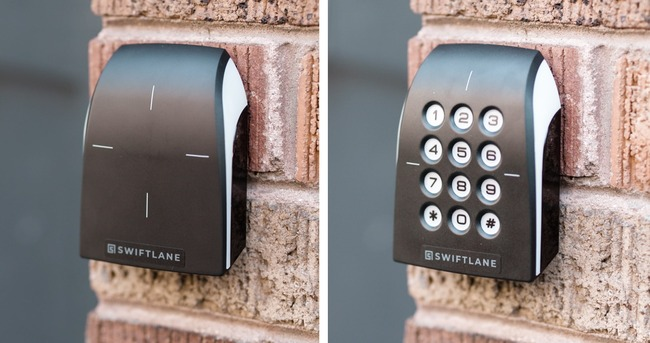
With Swiftlane’s access control system, administrators can:
- Manage encrypted key fobs, key cards, mobile access, and visitor PINs from one dashboard, and issue or revoke any of them remotely.
- Apply floor-level elevator access and per-amenity schedules.
- Handle visitors and deliveries through Swiftlane’s video intercom on the same platform.
- Add face recognition later, where permitted and with resident consent, without replacing the system.
For boards, that means fewer volunteer hours on fob administration, a complete audit trail, and a system that can grow from fobs to mobile access at the community’s pace.
Explore Swiftlane for residential communities or request a demo to see how it fits your building.
FAQs
How much does a key fob system cost for a condo?
Plan on $1,500 to $5,000 per door installed, with gates and high-traffic perimeter doors at $5,000 to $6,000 or more. A small low-rise often totals $4,500 to $9,500, and a high-rise with garage and elevator control can exceed $55,000.
Can an HOA use reserve funds for a new key fob system?
Yes, if the project replaces an access system already listed as a component in the reserve study. Many states restrict reserve spending to repairing or replacing those components, so new scope such as elevator control may need other funding.
Do condo owners have to vote on an access control upgrade?
It depends on the cost, the funding source, your state statute, and your governing documents. In California, for example, special assessments above 5% of budgeted gross expenses in a year require owner approval.
Can condo key fobs be copied?
Legacy 125 kHz proximity fobs can be copied quickly with inexpensive handheld duplicators or at some retail key kiosks. Encrypted 13.56 MHz credentials such as MIFARE DESFire EV3 and HID iCLASS SE are designed to resist copying.
What is the most secure key fob for a condo?
Choose an encrypted 13.56 MHz credential with mutual authentication, such as MIFARE DESFire EV3 or HID Seos, read by readers that support OSDP. Avoid 125 kHz proximity fobs and older MIFARE Classic fobs.
What happens when a resident loses a key fob?
On a cloud-managed system, an administrator deactivates the lost fob from a phone or browser right away, then issues a replacement fob or a mobile credential. No locks need rekeying.
Can we restrict elevator floors and amenity hours?
Yes, a reader in the elevator cab can limit each resident to their own floor and shared levels, and amenity doors can run on schedules. Fire service recall always overrides floor restrictions, and suspensions for delinquent accounts must follow state law.
Can investor owners give their tenants access remotely?
On a cloud system, yes, if the board’s rules allow it. The owner or their manager requests access, the board or manager approves it, and the tenant receives a mobile credential tied to the lease dates.
Do key fob systems work during a power or internet outage?
A well-designed cloud system stores credentials on the local controller, so doors keep working when the internet drops. During a power failure, behavior depends on battery backup and how each door is configured.
How long does a condo key fob system last?
Readers, controllers, and door hardware typically last 7 to 15 years with maintenance. Software, credentials, and security standards may need updating sooner, which is why cloud platforms that update remotely tend to age better.


