

Property management is no longer tied to being on-site, and the rise of the remote intercom system is a big reason why.
Managers are expected to respond in real time. Residents want instant access. Vendors come and go all day. Security can’t wait for someone to be physically present.
Traditional intercoms were not built for this. They rely on fixed wiring. Calls go to a desk or unit phone. Access changes require manual updates. Everything happens on-site. All these challenges are making this model increasingly difficult to sustain.
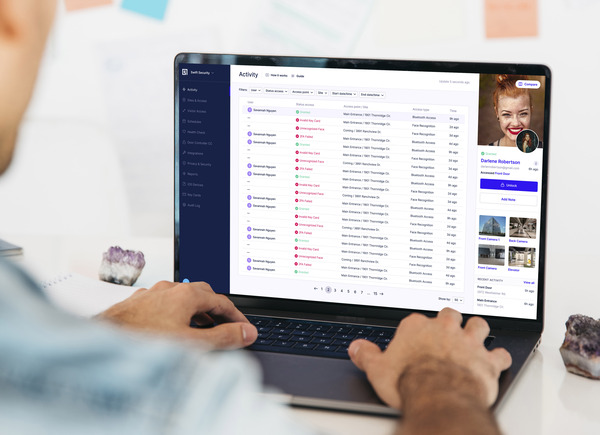
Today’s properties are moving to cloud-based systems. These systems route calls to smartphones. They let you control access from anywhere. They give you real-time visibility across buildings.
In this guide, you’ll learn how remote intercom systems work. And based on our experience in hundreds of deployments, we’ll tell you the key features that matter to property teams.
The takeaway is simple. Remote capabilities are no longer optional. They are now a core requirement for modern properties.
Key Takeaways
- A remote intercom system lets property managers control access from anywhere. It removes the need to be on-site for daily operations.
- Remote capabilities like mobile access, real-time alerts, and user management improve efficiency. They also reduce delays and manual work.
- These systems enhance security with video verification, activity logs, and instant notifications. You get better visibility across your property.
- Remote intercom systems are becoming the standard for modern buildings. They meet rising expectations for convenience, control, and scalability.
Table of Contents
- What Is a Remote Intercom System?
- How Remote Intercom Systems Work
- Key Remote Capabilities Property Managers Should Understand
- Benefits of Remote Intercom Systems
- Remote Intercom vs Traditional Intercom: Key Differences
- Common Use Cases Across Property Types
- What to Look for in a Remote Intercom System
- Challenges and Considerations When Using Remote Intercom Systems
- The Future of Remote Intercom Systems
- Conclusion
- See How Swiftlane Powers Remote Intercom Systems
- Frequently Asked Questions
Related Posts
- Intercom Systems: Become an Expert at Wired, Wireless, Video Intercoms
- Wired vs Wireless Intercom System
- Wireless Intercom Systems: What to Know and Top Picks
What Is a Remote Intercom System?
A remote intercom system is an intercom that can be accessed and managed through the internet.
Instead of being tied to a physical location, it connects to a cloud platform. That means you can control it from a browser or a mobile app.
This is the biggest difference from traditional intercoms. Legacy systems are wired and local. If you want to make changes, you often need to be on-site. If a visitor calls, the system rings a unit or a front desk phone. If no one answers, access stops there.
A remote intercom system removes those limitations.
Main Parts of a Remote Intercom System
1. Hardware at the entry point
- Door station with a camera
- Microphone and speaker
- Access reader (key fob, PIN, or mobile credential)
2. Software in the cloud
- Admin dashboard for managers
- Mobile app for residents and staff
Together, these components create a connected system.
Here’s what that looks like in practice:
- A visitor presses a call button
- The call is routed to a resident’s smartphone
- The resident sees video and speaks to the visitor
- The resident taps a button to unlock the door
All of this happens remotely.
Property managers can also:
- Add or remove users without visiting the site
- Change access permissions instantly
- View activity logs from anywhere
In short, a remote intercom system turns a static entry system into a dynamic, connected platform.
How Remote Intercom Systems Work
At a high level, remote intercom systems rely on cloud infrastructure. That sounds technical, but the concept is simple.
Instead of connecting calls through physical wiring, the system uses the internet. The intercom device at the door sends data to the cloud. The cloud then routes that data to the right user.
Here’s a typical call flow:
- A visitor arrives and initiates a call at the door station
- The system sends that call to the cloud
- The cloud routes the call to the resident’s mobile app
- The resident answers the call on their phone
- The resident sees live video and speaks with the visitor
- The resident unlocks the door remotely if needed
This process takes seconds.
Internet connectivity plays a key role. Most systems use Wi-Fi or Ethernet. Many also support LTE as a backup. That ensures the system stays online even if the primary connection fails.
Remote intercom systems also integrate with broader access control systems. That means they can work alongside:
- Key fob systems
- Mobile credentials
- Smart locks
- Elevator controls
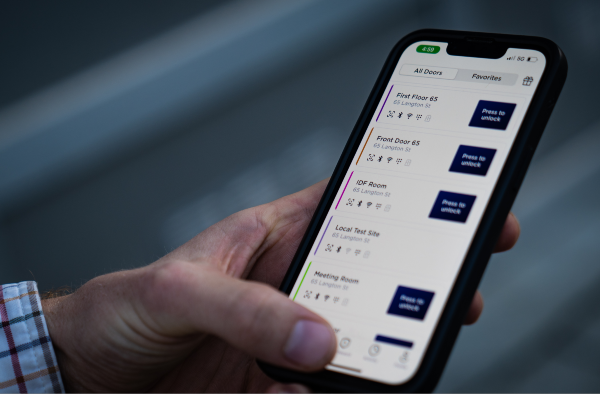
The mobile app is where most of the interaction happens. Through the app, users can:
- Answer video calls
- Unlock doors remotely
- View access logs
- Manage permissions (for admins)
For property managers, the cloud dashboard provides a centralized view. You can log in from anywhere and manage your entire system.
That’s the core advantage. Control is no longer tied to the building. It follows you wherever you are.
Key Remote Capabilities Property Managers Should Understand
This is where remote intercom systems deliver the most value. It’s not just about answering calls on your phone. It’s about rethinking how access is managed across your property.
Remote Access Management
Access control used to be manual. Adding a new resident often meant programming a key fob on-site. Removing access could take time. Temporary access proved difficult to manage.
How can a remote intercom system change all that? It allows you to:
- Add or remove users instantly
- Assign access levels based on roles
- Set schedules for when access is active
For example, a cleaner can have access only on weekdays from 9 AM to 5 PM. A contractor can have access for a limited date range.
You don’t need to visit the property. You don’t need to reprogram hardware.
For property managers handling multiple buildings, this is critical. You can manage all users across all properties from one dashboard. That level of control reduces friction. It also reduces errors.
Mobile-Based Visitor Management
Visitor management is one of the most visible parts of any property. With traditional intercoms, the experience is limited. Calls go to a fixed location. If no one answers, the visitor is stuck.
You can move this process to mobile using remote systems. Your residents and staff can:
- Receive calls on their smartphones
- See live video of the visitor
- Speak directly through the app
- Grant or deny access instantly
This creates a better experience for everyone. Residents don’t need to be home. Staff don’t need to be at a desk. Deliveries can be handled quickly. Guests don’t wait outside.
Video intercoms add another layer. Users can verify who is at the door before granting access. That improves both convenience and security.
Real-Time Monitoring and Alerts
Visibility is a major gap in traditional systems. If something happens at the door, you may not know about it. Logs are often limited or hard to access.
Remote intercom systems, however, can provide real-time monitoring. You can:
- View entry and exit logs
- Track door activity across properties
- Receive instant alerts for specific events
For example:
- A door is forced open
- A failed access attempt occurs
- A delivery arrives
These alerts can be sent to your phone or email. Over time, this creates a full audit trail. You can review who accessed the building and when. This is valuable for both security and compliance. It also helps resolve disputes quickly.
Multi-Property and Portfolio Control
Many property managers oversee more than one building. With traditional systems, each property operates independently. You may need to visit each site or log into separate systems.
With remote intercom systems, you can centralize everything. You can:
- Manage multiple properties from one interface
- Standardize access policies
- Monitor activity across your entire portfolio
This is especially useful for property management companies. It reduces complexity. It also makes scaling easier. Adding a new building doesn’t mean adding a new workflow. Everything stays connected.
Remote Unlock and Emergency Access
Access situations don’t always follow a schedule. Deliveries arrive early. Vendors show up late. Emergencies happen without warning.
But remote intercom systems can give you flexibility. You can unlock doors from anywhere, including:
- Letting in a delivery driver
- Granting access to a maintenance technician
- Assisting emergency responders
This reduces the need for on-site staff. It also speeds up response times. In critical situations, that matters.
Benefits of Remote Intercom Systems
The capabilities above translate into clear operational benefits.
Efficiency in Operations
With remote intercom systems, you’ll spend less time traveling between properties. You can also complete more tasks faster from your phone – without needing to be on-site, you can grant access and respond to urgent issues in seconds. This can eliminate delays and keep your daily operations running even with interruptions.
Cost Savings
You can experience lower travel and labor costs because you will no longer require many site visits. You can even complete routine tasks that would otherwise need intervention from on-site staff or front desk personnel.
Maintenance is also made simpler with cloud-based systems. Instead of dealing with complex legacy wiring and hardware, updates and fixes can be handled remotely.
For instance, you can receive software updates automatically while your cloud-based platform can diagnose issues without requiring you to send a technician to check the problem.
Improved Tenant Experience
Residents today expect convenience, preferably via a mobile-first experience. With a remote intercom system, you can give them mobile access and the ability to receive calls, see visitors, and unlock doors from anywhere.
Stronger Security Posture
A remote intercom system can give you better visibility across your property. With video capabilities, you have another layer of verification at entry points.
You also get quick access to activity logs that can show you who entered and exited your building and when.
Cloud-based systems are also capable of sending real-time alerts, which lets you respond quickly to issues.
Scalability
As your portfolio grows, the system can grow with you. You can manage multiple or expanding properties from a single platform. With each new building added, you won’t need to rebuild your entire workflow.
Remote Intercom vs Traditional Intercom: Key Differences
The shift to remote systems is driven by clear limitations in legacy technology. Here’s how they compare:
| Category | Traditional Intercom | Remote Intercom System |
| Access Control | On-site only | Accessible from anywhere |
| Infrastructure | Wired and hardware-dependent | Cloud-based and flexible |
| Scalability | Limited and hard to expand | Easily scalable across properties |
| Functionality | Often audio-only | Video, mobile access, and integrations |
Traditional systems still work. But they don’t meet modern expectations. They create bottlenecks. They limit visibility. They require manual effort.
Remote intercom systems remove those constraints. That’s why they are quickly becoming the standard.
Common Use Cases Across Property Types
Remote intercom systems are not limited to one type of property. Their value shows up across different environments.
Multifamily Apartments and Condos
Residents expect mobile access. Deliveries are constant. Remote systems allow residents to manage entry from their phones and reduce reliance on front desk staff.
Gated Communities
Managing pedestrian and vehicle access can be complex. Remote systems let staff verify visitors and grant access without being at the gate.
Commercial Office Buildings
Tenants, guests, and vendors move in and out throughout the day. Remote intercoms streamline visitor access and improve security at entry points.
Mixed-Use Developments
These properties combine residential, retail, and office spaces. A centralized system helps manage different access needs from one platform.
Student Housing
High turnover and frequent guest access make remote management essential. Property teams can quickly update permissions and handle access remotely.
In each case, the key advantage is the same: control without being on-site.
What to Look for in a Remote Intercom System
Not all systems offer the same level of remote capability. Here’s what to evaluate.
Cloud-Based Management Platform
Some systems claim to be remote but still rely on local servers or limited connectivity. Go for a true cloud-based platform that lets you:
- Access your system from anywhere
- Make changes in real time
- Manage multiple properties in one place
Mobile App Experience
The app is where most interactions happen. It should be easy to use, reliable, and fast to respond. Remember that your staff and your residents will use it daily. If it’s a poorly designed app, it can create friction quickly.
Video and Smart Features
Video is now a baseline feature. You should look for high-quality video and audio, as well as optional smart capabilities like facial recognition. These features improve security as well as enhance the overall user experience.
Integration Capabilities
A remote intercom should not operate in isolation. It should integrate with access control systems, smart locks, and security cameras. This creates a unified system that can also reduce the need for multiple tools.
Reliability and Connectivity Options
Connectivity matters. Choose a system that can support:
- Wi-Fi or Ethernet
- Cellular backup (LTE)
This ensures the system stays online even if one connection fails.
Security and Data Protection
If you’re managing sensitive access data, make sure your system includes encryption, role-based permissions, and detailed audit logs. Security should be built into the platform, not added later.
Challenges and Considerations When Using Remote Intercom Systems
No system is perfect. Remote intercom systems come with a few considerations:
- Internet dependency. These systems rely on connectivity. However, backup options like LTE can reduce this risk.
- Initial upgrade costs. Modern systems may require upfront investment. But they often reduce long-term costs.
- Training staff and residents. New technology requires onboarding. Most systems are designed to be intuitive, which helps adoption.
- Integration with existing infrastructure. Older buildings may need adjustments. Planning ahead can simplify the transition.
The good news is that these challenges are mostly manageable. And in most cases, the benefits easily outweigh the trade-offs.
The Future of Remote Intercom Systems
The shift toward remote access is just getting started. What we’re seeing now is only the baseline. The next wave will not only focus on mobile, but also on automations and deeper system integration.
Mobile-First Access: The New Default
Smartphones are quickly becoming the primary credential. Residents are shifting away from key fobs and physical access cards. They now expect to use their phones for everything.
Remote intercom systems are adapting to this shift. Access, visitor calls, and credentials are all moving into a single mobile experience.
AI-Driven Features
AI is starting to play a larger role. It’s not only facial recognition, which can help verify users at the door. Property teams are now leveraging AI-powered analytics to flag unusual activity and detect patterns.
These features not only improve both security and efficiency. They can also reduce the need for manual monitoring.
Touchless Entry
Touchless access is gaining more traction, too. Users want to move through buildings without physical contact.
Mobile credentials, wave-to-unlock, and automatic door triggers support this. This trend is driven by both convenience and health awareness, especially after the global pandemic.
Integration With Proptech Ecosystem
Remote intercom systems are no longer standalone tools. They are now part of a larger proptech stack. You can now see many models that can connect with access control, surveillance systems, and building management platforms in order to create a more unified system.
Conclusion
Remote intercom systems change how properties operate. They give property managers control from anywhere. They improve the resident experience. They strengthen security.
The key takeaway is simple: remote capabilities are no longer a “nice-to-have.” They are essential.
Properties that adopt them gain efficiency and flexibility. Those that don’t risk falling behind. The shift is already happening.
See How Swiftlane Powers Remote Intercom Systems
If you’re evaluating remote intercom systems, it’s important to choose a platform built for modern properties.
Swiftlane is designed with remote management at its core. It offers:
- A mobile-first experience for residents and staff
- A cloud-based dashboard for full control
- Seamless access across multifamily and commercial properties
With Swiftlane, you can manage access, verify visitors, and monitor activity from anywhere. Explore how remote intercom systems work in real-world deployments today.
Frequently Asked Questions
What is a remote intercom system?
A remote intercom system lets you manage and use your intercom through the internet. You can answer calls, unlock doors, and manage users from your phone or computer.
Can I use my phone as an intercom?
Yes. Most remote intercom systems route calls to a mobile app. You can see visitors, talk to them, and grant access directly from your smartphone.
Do remote intercom systems require internet access?
Yes. These systems rely on internet connectivity to function. Many also support cellular backup to stay online if the main connection fails.
Are remote intercom systems secure?
Yes, if they are properly designed. Look for systems with encryption, user permissions, and audit logs. These features help protect access and track activity.
Can I manage multiple properties with one system?
Yes. Most remote intercom systems support multi-property management. You can control access, users, and activity across buildings from one dashboard.
What happens if the internet goes down?
It depends on the system. Some features may be limited during an outage. Systems with cellular backup can continue operating with minimal disruption.


