

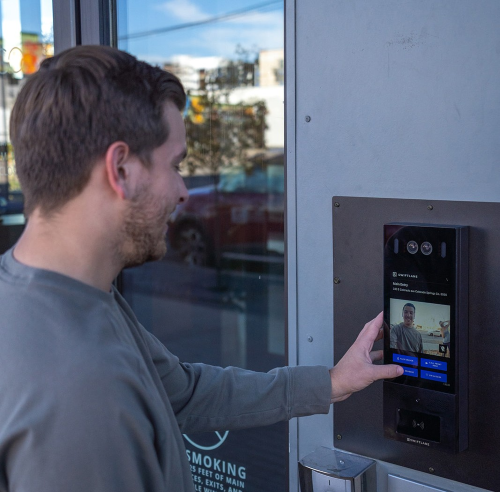
Intercoms for business are one of the most impactful access control investments an office can make in 2026. They shape how visitors arrive, how access decisions are made, and how smoothly the front of the office runs throughout the day.
Comparing business intercoms comes down to understanding how they’re actually used. Some systems work well when there’s a front desk. Others make more sense when calls need to be handled remotely or routed across teams. Looking at these differences in context makes it easier to narrow down options that fit an office’s day-to-day reality.
This article is based on a review of commonly deployed business intercom systems, current access control standards, and real-world office security workflows. It reflects patterns seen across modern offices, multi-tenant buildings, and hybrid workplaces, as well as guidance from access control manufacturers and facility operations teams.
Key takeaways
- Business intercoms vary widely, and the right choice depends on how an office handles visitors, access decisions, and day-to-day operations.
- Features like video, mobile call answering, and call routing matter, but only when they align with how teams actually operate.
- Comparing intercom systems by use case (modern offices, multi-tenant buildings, smaller offices) makes it easier to narrow down practical options.
Table of Contents
- What are Intercoms for Business?
- Benefits of a Business Intercom
- Types of Business Intercoms in 2026
- Features to Look for in an Intercom System for Business
- Best Intercoms for Business in 2026
- Summary
- Frequently Asked Questions
What are Intercoms for Business?


Business intercoms let offices communicate with visitors, and often see them, before granting access. At their core, they connect building entry points to staff inside the office or working remotely, allowing visitors to announce themselves and request entry.
In modern workplaces, intercoms are used at main entrances and shared access points, with calls routed to front desks, teams, or mobile devices. Today’s systems often include video, remote answering, and integrations with access control, making them well suited for distributed teams, flexible reception coverage, and shared security responsibilities.
Rather than standalone tools, business intercoms are typically part of a broader access control and visitor management strategy, helping offices balance security with smooth day-to-day operations.
Benefits of a Business Intercom


If you’re still relying on older systems or have no intercom at all, you may be missing out on tools that simplify access management, strengthen security, and reduce the operational load on your team. Today’s intercom systems help offices manage who enters, when, and how across a wide range of scenarios, from daily visitors to emergency situations.
Below are the core benefits offices typically see when using business intercom systems:
Streamlined Visitor and Employee Access
A business intercom creates a clear, structured entry process for both visitors and employees. Instead of relying on ad hoc phone calls, door knocks, or manual coordination, access requests are routed through a single system. This reduces delays at the door and ensures entry decisions are handled consistently throughout the day.
Tracked Access Activity and Audit Trails
Many modern intercom systems log access requests, call activity, and entry events. These records can be used to review incidents, investigate security concerns, or understand traffic patterns over time. Having access data available adds accountability and visibility, which older or manual-entry procedures often lack.
Controlled and Restricted Access by Area
Business intercoms help offices enforce restricted access policies by limiting entry to specific doors, floors, or zones. This is especially crucial in offices with sensitive areas, shared tenants, or mixed-use facilities, where not everyone should be able to access all areas.
Stronger Protection Against Unauthorized Access and Emergencies
Intercoms reduce tailgating and unwanted access by requiring verification before entering. When coupled with access control or security systems, they can also help in emergency responses by restricting entry points or assisting with lockdown processes as needed.
Reduced Staffing Costs and Operational Overhead
A business intercom can eliminate the need for a constantly staffed front desk while still maintaining control over entry. Calls may be answered by the correct person, from the right device, and at the right time, making the system a cost-effective alternative to manual staffing that does not compromise security or professionalism.
Types of Business Intercoms in 2026
Business intercoms come in a few common forms, each suited to different office setups and access needs. Understanding these types helps narrow down which intercom systems for business are practical for how an office actually operates, rather than choosing based solely on features.
Audio Intercoms

Audio intercoms allow visitors to speak with someone inside the office before entry is granted. These systems are often used in similar offices or locations with low visitor traffic.
While audio-only business intercoms can be sufficient in simple environments, they rely entirely on voice confirmation. Offices that need stronger verification or handle frequent deliveries may find this limiting over time.
Video Intercoms


Video intercoms add visual confirmation, allowing employees to see who is requesting access. This added context helps offices make more informed entry decisions, especially when dealing with visitors, vendors, or deliveries throughout the day.
Many modern intercoms for business include video as a standard feature, making them a common choice for offices that want visual verification without adding complexity.
IP-based, Network-Connected Intercoms


IP-based, network-connected intercoms for business connect through an office’s network rather than relying on traditional wiring. These systems often support remote management, software updates, and integration with other office security tools.
Because they’re easier to manage centrally and scale across multiple entry points, IP-based, network-connected intercoms are frequently used in growing offices or multi-location environments.
Wired Intercoms


Wired intercom systems rely on physical cabling between entry panels, control units, and indoor stations. These systems are often chosen for their reliability and consistent performance, particularly in buildings with existing wiring infrastructure. Wired intercoms can support both audio and video communication, but they typically require more planning and installation effort, making them best suited for offices that already have the wiring set in place.
Wireless Intercoms


Wireless intercoms use Ethernet, cellular, or WiFi connections to communicate between entry points and users. In practice, most “wireless” business intercoms still require power and a network connection wiring, but instead don’t rely on traditional intercom cabling to each substation. They can simplify installation in offices where running new cabling isn’t practical.
That said, wireless business intercoms depend heavily on network reliability, so offices should consider their infrastructure carefully when evaluating this option.
Mobile-enabled intercoms

Some intercom systems for business allow calls to be answered directly on mobile devices, tablets, or computers. These systems are useful for offices without a dedicated front desk or with flexible staffing.
Mobile-enabled business intercoms are often chosen by teams that need to manage access remotely or share responsibility for answering entry calls.
Features to Look for in Intercom Systems for Business

When comparing intercom systems for business use, features matter. But not all features matter equally. The most useful capabilities are the ones that support how an office handles visitors, manages access, and adapts to daily operations.
Rather than focusing on spec lists, it helps to prioritize features that reduce friction and improve reliability over time.
Audio and Video Communication
At a minimum, business intercoms should allow clear communication between visitors and staff. Audio-only systems may work in low-traffic offices, but video adds an extra layer of context, helping teams verify visitors more confidently.
Mobile and Remote Call Answering
Many modern intercoms for business allow calls to be answered from mobile phones, tablets, or computers. In practice, office managers often rely on remote answering when reception coverage is inconsistent or shared across roles, especially in hybrid or flex-office environments.
Remote answering ensures access decisions can still be made even when no one is physically near the entrance.
Call Routing and Fallback Options
Offices rarely rely on a single person to handle entry requests. Business intercom systems that support call routing to multiple users or teams help prevent missed visitors. In day-to-day operations, missed intercom calls are among the most common friction points, particularly in offices where access responsibilities rotate among teams.
Fallback routing, where calls move to another contact if the first person doesn’t answer, adds reliability and reduces wait times at the door.
Integration with Access Control Systems
Intercom systems for businesses are often more effective when integrated with existing access control systems. Integration with access credentials (cards, fobs, or mobile credentials) and door hardware allows offices to manage entry without switching between platforms.
This also helps maintain consistency across security workflows.
Remote Management and Updates
For many offices, the ability to manage intercom settings remotely is an important consideration. Cloud-based or networked business intercoms often support remote configuration, monitoring, and software updates.
These capabilities reduce the need for on-site maintenance and make it easier to adjust settings as office needs change.
Durability and Reliability
Business intercoms are typically installed at entry points that see regular use. Features like weather resistance, vandal protection, and dependable hardware help ensure the system continues working without frequent repairs.
Reliability matters just as much as functionality, especially for offices that depend on intercoms as part of their daily security setup.
Pro Tip: Consider investing only in business intercom systems with a vandal protection rating of at least 8 (IK08).
Best Intercoms for Business in 2026
Not all business intercom systems solve the same problems. The right choice depends on your office’s size, visitor volume, staffing model, and how calls should be handled.
Below are commonly evaluated intercom systems for business use, grouped by real-world scenarios.
Best Intercoms by Use Case
For modern offices with mobile and remote workflows
Ideal when reception coverage is limited, calls need to be answered remotely, and teams are distributed.
| System | Type | Strength | Notes |
| Swiftlane: Swiftreader X | IP-based video intercom | Cloud-based video intercom with Face recognition access | Supports remote call answering and works in tandem with security cameras, property management systems, and smart locks |
| Hikvision | IP-based video intercom | Feature-rich video with analytics | Good combination of video clarity and system flexibility |
Why these fit:
These business intercoms allow calls to reach phones, tablets, or desktops. They support mobile-based answering and cloud-managed workflows, which can be useful for hybrid offices and distributed teams.
For multi-tenant or high-traffic office buildings
Best when multiple businesses or departments use the same entry points, or when visitor volume is high.
| System | Type | Strength | Notes |
| 2N | IP-based video intercom | Modular, scalable | Handles complex multi-tenant directories and workflows |
| Aiphone | IP-based video intercom | Configurable and robust | Works well in large buildings with many entry points |
Why these fit:
These intercom systems support large directories with flexible call routing, helping reduce bottlenecks at entry points and ensuring visitors reach the intended tenant quickly.
For smaller or mid-size offices looking for clarity and value
Good options when visitor volume is moderate, and simplicity is preferred.
| System | Type | Strength | Notes |
| Alphatouch | Video | Easy touchscreen experience | Simple interaction, quick deployment |
| DoorBird | Video | Strong hardware and design | Combines video communication with a solid build |
| Swiftlane: Swiftvision Intercom | Video | Cloud-managed video intercom with mobile access | Supports remote answering, modern workflows, and straightforward deployment |
Why these fit:
These business intercoms provide dependable video communication and clear visitor workflows without excessive complexity or cost.
For traditional setups and legacy deployments
Still relevant where simplicity and rugged hardware matter more than advanced workflows.
| System | Type | Strength | Notes |
| Doorking | Audio / Video | Long history of reliability | Good fit for offices with simpler access needs |
| Aiphone Audio / Video | Audio / Video | Trusted legacy brand | Works well where video is optional or limited |
Why these fit:
These systems are straightforward and have been used in business settings for many years. They’re best when advanced mobile features aren’t a priority.
Swiftlane: A Modern Business Intercom System Option
Swiftlane offers a modern business intercom system designed for offices and multi-tenant environments that need flexibility, security, and centralized management. Its intercom systems are based on cloud connectivity and mobile access, allowing teams to manage guest entrance without requiring a staffed front desk.
Swiftlane intercoms support video-based visitor verification, remote call answering, and integration with access control systems. This makes them well-suited for workplaces with hybrid schedules, distributed teams, or multiple entry points, where access decisions may need to be handled by different people throughout the day.
Swiftlane systems are suitable for offices that need a more flexible solution for visitor access without relying on manual operations. The platform enables modern front-of-office access procedures by combining video intercom functionality, cloud-based management, and mobile access.
Summary
The key to choosing a business intercom is to match features with the actual operations of your organization. Visitor flow, call handling, and access decision-making all determine which capabilities matter most.
The goal is to find a system that balances visibility, flexibility, and simplicity over time, and understanding the types of intercoms available and how they compare by use case helps you narrow options with confidence and choose a solution that can adapt as your needs evolve.
Explore how modern business intercoms are used in real office environments and evaluate whether Swiftlane aligns with your access and visitor management needs. Request a quote today!
Frequently Asked Questions
What is the best intercom system for a business?
There isn’t a single best option for every business. The best intercom depends on factors like office size, visitor volume, staffing model, and whether calls need to be answered on-site or remotely. Comparing systems based on how they’ll be used day to day is often more effective than comparing feature lists alone.
Do businesses need video intercoms?
Video intercoms aren’t required in every business setting, but many offices prefer them because visual confirmation helps with access decisions. Video can be especially useful in offices that receive frequent visitors or deliveries, or where visibility into security is important.
Can business intercoms be answered remotely?
Yes, many modern intercom systems for business allow calls to be answered on mobile phones, tablets, or computers. This is helpful for offices with hybrid work schedules, limited front desk staffing, or shared responsibility.
Are intercom systems difficult to install in offices?
Installation complexity varies. Some business intercoms require wiring and on-site configuration, while others rely on network or wireless connections, simplifying setup. Office layout and existing infrastructure play a major role.
How do intercom systems improve office security?
Business intercoms allow teams to verify visitors before granting access, reducing reliance on open entry points or physical keys alone. When paired with access control systems, they can also improve visibility into entry activity.
Do intercom systems integrate with access control platforms?
Many intercom systems for business are designed to work alongside access control solutions such as key cards or mobile credentials. Integration options vary by system, so compatibility should be evaluated during the selection process.


