QR Code Intercoms: How They Work and Are They Worth It
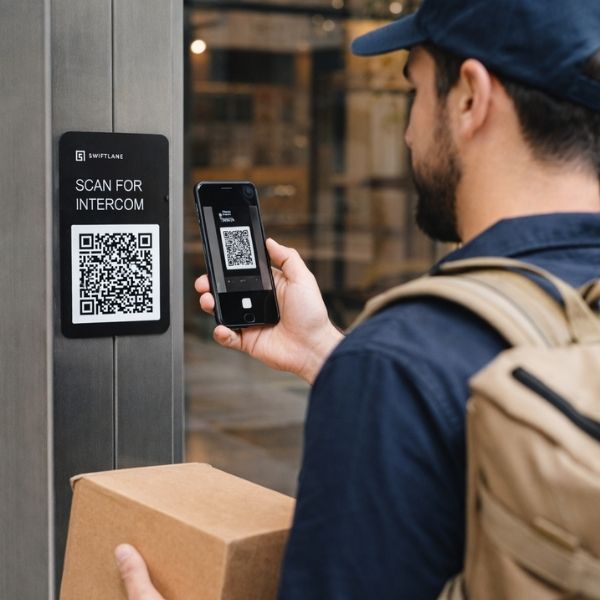
A QR code intercom is a cloud-based visitor access system in which a weatherproof plaque mounted at a building entrance displays a QR code. Visitors scan it with any smartphone camera, which opens a browser-based interface. No app download required. And they can browse a directory, call a tenant, or request door release. The tenant receives the call on their phone and unlocks the door remotely. No on-site hardware panel is required, other than the plaque and a door controller.
QR code intercoms are not always the right choice. Depending on the building type, visitor volume, and security expectations, a full video intercom system may serve your property better and cost less over time than it appears. This guide walks you through how QR code intercoms work, what they cost, and exactly which properties they are and are not suited for.
How We Researched This
This guide is based on Swiftlane’s direct experience deploying QR code intercom systems across 3000+ buildings, supplemented by independent market research on QR intercom pricing, security risks, and competitor implementations.
Pricing ranges reflect current deployment data and regional labor costs. Security limitations, including QR spoofing and connectivity dependency, are drawn from published industry sources and real-world access control case reviews. This article was reviewed for technical accuracy before publication.
Key Takeaways
- A QR code intercom replaces a physical intercom panel with a weatherproof plaque and cloud software. Visitors scan, call, and get buzzed in. All from their smartphone browser.
- QR code intercoms work best for small to mid-sized buildings, secondary doors, and properties where hardware installation is not practical.
- Upfront hardware costs are significantly lower than full video intercom systems, and that gap persists over a multi-year period. QR remains roughly half the cost of a comparable video intercom through year three.
- Key limitations include QR spoofing risk, connectivity dependency, no fallback for visitors without a smartphone, and potential directory harvesting by unauthorized users.
- High-traffic buildings, luxury residential properties, senior living, and properties with elevated security requirements are better served by a full video intercom system.
Table of Contents
- What Is a QR Code Intercom System?
- How It Works: Step-by-Step
- Benefits of a QR Code Intercom System
- Limitations of QR Code Intercoms
- QR Code Intercom vs. Video Intercom: Side-by-Side Comparison
- Is a QR Code Intercom Right for Your Property?
- QR Code Intercom: Pricing Breakdown
- Swiftlane’s QR Code Intercom: What Sets It Apart
- Frequently Asked Questions
What Is a QR Code Intercom System?
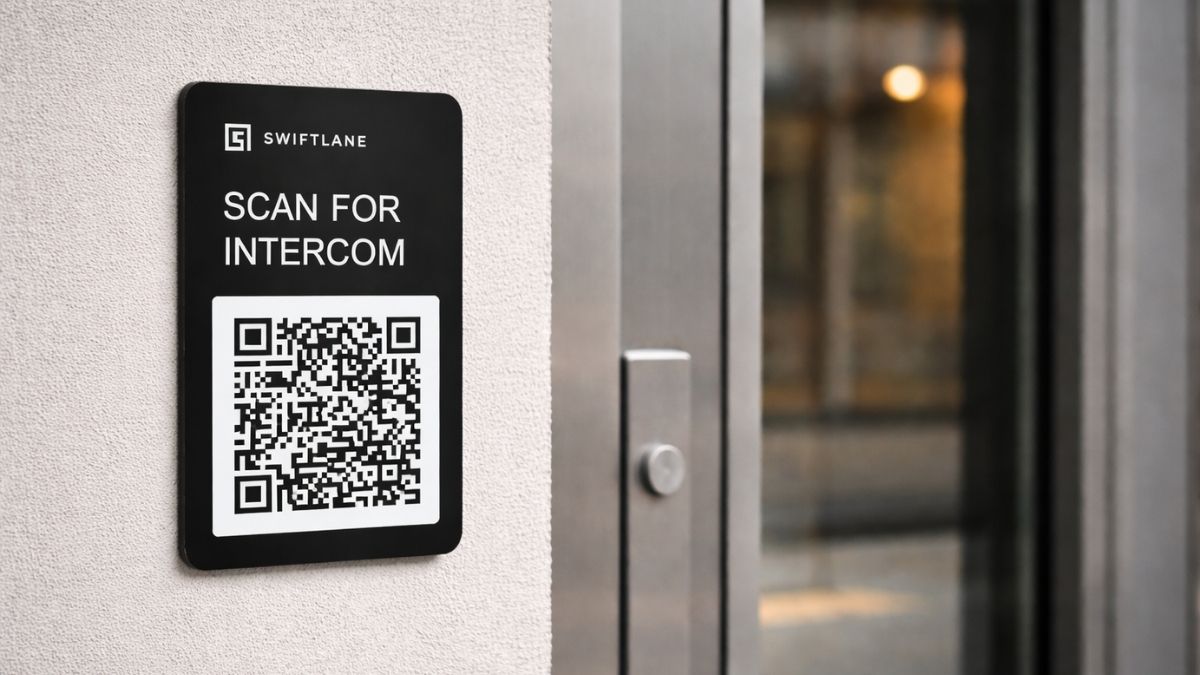
A QR code intercom system has two physical components: a weatherproof plaque or plate mounted beside a building entrance, and the door release hardware integrated with an existing lock or gate. Everything else runs in the cloud. The plaque itself contains no electronics. It is a durable, printed, or laser-etched surface that displays the QR code and optionally the property name and instructions.
The software layer handles the directory, call routing, access logging, and tenant notifications. Property managers control the system through a cloud dashboard and can manage multiple properties, add or remove tenants, and view access event logs from any device.
How It Works: Step-by-Step
- The visitor arrives at the entrance and opens their smartphone camera.
- They scan the QR code on the mounted plaque. No app download is required.
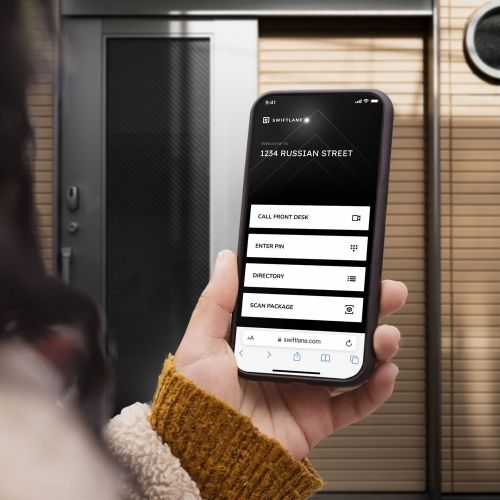
- A browser-based interface opens, showing the building directory or a call option.
- The visitor selects a tenant or unit and initiates a call.
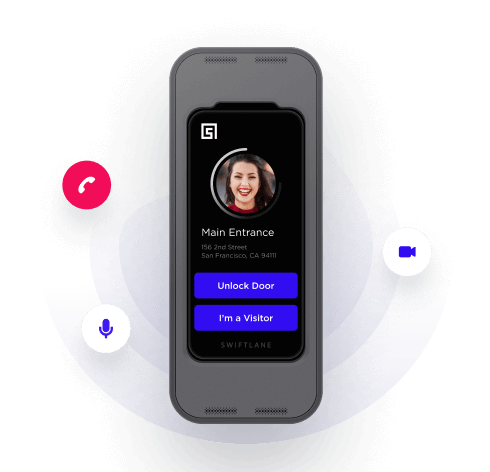
- The tenant receives a video or audio call on the app and can see and speak with the visitor.
- The tenant taps to unlock the door or gate remotely. The visitor enters.
- The access event is logged automatically with a timestamp for the property manager’s records.
Benefits of a QR Code Intercom System
For the right property type, a QR code intercom trades a wired panel for a plaque and cloud software, with real advantages in cost, speed, and flexibility.
Lower Upfront Cost, Faster Deployment
No panel to wire and no in-wall components to maintain means hardware and installation costs drop significantly, and deployment shrinks from days to hours. This also makes a QR intercom a practical temporary solution during a longer intercom rollout, or the right permanent fit for older buildings where wall drilling isn’t an option.
Remote, Centralized Control
Tenants grant access from anywhere, and property teams managing multiple buildings can control tenant directories, access logs, and door permissions for their whole portfolio from one dashboard. Useful for hybrid-work offices and short-term rental properties where no one is consistently on-site.
Scheduled and Temporary Visitor Access
Instead of issuing a physical key fob or card, property teams can generate time-limited or single-use PINs for expected visitors like delivery drivers, contractors, or short-stay guests through the cloud dashboard. The visitor enters the PIN through the browser interface after scanning the QR code, so no physical keypad or additional hardware at the entrance is required. This reduces the credential-management overhead of key fob or card-based systems, since there’s no physical credential to issue, collect, or deactivate.
In commercial buildings, this same remote-access model can reduce or eliminate the need for reception staff to direct visitors.
See the property fit section below to check whether these benefits apply to your specific building.
Limitations of QR Code Intercoms
QR code intercoms are not the right fit for every property or every use case. Understanding their limitations helps property managers make a more informed decision and avoid deploying a system that creates operational inefficiencies and problems down the line.
QR Code Spoofing (Quishing) Risk
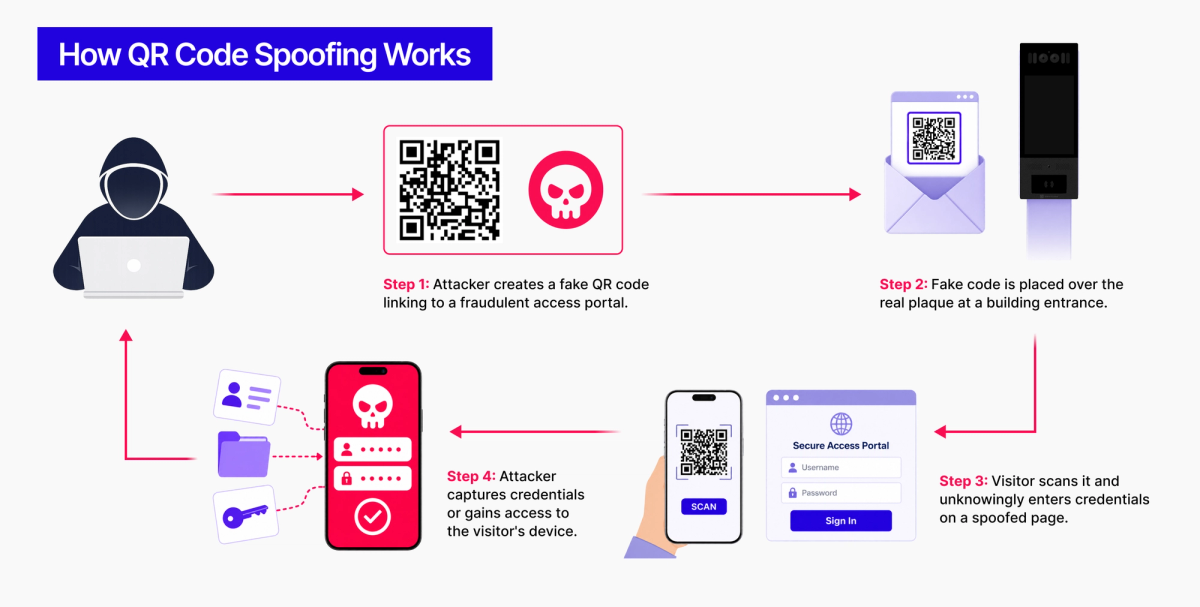
A malicious actor can print a fake QR code and place it over the real plaque, redirecting visitors to a phishing page that mimics the building’s access portal. This is a known attack vector called quishing (QR code phishing). For most residential buildings, the risk is low, but it is a real concern for high-traffic commercial properties in publicly accessible locations.
Connectivity and Power Dependence
The QR intercom workflow has two separate points of failure, and both need to be working for a visitor to get in. First, the visitor’s smartphone needs an active internet connection to load the browser interface and place the call. A weak cellular signal, a local outage, or a building’s dead-zone positioning can render the visitor side temporarily unusable.
Second, the door controller itself depends on the building’s network connection and power supply to receive and execute the unlock command. A WAN outage, an ISP disruption, or a loss of power to the controller will block entry even if the visitor’s phone has a full signal. Unlike a wired intercom panel with a local keypad fallback, there is typically no offline path to unlock the door on either side of this chain.
Implication: Property teams should evaluate two things before deploying a QR-only system: cellular reliability at entry points (underground parking garages, thick concrete lobbies, rural gated communities), and the controller’s network and power resilience (backup battery or PoE with UPS backing, and whether the building’s internet connection has redundant failover). A QR intercom is only as reliable as the weaker of the two links.
Visitor Smartphone Required
Every visitor must own a smartphone capable of scanning a QR code. While smartphone penetration is high, this creates a genuine accessibility barrier for elderly visitors, those without data plans, and anyone whose phone battery has died. There is no fallback credential option for visitors without a working phone.
Directory Harvesting Risk
Because the QR code links to a publicly accessible web interface, anyone who scans the code and saves the URL gains persistent access to the building’s tenant directory. A bad actor, or even a curious passerby, could use the save link to call tenants remotely at any time.
Limited Audit Trail on Some Implementations
Basic QR intercom implementations may log call events but not capture visitor identity, images, or even entry confirmation.
For properties requiring detailed access records – commercial buildings with compliance requirements, Class A residential, or buildings that have experienced security incidents – a video intercom system with time-stamped photo logging provides a strong audit trail.
QR Code Intercom vs. Video Intercom: Side-by-Side Comparison
Not sure which system is right for you? The table below compares QR code intercoms and full video intercom systems across the factors that matter most for property managers and building owners.
| QR Code Intercom | Video Intercom | |
|---|---|---|
| Hardware required | Plaque/plate + door controller or lock only | Panel + wiring + controller |
| Upfront cost | $450 – $1,400 per door | $1,500 – $5,000+ per door |
| Monthly software | $10 – $50 per door | $30 – $100+ per door |
| Install time | Hours (no wiring) | Days (wiring + hardware) |
| Visitor capacity | Low to moderate traffic | High-volume traffic |
| Visitor verification | Two-way video/audio call | Two-way video/audio call |
| Fallback if phone dies | None | Physical panel available |
| QR spoofing risk | Yes | Not applicable |
| Elderly user friction | Higher | Lower |
| Best for | Small/mid buildings, secondary doors | Large/luxury buildings, primary entrances |
See the full video intercom product overview or read the apartment intercom buyer’s guide for a deeper comparison.
Is a QR Code Intercom Right for Your Property?
A QR code intercom is a strong fit for some properties and a poor fit for others. The six factors below are the most reliable predictors. Work through them for your specific building before committing to a deployment.
Building Type and Size
QR code intercoms work best in small to mid-sized buildings: walk-up apartment buildings, boutique residential properties, small-to-medium commercial offices, and professional services firms with hybrid workforces. They also work well as secondary-door or service-entrance solutions at larger properties, where the main entrance uses a full intercom system.
Large residential condominiums, Class A office buildings, and high-traffic commercial properties are poor fits for QR-only deployments at primary entrances. Visitor entry congestion becomes a real operational problem when every visitor must pull out their phone, scan, navigate a browser interface, initiate a call, and wait for remote unlock.
Visitor Volume and Traffic Pattern
QR intercom is a strong fit if your property has:
- Visitors arriving one or two at a time (not in groups)
- Primarily first-time visitors: delivery drivers, contractors, clients
- Unpredictable, low-frequency visitor traffic
- No requirement for rush-hour or concurrent entry
A full video intercom is a stronger fit if your property has:
- 5 to 20 people arriving simultaneously during peak periods
- Predictable surges: morning rush, lunch breaks, shift changes, delivery windows
- High proportion of daily repeat visitors: residents, employees, regular vendors
Resident and Visitor Tech Comfort
Properties with tech-comfortable populations — urban multifamily, co-working buildings, modern commercial offices — are natural fits. Populations that include a significant share of elderly residents, visitors without data plans, or users who struggle with unfamiliar mobile interfaces are better served by a physical panel intercom.
Security Expectations
QR code intercoms provide adequate visitor verification for most small residential and commercial properties. Two-way video calling lets tenants confirm visitor identity before granting access, and access logs provide a usage record.
Properties with elevated security requirements — luxury residential, government-adjacent commercial, healthcare facilities, or buildings with a prior security incident history — should use a full video intercom. Hardware-based systems offer IP- and IK-rated physical resilience, stronger audit trails, and no QR spoofing vulnerability.
Installation Constraints
If existing wiring is in place and the budget supports a full system, there is little reason to choose QR. If the building is historic, a retrofit is not feasible, or speed of deployment is a priority, QR is the more practical option. A QR intercom can also serve as an interim access solution while a full system is being specified and installed.
Budget and Total Cost of Ownership
QR code intercoms have lower upfront hardware costs, and that advantage holds up over a multi-year TCO model. The subscription fee doesn’t erase the initial savings. See the pricing section below for a full breakdown.
QR Code Intercom: Pricing Breakdown
Pricing below is based on Swiftlane’s market research and recent customer deployments. Costs vary by property size, door count, existing hardware, and regional labor rates.
- Weatherproof plaque: $150 – $200 per door. Mounted beside the entrance; no electronics, no maintenance.
- Door lock or controller: $300 – $1,200 per door. For remote door release; can integrate with an existing electronic lock or gate.
- Plaque installation labor: $300 – $1,000 per entrance, depending on mounting complexity and door release integration.
- Monthly software subscription: $10 – $50 per door per month, depending on provider and feature tier.
Multi-door deployments typically receive volume pricing on both hardware and installation.
At the three-year mark, a QR code intercom still costs roughly 45-50% of a comparable video intercom per door across this pricing range. The upfront hardware gap remains the dominant factor, and the ongoing software subscription doesn’t close it.
Properties choosing based on total cost, not just install cost, will still find the QR cheaper option over a multi-year horizon for the traffic levels it’s suited for. The subscription fee is worth budgeting for as a recurring line item, but it isn’t the deciding factor in this comparison.
| QR Code Intercom | Video Intercom | |
|---|---|---|
| Upfront hardware + installation | $750 – $2,400 | $1,500 – $5,000+ |
| Year 1 cumulative (hardware + 12 mo. subscription) | $870 – $3,000 | $1,860 – $6,200+ |
| Year 2 cumulative | $990 – $3,600 | $2,220 – $7,400+ |
| Year 3 cumulative | $1,110 – $4,200 | $2,580 – $8,600+ |
Swiftlane’s QR Code Intercom: What Sets It Apart
Swiftlane’s QR code intercom is purpose-built for property teams that need a deployable, cloud-managed visitor access solution without the installation overhead of a full hardware system. It is part of the same platform that powers Swiftlane’s SwiftReader X video intercom, face recognition access control, and mobile unlock, which means a property that starts with QR can expand to a full access control stack without migrating to a new system.
Platform-Native: Start with QR, Upgrade When Ready
One of the most common questions we hear from property managers is: “What happens when we outgrow a QR-only system?” With Swiftlane, the answer is straightforward. The cloud-based dashboard you use to manage your QR intercom is the same one used to manage SwiftReader X video intercoms, face recognition readers, and smart locks.
Upgrading means adding hardware to an existing account, not replacing software, retraining staff, or migrating tenant data.
Key Product Features
- Two-way video calling: Tenants see and speak with visitors before granting access.
- Remote door release: Tenants unlock from anywhere via the Swiftlane app.
- PIN-based visitor access: Issue single-use or time-limited PINs for deliveries, contractors, and guests.
- Access event logging: Every call and entry event is logged with a timestamp.
- Multi-property dashboard: Manage access across your full portfolio from one cloud interface.
- No app required for visitors: The QR code opens a browser-based interface; visitors need no download.
Frequently Asked Questions
What is a QR code intercom?
A QR code intercom is a cloud-based visitor access system where a weatherproof plaque mounted at a building entrance displays a QR code. Visitors scan it with any smartphone camera, which opens a browser-based interface where they can call a tenant or request door access.
The tenant receives the call on their phone and remotely unlocks the door. No physical intercom panel is required.
How does a QR code intercom work?
A visitor scans the QR code at the entrance using their smartphone camera. This opens a web-based directory in their browser. The visitor selects a tenant and initiates a call. The tenant receives a video or audio call on the Swiftlane app, verifies the visitor, and taps to unlock the door remotely. The access event is logged automatically.
Are QR code intercoms secure?
QR code intercoms provide adequate security for most small residential and commercial properties, with two-way video verification and access logging. However, they carry risks that wired intercom systems do not: QR code spoofing (quishing) attacks, connectivity dependency, and no fallback for visitors without smartphones.
Properties with elevated security requirements should use a full video intercom system with hardware-based access control.
What is the difference between a QR code intercom and a video intercom?
A QR code intercom replaces the physical intercom panel entirely with a plaque and cloud software. Visitors use their own smartphone to connect. A video intercom uses a dedicated hardware panel at the entrance with a built-in camera, speaker, and display. Video intercoms do not require visitors to have a smartphone, handle higher visitor volumes more efficiently, and are less vulnerable to QR spoofing. QR intercoms have lower upfront costs and faster installation.
How much does a QR code intercom cost?
A QR code intercom typically costs $150 – $200 per door for the weatherproof plaque, $300 – $1,200 per door for the door release hardware, and $300 – $1,000 for installation labor. Ongoing software subscriptions run $10 – $50 per door per month. Total first-year cost per door is typically $870 – $3,000 depending on hardware and regional labor rates. See the 3-year cost comparison below for how this stacks up against a video intercom over time.
When should I choose a QR code intercom over a full video intercom?
Choose a QR code intercom for small to mid-sized buildings with low to moderate visitor traffic, secondary doors or service entrances at larger properties, buildings where hardware installation is not feasible, and deployments where fast setup and lower upfront cost are the priority.
Choose a full video intercom for high-traffic buildings, luxury or Class A residential, properties with elderly populations, or any location where visitor verification and security are the primary requirements.