

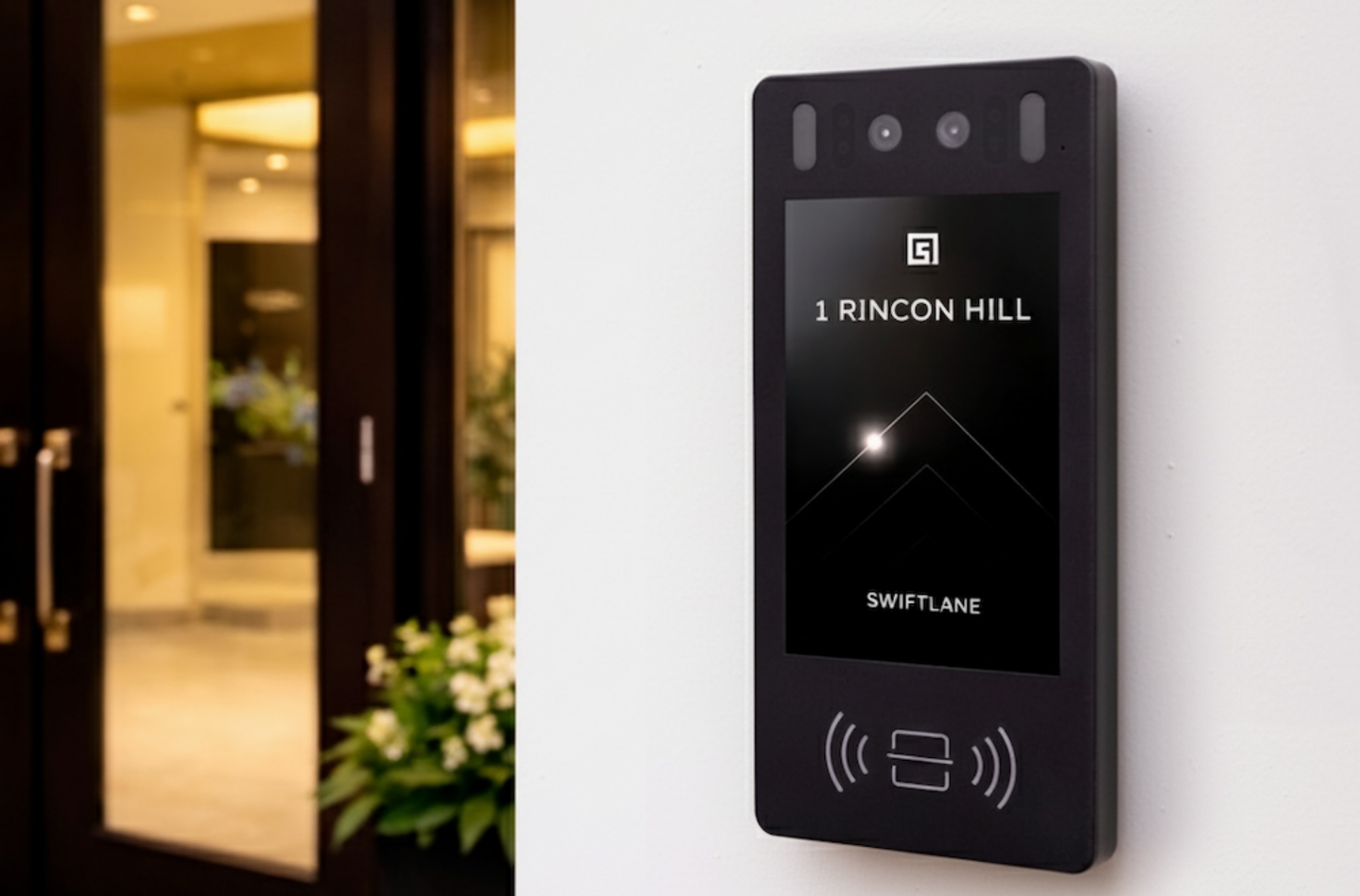
A smart intercom system is a building entry solution that combines door-mounted video hardware with cloud software, mobile app call handling, and configurable access rules, so residents, tenants, and property teams can manage visitors, unlock doors remotely, and review access history from anywhere. What separates a smart intercom from a traditional one is not the hardware: it is the software layer that handles call routing, permissions, integrations, and audit trails.
Also, read:
- Smart Intercom vs Traditional Intercom: Key Differences and Buying Considerations
- Smart Apartment Buzzer: An Upgrade Guide for Modernizing Building Access
- Best Intercom Systems (2026) – Top Picks for Every Building Type
How We Researched This Guide
This guide was developed through the following process:
- Review of vendor documentation from Swiftlane, DoorBird, Aiphone, Akuvox, and Doorking, specifically installation manuals, data sheets, and integration specs.
- Review of installer and property manager feedback collected through Swiftlane’s onboarding and support channels, focusing on common configuration mistakes and workflow gaps.
- Final review with Swiftlane’s team, which brings 50+ years of combined experience building intercom and building entry systems.
Key Takeaways
- Smart intercoms go beyond audio buzzers by combining two-way video and audio with a mobile app experience for residents, tenants, and staff.
- What makes them ‘smart’ is the software layer: cloud management, call routing to mobile devices, configurable visitor workflows, access logs, and integrations.
- Architecture matters: IP/PoE, Wi-Fi with LTE backup, and 2-wire retrofit are deployment models with distinct trade-offs.
- Visitor workflows (deliveries, vendors, guests, staff) should be designed before selecting hardware, not after.
- The best option depends on your building type, staffing model, number of entry points, and the frequency of changes to access permissions.
- For modern multifamily, office, and mixed-use buildings, smart intercoms are increasingly used as part of an all-in-one access strategy that scales more easily than traditional systems.
Table of Contents
- What is a Smart Intercom System?
- Smart Intercom Architecture: How It Actually Works
- Smart Entry Workflows: How to Handle Every Visitor Type
- Intercom Requirements Checklist
- Cost and TCO: What Drives Intercom Pricing
- Common Smart Access Deployment Mistakes
- FAQs
What is a Smart Intercom System?
A smart intercom system combines two-way audio and video communication with internet connectivity, cloud-based management, and mobile app integration to give buildings a flexible, modern access control solution. These systems connect entry-point hardware to smartphones, tablets, or computers so residents and staff can see and speak with visitors, verify identities visually, and grant access from anywhere.
What makes an intercom ‘smart’ is its suite of connected features: high-definition video streaming, real-time two-way audio, push notifications, centralized cloud dashboards for property teams, and integrations with other systems such as access control or building management platforms.
The 5 things that make an intercom ‘smart’
Not every connected device qualifies. Here are the five capabilities a system must have before it can genuinely be called smart:
| Capability | What it means in practice |
| 1. Cloud admin + remote updates | Property teams can add or remove users, update access schedules, and push firmware changes from a browser — no on-site technician required. |
| 2. Mobile call handling | Calls route to a smartphone app (not a fixed in-unit device). Resident answers on iOS or Android, sees live video, and can unlock remotely. Fallback behavior on missed calls should be configurable. |
| 3. Visitor workflow controls | The system supports different entry paths for guests (one-time links), delivery carriers (PIN windows), recurring vendors (scheduled access), and staff (role-based credentials) — not one-size-fits-all buzzers. |
| 4. Logs + audit trail | Every door event is time-stamped and attributed: who unlocked it, how (app, PIN, face ID, key fob), and from where. Logs are searchable and exportable, not buried in hardware memory. |
| 5. Integrations | The intercom connects to access control readers, smart locks, cameras/NVRs, and property management systems (e.g. Yardi, RealPage, BuildingLink), reducing the number of disconnected tools a team manages. |
Smart Intercom Architecture: How It Actually Works
Smart intercoms are not monolithic products. They are systems. Understanding the architecture helps property teams evaluate options more accurately and avoid mismatched deployments.
Entry panel → call routing → unlock
The basic flow is consistent across systems:


- A visitor arrives at the entry panel and either selects a resident from a directory, scans a QR code, or presses a call button.
- The panel sends a call request through the internet to the cloud platform, which routes it to the resident’s smartphone app as a push notification.
- The resident sees a live video feed from the panel camera, hears the visitor through two-way audio, and taps to unlock the door.
- The door strike or magnetic lock receives a signal (via a relay output or an integrated access control system), and the event is logged with a timestamp and the credential type.
Where systems differ: call routing reliability, fallback behavior when a call is missed, and how the unlock command reaches the door hardware.
Cloud vs. on-premises: who should choose which
| Cloud-managed | On-premises | |
| Updates | Automatic, pushed OTA by vendor | Manual, requires on-site technician or IT |
| Management | Browser or mobile app from anywhere | Local server / VPN access required |
| Scalability | Add buildings or entry points without new servers | Each site needs local infrastructure |
| Data control | Vendor stores access logs and video | Full control over retention and storage |
| Best for | Multifamily, mixed-use, portfolios, remote management | High-security facilities, government, and regulated environments |
Connectivity models: IP/PoE, Wi-Fi + LTE, and 2-wire retrofit
How the entry panel connects to your network determines installation cost, reliability, and flexibility. There are three main models:
IP / PoE (Power over Ethernet)
The panel runs on a single Cat5e/6 cable that carries both data and power. This is the most reliable option for new construction or buildings with structured cabling. PoE intercoms are fully network-managed, support HD video, and integrate seamlessly with access control panels.
Installation cost is moderate if cabling already exists; higher if new runs are required. See Swiftlane’s PoE intercom guide for wiring specifications.
Wi-Fi with Cellular (LTE) Backup
The panel connects to the building Wi-Fi for primary data transmission, with an embedded LTE SIM as a fallback if Wi-Fi drops out. This is common in retrofit scenarios where running new network cabling is impractical.
Tradeoffs: Wi-Fi signal quality at the entry door must be validated; LTE backup incurs a monthly carrier cost; video latency may be slightly higher than with PoE.
2-Wire Retrofit
Some smart intercom systems are designed to run over existing 2-wire intercom cabling, making them viable for older multifamily buildings without structured data cabling. The existing wiring carries both power and data to the panel. This significantly reduces installation labor costs and disruption.
Limitations: bandwidth constraints may limit video quality; not all buildings have compatible legacy wiring; some systems require a 2-wire-to-IP converter hub.
Smart Entry Workflows: How to Handle Every Visitor Type


This is where smart intercoms earn their value, or fail quietly. Most buildings configure a single entry path for all visitors and then wonder why residents complain about missed deliveries or unauthorized access. A properly designed system has distinct workflows for each visitor type.
1. Delivery and Courier Access
- Carrier arrives at the entry panel and selects ‘Delivery’ from the directory (or uses a pre-assigned PIN).
- System authenticates the PIN against a time-window rule (e.g., valid Mon–Fri, 8 am–6 pm) — no resident call required.
- Lobby or mailroom door unlocks; the event is logged with the carrier credential type and timestamp.
- Resident receives a push notification: ‘Package delivered — lobby door accessed at 2:14 PM.”
Key requirement: The delivery workflow should not depend on a resident answering their phone. Carriers have tight routes; a missed call means a missed delivery.
2. Vendor and Recurring Service Provider Access
- The property manager creates a vendor profile in the admin dashboard with a named credential and access schedule (e.g., HVAC technician, Tuesdays 9 am–5 pm, back entrance only).
- Vendor arrives and uses a mobile credential or PIN at the designated entry point.
- Access is granted only for the scheduled window and specific door(s), not building-wide.
- The event is logged under the vendor’s profile. The manager can revoke or modify the schedule remotely without visiting the property.
Key requirement: Role-based access scoped to specific doors and time windows. A vendor credential that opens every door in the building is a security gap.
3. Guest and Resident Invite Flow
- The resident generates a guest link or a one-time PIN from their mobile app (or the property management portal).
- The guest receives the link via SMS or email and arrives at the entry panel.
- Guest scans QR code or enters PIN; no app download required on the guest’s side.
- Door unlocks; event logged under the resident’s account with guest label.
- The resident can set an expiry window for the guest credential (e.g., valid Saturday 6 pm–midnight).
Key requirement: Guests should not need to download an app. Friction in the guest flow leads residents to prop doors open.
4. Staffed vs. Unmanned Buildings
Staffed buildings (with a concierge or front desk) need a different intercom configuration than unmanned ones:
| Staffed building | Unmanned building | |
| Call routing | Front desk receives all visitor calls; residents as fallback | Calls route directly to resident app |
| After-hours | Overflow to resident when front desk is unstaffed | Resident-only; missed call behavior must be defined |
| Visitor log | Front desk can view and manage active visitors | Full log available in admin dashboard for remote review |
5. Multi-Entrance Buildings
Buildings with a front door, side door, garage, and amenity doors present a management challenge: each entrance has its own access rules, and residents, staff, deliveries, and vendors may need different permission sets for each door.
- Map each entrance to an access group before configuration begins.
- Delivery PINs should work only at the lobby/mailroom; not the garage or amenity doors.
- Staff credentials should be scoped to relevant entrances (e.g., maintenance has garage access; front desk staff does not).
- Resident credentials (mobile, fob, face ID) typically cover all resident-accessible entrances.
- The admin dashboard should show activity by door, not just by user, so anomalies at specific entry points surface quickly.
Intercom Requirements Checklist
Use this checklist when evaluating vendors. Each category maps to a common failure point when buildings deploy smart intercom systems without a formal requirements process.
Mobile Experience
| Requirement | Why it matters |
| Call delivers push notification to iOS and Android within 3 seconds | Delayed calls lead to missed visitors and resident frustration |
| Missed-call fallback is configurable (route to next contact, send PIN, or log only) | Unconfigured fallback = missed deliveries and no audit trail |
| Resident can unlock remotely without being on the premises | Core smart intercom value proposition |
| Guest access does not require guests to download an app | Reduces door-propping behavior |
Admin and Management
| Requirement | Why it matters |
| Bulk user upload via CSV or PMS integration (not manual entry per resident) | Manual entry does not scale above 20 units |
| Role-based access control (admin, staff, resident, vendor tiers) | Vendor with building-wide access is a liability |
| Access schedules configurable by door, user group, and time window | Required for delivery, vendor, and after-hours workflows |
| Multi-property dashboard for portfolio managers | Eliminates tool sprawl across buildings |
Security and Audit
| Requirement | Why it matters |
| End-to-end encryption for video streams and access credentials | Unencrypted streams are interceptable on shared networks |
| Access logs are searchable by user, door, credential type, and date range | Unsearchable logs are useless for incident review |
| Video retention policy is configurable (not fixed by vendor) | Regulatory and insurance requirements vary by property type |
| Audit log exports available for compliance or legal requests | Required for incident documentation |
Hardware
| Requirement | Why it matters |
| 1080p or higher camera resolution with low-light performance | Entry points are often poorly lit; resolution matters at night |
| Vandal-resistant housing (IK08 or better) for exterior installations | Standard panels degrade quickly in high-traffic or exposed locations |
| ADA-compliant panel height and audio assistance (TTY or equivalent) | Required in many jurisdictions for commercial and multifamily |
| IP65 or better weather rating for exterior panels | Unrated panels fail in wet climates |
Offline Behavior
| Requirement | Why it matters |
| Fail-open vs fail-closed behavior is configurable per door | Life-safety doors (fire exits) must fail open; secure doors should fail closed |
| Cached credentials allow offline unlock for enrolled users | Prevents lockouts during internet outages |
| LTE backup available as a connectivity fallback option | Particularly important for single-ISP properties |
Cost and TCO: What Drives Intercom Pricing
Smart intercom costs vary significantly based on building size, connectivity model, and software tier. The table below shows approximate ranges. Full cost breakdowns are covered in the linked resources.
| Cost driver | Typical range | Notes |
| Hardware per entry point | $500 – $2,500+ | Varies by camera quality, ruggedization, and whether indoor call stations are included |
| Installation labor | $200 – $800 per door | Lower for Wi-Fi retrofit; higher for new PoE cabling runs |
| Software subscription | $20 – $150/month per building | Per-door, per-unit, or flat-rate models depending on vendor |
| PMS / access control integration | Included to $500 setup | Native integrations (e.g., Yardi, RealPage) are usually no extra cost; custom API work adds cost |
| Ongoing maintenance | Near zero (cloud) to $500+/yr (on-prem) | Cloud systems update automatically; on-prem requires manual IT maintenance |
A note on fit: Swiftlane is designed for multifamily, commercial, and mixed-use buildings with multiple entry points and ongoing user management needs. It is not the right fit for single-family homes or small residential properties, where a simpler doorbell camera or consumer intercom would be more practical and cost-effective.
Common Smart Access Deployment Mistakes
Treating it as a buzzer replacement instead of a workflow change.
Most intercom failures don’t happen because the hardware is wrong; they happen because nobody designed the visitor workflows before installation. Installing a smart intercom without defining how deliveries, vendors, guests, and staff will each be handled means the system ends up being used the same way as the old buzzer.
No Delivery Workflow
If the delivery flow requires a resident to answer their phone, packages will pile up in the lobby or go undelivered. Carrier access should be handled via time-windowed PINs or a carrier-specific credential.
No Role-Based Access for Staff
Giving all staff a single master credential that opens every door is a common shortcut with real security consequences. Maintenance staff, leasing agents, cleaning crews, and concierges should have credentials scoped to the doors they actually need.
No Video Retention Policy
Many deployments use the vendor default (30 days), without checking whether local regulations or insurance policies require longer retention. Set the retention policy before go-live and document it.
No Defined Offline Behavior
When the internet goes down, what happens? If the answer is ‘we don’t know,’ that is a configuration gap. Each door must have a defined fail-open or fail-closed rule, and enrolled users should be able to unlock doors using cached credentials during outages.
FAQs
What happens if the internet goes down?
Smart intercoms vary significantly in their behavior when offline. Well-designed systems cache enrolled credentials locally on the reader hardware, so residents with mobile, key fob, or face ID credentials can still unlock doors even without an active internet connection.
Video calling and remote unlock functions typically require an internet connection, but door access for known users should not depend on it. Before selecting a system, ask the vendor specifically: ‘What happens at each door during an ISP outage?’ Fail-open vs. fail-closed behavior should be configurable per door type.
Does a smart intercom require a subscription?
Most modern cloud-based smart intercom systems require a software subscription for remote management, updates, mobile call handling, and cloud storage of access logs. Pricing models vary: some charge per door, some per unit, and some use flat-rate building tiers.
On-premises systems may avoid recurring subscription fees but require upfront server hardware and ongoing IT maintenance. Factor both into the TCO calculation, not just the hardware purchase price.
Do smart intercom calls come through as phone calls or app notifications?
It depends on the system. Most modern platforms route calls as push notifications to a dedicated mobile app, which opens a live video feed. Some older or hybrid systems still use PSTN routing (the call comes through as a regular phone call) with no video.
App-based routing is generally more reliable, supports video, and does not consume cellular minutes, but it requires the resident to have the app installed and notifications enabled. Confirm with your vendor whether the system falls back to PSTN if the app is unreachable.
Can we support residents without smartphones?
Yes, in most cases. Smart intercom systems typically support multiple credential types: mobile app, key fob or card, PIN, and, in some cases, face recognition. For residents without smartphones, a key fob or card credential provides full door access. The call-answering function (for visitor video calls) requires a device. Some systems support in-unit touchscreens or IP handsets as alternatives to a smartphone.
How do access logs help resolve disputes?
Access logs create a searchable, time-stamped record of every door event: who unlocked it, when, at which entry point, and using which credential. When a resident claims a package was stolen from the lobby, or a security incident is reported, logs let property managers reconstruct exactly what happened without relying on recollection.
Logs are also useful for identifying credential misuse, for example, if a former resident’s fob is still being used after move-out.
How does a smart intercom integrate with an access control system?
Integration depth varies by vendor. At a basic level, the intercom sends an unlock command to the door relay when a call is answered, and the resident taps the unlock button. More advanced integrations connect the intercom to an access control platform so that the same credential database governs both the intercom directory and all door readers in the building.
The highest level of integration includes a unified dashboard, shared audit logs, and synchronized user provisioning, so adding a new resident automatically creates credentials across intercoms, readers, and smart locks.
Does a smart intercom work with existing wiring?
In many cases, yes. Systems designed for 2-wire retrofit run over legacy intercom cabling and can replace an older audio-only system without major rewiring. IP/PoE systems require a data cable (Cat5e or Cat6) to each panel. Wi-Fi systems require only a power connection at the panel and a reliable Wi-Fi signal at the entry point.
Confirm the specific wiring requirements with your installer before committing to a product. A system that requires new cabling runs in a finished building can significantly increase installation costs.


