

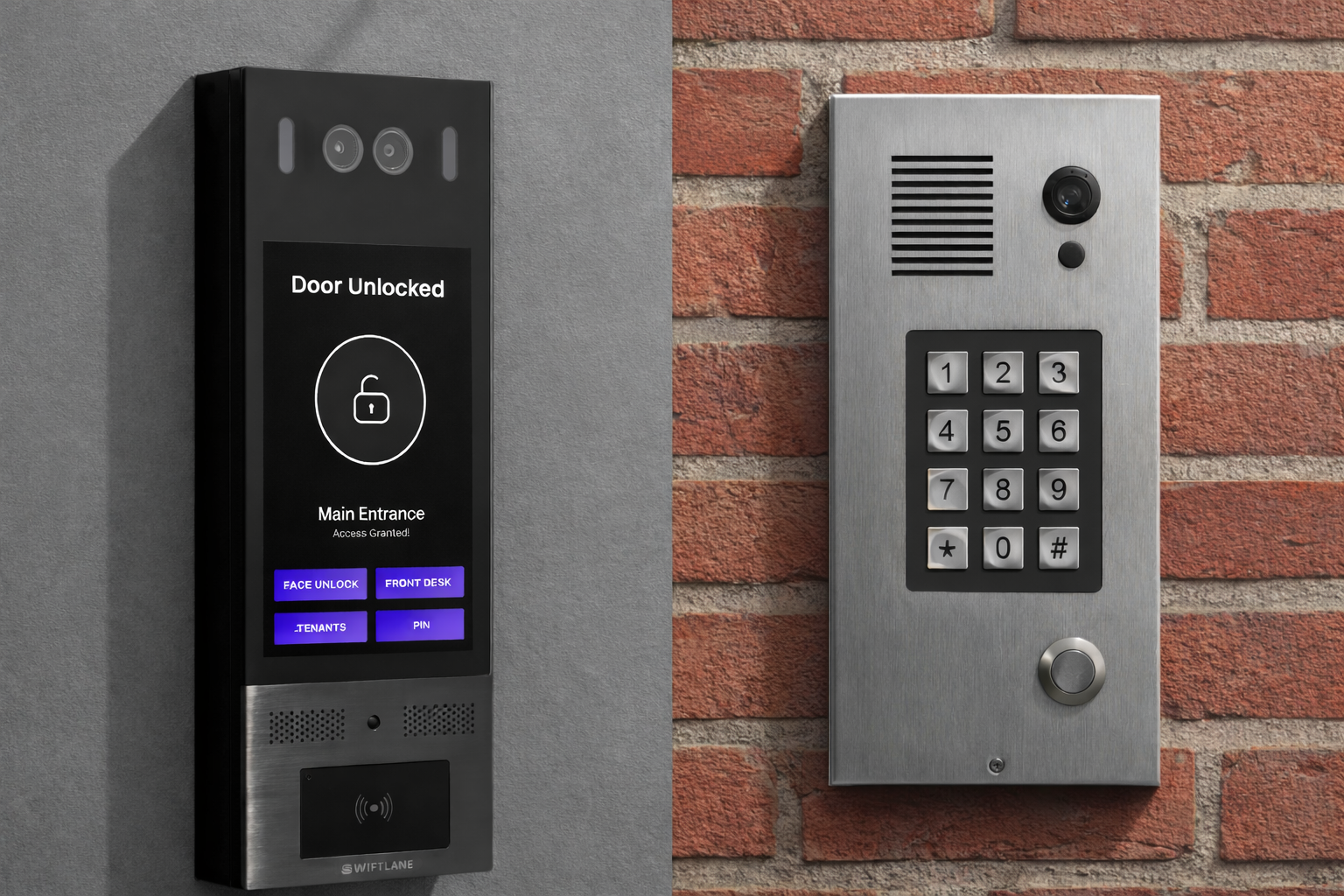
Smart intercoms are generally the better fit for multifamily, office, and multi-building properties. They support video calling, mobile unlock, access logs, remote directory updates, and cloud management from a single dashboard. Traditional intercoms still make sense for small buildings with stable tenants, working wiring, and simple audio-only access needs.
For property managers and owners, the choice between the two comes down to building size, visitor volume, and how much time you can spend on manual, on-site management. Both systems handle the basics: security verification, access control, and two-way communication. But they diverge significantly in how they verify visitors, scale across buildings, and reduce administrative overhead.
Swiftlane has deployed access control and video intercom systems across 3,000+ buildings, and the patterns below reflect what actually drives the decision in the field.
Choose a smart intercom if:
- Your building has 20+ units or multiple entry points
- You manage more than one property
- Tenants turn over regularly, and directory updates are frequent
- You need visitor logs for security or compliance
- You want residents to answer calls from their phones
Choose a traditional intercom if:
- Your building has fewer than 20 units with stable, long-term tenants
- You have existing compatible wiring you want to reuse
- Visitor traffic is low, and audio-only verification is sufficient
- Budget is the primary constraint, and long-term costs are secondary
The full comparison below covers nine categories: technology and connectivity, access control, security, user experience, installation, cost, management, reliability, and best-fit use cases.
How We Researched This
The comparisons in this article draw on Swiftlane’s direct experience deploying smart intercom and access control systems across multifamily, commercial, and mixed-use properties. Installation timelines, wiring-reuse feasibility, and failure-scenario behavior reflect real deployment patterns observed across the Swiftlane portfolio.
Industry trend data is drawn from the HID 2025 State of Security and Identity for mobile credential and biometric adoption trends. Pricing guidance reflects Swiftlane’s own installation data rather than third-party consumer estimates. Key product claims and deployment figures were reviewed with the Swiftlane executive and engineering team prior to publication.
Key Takeaways
- The right intercom system depends on building size, visitor volume, portfolio scale, and the level of on-site management your team can sustain.
- Smart intercoms use cloud software for remote access control, multiple verification methods, and centralized management. Best suited for medium to large buildings and multi-property portfolios, where administrative volume makes manual updates impractical.
- Traditional intercoms rely on hardwired connections and on-site management. Their limited feature set works better for smaller buildings with lower visitor traffic and fewer units to manage.
Table of Contents: Quick Navigation
- What Is an Intercom?
- Smart Intercoms vs Traditional Intercoms: A Side-by-Side Comparison
- 1. Technology & Connectivity
- 2. Access Control & Visitor Management
- 3. Security & Identity Verification
- 4. User Experience
- 5. Installation & Infrastructure Requirements
- 6. Prices & Costing (Upfront vs Long-Term)
- 7. Management & Administrative Control
- 8. Reliability & Failure Scenarios
- 9. Best Use Cases
- Quick Overview: Key Differences
- Can You Upgrade From a Traditional Intercom to a Smart One?
- Smart vs. Traditional Intercom: Which One Does Your Property Need?
- Swiftlane: A Smart Intercom Solution for Your Property
- Frequently Asked Questions
What Is an Intercom System?
A building intercom system allows people inside a building to communicate with visitors at the entrance, verify their identities, and unlock doors remotely.
How a Building Intercom Works
- A visitor arrives at the building entrance and approaches the intercom panel.
- They initiate a call by selecting the resident’s name or unit from the directory.
- The resident receives the call and verifies the visitor through video or audio.
- The resident grants access by unlocking the door from an in-unit device or mobile app.
What are Traditional Intercoms?
Traditional intercoms are legacy systems built on hardwired connections between an entry panel and in-unit answering stations. Brands like Aiphone and Doorking are common examples, offering hardwired audio panels and telephone entry systems, respectively. These systems support basic two-way audio communication, a physical tenant directory, and electronic door release. Newer traditional models may use cellular or VoIP to route calls to residents, but management remains manual and on-site.
In smaller apartment buildings with low visitor traffic, traditional intercoms can meet basic access needs. However, their fixed hardware and limited feature set make them difficult to scale or update as occupancy grows.
What Makes an Intercom Smart?
Smart intercoms are cloud-connected systems that use software to manage access control, visitor verification, and two-way video communication. Unlike traditional intercoms, smart systems receive regular software updates, integrate with access-control hardware, and can be managed remotely via a web dashboard or mobile app.
Key capabilities that distinguish smart intercoms from traditional ones include:
- Cloud-based management accessible from any device or location
- Two-way video communication, in addition to audio
- Multiple credential types: mobile app, PIN, RFID, face recognition, and QR code
- Integration with elevator access, vehicle access, and package room systems
- Real-time visitor logs and audit trails
- Software updates that add features over time without hardware replacement
These capabilities make smart intercoms increasingly common in high-traffic and high-occupancy environments where traditional systems create operational bottlenecks. For broader access needs, many smart systems also integrate with elevator access controls, vehicle gates, and package room systems.
Smart Intercoms vs Traditional Intercoms: Side-by-Side Comparison


The right intercom system depends on your building’s scale, layout, and operations. The nine categories below break down where smart and traditional systems differ, and what those differences mean in practice.
1. Technology and Connectivity
Smart intercoms connect via Wi-Fi or Ethernet, most commonly Power over Ethernet (PoE), which carries both data and power over a single cable. This eliminates the need for long physical runs to in-unit answering stations and allows faster deployment, particularly in larger buildings. For buildings where running new cable isn’t practical, wireless intercom systems offer a comparable installation advantage.
These connections feed into a centralized cloud platform where property managers can update tenant directories, adjust access permissions, and monitor entry activity across one or multiple buildings from a single interface, without being on-site.
Traditional intercoms, such as telephone entry systems, rely on physical wiring between the main entry panel and each in-unit device. While some newer traditional models route calls over cellular networks or VoIP, management remains decentralized. Any directory update, permission change, or hardware adjustment requires a manual, on-site intervention at each panel.
For properties with multiple doors, high unit counts, or a growing portfolio, this distinction has real operational consequences. A change that takes seconds in a cloud dashboard can take hours of on-site work across a traditional system.
At a glance:
- Smart intercoms: Wi-Fi or PoE connectivity, centralized cloud management, remote updates, scalable across multiple doors and properties
- Traditional intercoms: Hardwired telephone, cellular, or VoIP lines, manual on-site management required for each panel
2. Access Control and Visitor Management
Smart intercoms manage directories and access credentials through centralized cloud platforms. From a web dashboard or mobile app, property managers can update tenant information, issue or revoke credentials, and review visitor logs from any location.
Traditional intercoms rely on in-unit devices and physical directory panels. There is no centralized management, no visitor logging, and no way to update credentials remotely. For larger properties or multi-building portfolios, this becomes a significant operational limitation.
At a glance:
- Smart intercoms: Centralized cloud platform, remote credential management, visitor logs, door release
- Traditional intercoms: In-unit devices, physical directory panels, no visitor records, no remote access control
3. Security and Identity Verification
Smart intercoms support multiple verification methods beyond basic audio, including video calling, PIN codes, RFID keycards, mobile credentials via NFC or Bluetooth, face recognition, and QR codes. Many systems also support multi-factor authentication, combining two or more of these methods for tighter access control.
According to HID’s 2025 State of Security and Identity report, adoption of mobile credentials and biometrics is increasing across commercial and multifamily properties as operators look to reduce reliance on physical keys and PINs.
Traditional intercoms are limited to audio verification, PIN codes, and physical keys. Audio-only verification increases the risk of unauthorized access. It is easier to misidentify a visitor over a speaker than over video, and that risk compounds as building occupancy grows.
Swiftlane’s SwiftReader X supports video verification, mobile credentials, and face recognition access control, allowing residents and authorized users to unlock doors without a physical credential.
At a glance:
- Smart intercoms: Video, mobile credentials, PIN, RFID, face recognition, QR code, multi-factor authentication
- Traditional intercoms: Audio-only verification, PIN codes, physical keys
4. User Experience
Residents and Tenants
Smart intercoms use touchscreen interfaces that mirror smartphone interactions, making them intuitive for most users. Residents receive visitor calls through a mobile app with live video and caller ID, so they can see who is at the door before granting access. For residents who prefer traditional methods, most smart intercoms also support keycards, PIN codes, and physical buttons.
Traditional intercoms use physical buttons and audio-only communication. The experience is familiar and low-friction for most residents, but it offers no visual verification or mobile answering.
Property Managers and Owners
Smart intercoms allow managers to handle directory updates, credential changes, and access permission adjustments from a single web dashboard or mobile app anywhere. This is particularly valuable for multi-property portfolios where on-site visits for routine changes add up quickly.
Traditional intercoms require manual, on-site updates at each panel. For a single small building, this is manageable; for anything larger, it becomes a recurring operational cost.
At a glance:
- Smart intercoms: Touchscreen interface, mobile app answering, live video, accessibility options, centralized remote management
- Traditional intercoms: Physical buttons, audio-only, familiar but limited, manual on-site management
5. Installation & Infrastructure Requirements
Both systems require professional installation, but smart intercoms are generally faster to deploy. Most use PoE wiring, which runs a single cable per device rather than dedicated lines to every in-unit station. Many buildings can also reuse existing wiring during a retrofit, further reducing installation time and disruption.
Traditional intercoms require extensive hardwiring from each entry panel to each in-unit device. In larger buildings with many units or multiple entry points, this significantly increases installation time, labor costs, and the potential for disruption to existing tenants.
At a glance:
- Smart intercoms: Faster installation, PoE wiring, retrofit-compatible in many buildings
- Traditional intercoms: Extensive hardwiring to each unit, longer installation timelines, and disruptive in larger buildings
6. Prices & Costing (Upfront vs Long-Term)
The true cost of an intercom system goes beyond the hardware price. Installation complexity, ongoing maintenance, service calls, and telephone line fees all factor into what a building actually spends over time. For most medium and large properties, smart intercoms cost more upfront but less over a five-year period.
Upfront Cost Comparison
| Cost Item | Smart Intercom | Traditional Intercom |
| Hardware (entry panel) | $800 – $3,500+ | $300 – $1,500 |
| In-unit devices | Optional / app-based | Required per unit |
| Installation labor | $500 – $2,500 | $1,000 – $5,000+ |
| Wiring/infrastructure | Minimal (PoE or Wi-Fi) | Extensive hardwiring required |
| Typical upfront total | $1,500 – $8,500+ | $2,000 – $15,000+ (larger buildings) |
Hardware costs for smart intercoms vary by manufacturer, number of entry points, and whether in-unit devices are included. Traditional intercom installations carry higher labor costs in larger buildings because each unit requires a dedicated hardwired connection to the entry panel.
5-Year Total Cost of Ownership by Building Size
| Building Size | Smart Intercom (5-yr) | Traditional Intercom (5-yr) |
| Small (under 20 units) | $3,000 – $6,000 | $2,500 – $5,500 |
| Medium (20–100 units) | $6,000 – $14,000 | $10,000 – $22,000 |
| Large (100+ units) | $12,000 – $30,000+ | $25,000 – $50,000+ |
The 5-year costs for the smart intercom include hardware, installation, and cloud subscription fees. Traditional intercom 5-year costs include hardware, installation, wiring repairs, on-site service calls, and telephone or VoIP line fees. Estimates are illustrative ranges based on typical configurations and will vary by vendor, region, and building layout.
Ongoing Cost Factors
| Recurring Cost | Smart Intercom | Traditional Intercom |
| Cloud subscription | $20 – $100/month (varies by vendor) | None |
| Telephone / VoIP line fees | None | $20 – $60/month per line |
| On-site service calls | Low (remote updates via software) | High (manual changes require a technician) |
| Wiring repairs | Minimal | Periodic, increases with building age |
| Software updates | Included in subscription | Not applicable |
For property managers handling multiple buildings, the administrative time saved by remote management is an additional cost offset not captured in hardware figures alone.
For a project-specific estimate, Swiftlane’s estimate generator provides a configurable breakdown based on building size and the number of entry points.
At a glance:
- Smart intercoms: Higher upfront hardware cost, lower long-term maintenance and service costs, predictable subscription fees
- Traditional intercoms: Lower initial hardware cost, higher cumulative costs from wiring, service calls, and telephone line fees in buildings with 20+ units
7. Management and Administrative Control
Smart intercoms give property managers remote control over tenant directories, access credentials, and entry permissions through a web dashboard or mobile app. Adding a new tenant, revoking a former resident’s access, or restricting entry through a specific door takes seconds and requires no site visit.
This matters most when managing multiple properties. Credential changes, tenant turnover, and access audits that would require separate on-site trips across a traditional system can all be handled from a single interface.
Traditional intercoms require manual, on-site updates at every panel. Tenant directory changes, credential resets, and permission adjustments must each be handled individually at each device. Across a multi-property portfolio, this creates a recurring administrative burden that grows with occupancy.
At a glance:
- Smart intercoms: Remote directory and credential management, audit logs, single interface for multiple properties
- Traditional intercoms: Manual on-site updates required per panel, no audit trail, inefficient at scale
8. Reliability and Failure Scenarios
Smart intercoms can be configured for fail-safe or fail-secure operation, but the final behavior depends on the lock hardware in use, the door’s fire rating, and local fire and life-safety codes. Fail-safe unlocks doors during a power outage to allow safe egress; fail-secure keeps doors locked to protect assets.
Many access control platforms allow administrators to configure this behavior in software. For fire-rated openings, electric strikes and access-control hardware generally need to preserve positive latching and comply with the listed fire-door assembly. In many cases, fail-secure electric strikes are required, but the correct configuration depends on the door hardware, opening type, listing, and AHJ requirements.
Hardware is typically rated for both IP (ingress protection) and IK (impact resistance) standards.
At a glance:
- Smart intercoms: Power and internet backups, IP and IK ratings, fail-safe or fail-secure operation configurable within the limits of lock hardware and fire code
- Traditional intercoms: Internet-independent but vulnerable to power loss, exposed wiring, fixed fail configuration
9. Best Use Cases
Smart intercom systems are best suited for properties where visitor volume, occupancy, or portfolio scale make manual management impractical. Even at the lower turnover rates that large landlords typically see (around 30%, compared with an industry norm closer to 50%), the sheer number of units means more total credential and directory changes occur each year.
A 200-unit building at a 30% turnover rate still processes 60 move-outs annually, each requiring a directory update. That volume, multiplied across a multi-property portfolio, is what manual, on-site management can’t keep up with.
- Medium to large apartment buildings and condominiums
- Office and commercial buildings
- Hospitality properties, casinos, and student housing
- Senior living facilities
- Gated communities
- Multi-property portfolios
Traditional intercom systems remain a practical option for smaller properties where existing wiring is compatible, and visitor traffic is low:
- Single-family homes
- Small apartment buildings
- Small office or commercial spaces
- Properties with existing compatible wiring
At a glance:
- Smart intercoms: High-traffic, high-occupancy, or multi-property environments where remote management and scalability are priorities
- Traditional intercoms: Small, low-traffic properties with existing wiring and straightforward access needs
Quick Overview: Key Differences
| Category | Smart Intercoms | Traditional Intercoms |
| Connectivity | Wi-Fi or PoE, cloud-connected | Hardwired telephone, cellular, or VoIP |
| Remote Management | Full remote control via web dashboard or mobile app | Manual, on-site updates required per panel |
| Visitor Verification | Video, mobile credentials, PIN, RFID, face recognition, QR code | Audio-only, PIN codes, physical keys |
| Visitor Logs | Digital logs with full audit trail | No record-keeping |
| Scalability | Software-based, easily expanded across doors and buildings | New wiring is required for each addition |
| Installation | PoE wiring, retrofit-compatible, faster deployment | Extensive hardwiring to each unit, longer timelines |
| Upfront Cost | Moderate to high, depending on configuration | Low to moderate |
| Long-Term Cost | Predictable subscription fees, low maintenance | Recurring repair, service call, and telephone line costs |
| Reliability | Power and internet backups, IP and IK rated | Internet-independent, vulnerable to power loss and wiring damage |
| Fail Configuration | Configurable within limits set by lock hardware and fire code | Fixed at installation |
| Upgrade Path | Regular software updates, features improve over time | No upgrades without full hardware replacement |
| Best For | Medium to large buildings, multi-property portfolios | Small buildings, low-traffic properties with existing wiring |
Can You Upgrade From a Traditional Intercom to a Smart One?
Yes, and it is one of the most common requests Swiftlane receives from property managers inheriting older buildings. The feasibility and complexity of an upgrade depend on three factors: existing wiring, entry panel placement, and whether in-unit devices need to be replaced.
Existing Wiring
Many smart intercoms, including Swiftlane’s SwiftReader X, can reuse existing low-voltage wiring for door release connections. This reduces installation time and cost significantly compared to a full rewire.
However, the old wiring runs to in-unit stations, which smart intercoms replace with a mobile app, so those runs are typically abandoned in place rather than reused end-to-end.
Entry Panel Replacement
The entry panel is always replaced. Traditional entry panels are not compatible with cloud platforms and cannot be updated to support video, mobile credentials, or remote management. Swapping the panel is the core of the upgrade and typically takes a few hours per entry point.
In-Unit Devices
This is where smart intercoms offer the clearest operational benefit. Because residents answer calls through a mobile app, in-unit handsets or answering stations can be removed entirely. This eliminates the cost of replacing aging handsets and removes a recurring maintenance liability.
Tenant Disruption
For most upgrades, door access remains functional throughout installation. The main transition period is the app onboarding phase; residents need to download the Swiftlane app and set up their credentials. Most properties complete this during a planned move-in cycle or with a short onboarding window communicated in advance.
At a glance:
- Existing low-voltage wiring can often be reused for door release connections
- Entry panel is always replaced
- In-unit handsets are eliminated, replaced by a mobile app
- Door access remains functional during installation in most cases
- Tenant onboarding requires app setup; it is manageable with advanced communication
Smart vs. Traditional Intercom: Which One Does Your Property Need?
Use the questions below to identify which system fits your situation.
Choose a smart intercom if:
- You manage a medium- to large-sized building with high visitor traffic or frequent tenant turnover
- You oversee multiple properties and need to manage access from a single interface
- Your current system requires frequent on-site service calls or manual directory updates
- You want video verification, mobile credentials, or face recognition for tighter security
- You are planning a new construction or full renovation where infrastructure can be designed for PoE
Choose a traditional intercom if:
- You manage a small building with stable, low-traffic occupancy
- Your property has existing compatible wiring and a limited upgrade budget
- Your access needs are straightforward and do not require remote management or visitor logging
For most growing or multi-property operations, smart intercoms offer a clearer long-term path, lower administrative overhead, stronger security, and a feature set that improves over time without hardware replacement.
Swiftlane: A Smart Intercom Solution for Your Property
Swiftlane offers smart intercom systems and access control readers designed for property managers and owners who need flexible, scalable entry management across one or more buildings.
The SwiftReader X is an IP-based video intercom that supports two-way video calling, mobile credentials, face recognition access control, and PIN access. Visitors initiate a video call at the entry panel; residents receive the call through the Swiftlane mobile app, verify the visitor on video, and unlock the door remotely. No in-unit handset required.
For broader access control, Swiftlane integrates with elevator, vehicle, and package room access systems, as well as smart locks. All managed from a single web dashboard. Tenant directories, access credentials, and entry permissions across every door and building in your portfolio can be updated remotely in seconds.
If you are evaluating whether a smart intercom is the right fit for your property, schedule a live demo to see the SwiftReader X in a real-world deployment. For a property-specific cost estimate, use the estimate generator.
To see how this works at scale, the Grand Castle Apartments, a 522-unit community in Grandville, Michigan, replaced its legacy access system with Swiftlane across more than 60 access points.
Frequently Asked Questions
What is the main difference between a smart intercom and a traditional intercom?
Smart intercoms connect to the internet and are managed through a cloud-based dashboard or mobile app. They support video calling, mobile unlock, remote directory updates, and visitor logs. Traditional intercoms rely on hardwired connections to in-unit devices, support audio-only communication, and require on-site manual management for any changes.
Which is better for an apartment building: a smart intercom or a traditional intercom?
For most apartment buildings, a smart intercom is the better choice. Buildings with 20 or more units, regular tenant turnover, or multiple entry points benefit most from remote management, mobile answering, and centralized access control. Traditional intercoms are more practical for smaller buildings with stable tenants and compatible wiring in place.
Can a smart intercom replace a traditional intercom system?
Yes. Most smart intercoms are designed to retrofit into existing buildings. Depending on the existing wiring, installation can reuse some infrastructure, reducing the time and cost of switching. A full rip-and-replace of legacy wiring is not always required.
How much does it cost to replace a traditional intercom with a smart intercom?
Upfront hardware and installation costs for a smart intercom typically range from $1,500 to $8,500 or more, depending on the building size, the number of entry points, and the selected hardware configuration. Long-term costs include a cloud subscription but are generally offset by fewer on-site service calls and lower maintenance costs. See the full cost comparison table for a breakdown by building size.
What happens to a smart intercom if the internet goes down?
Most smart intercom systems include failover options, such as cellular or battery backup, to maintain operation during outages. They can also be configured for fail-safe mode, which unlocks doors automatically during a power loss for safe exit, or fail-secure mode, which keeps doors locked to protect assets. Final behavior depends on the lock hardware and local fire code, so confirm the configuration with your installer. The specific failover options vary by manufacturer.
Do residents need a smartphone to use a smart intercom?
No. While smart intercoms support answering via mobile app, most systems also support in-unit devices, key cards, PIN codes, and landline forwarding for residents who prefer not to use a smartphone. Accessibility options such as large on-screen buttons and audio instructions are also available on many models.
What are the long-term maintenance costs of a traditional intercom system?
Traditional intercom systems typically have lower upfront hardware costs but accumulate higher long-term expenses. These include periodic wiring repairs, on-site service call fees, replacement of in-unit devices, and ongoing telephone or VoIP line charges. In larger buildings, these costs can exceed the total cost of a smart intercom system over a five-year period.
What is a telephone entry system, and how does it compare to a smart intercom?
A telephone entry system is a type of traditional intercom that connects visitors to residents by dialing a phone number through a cellular or landline network. Residents answer the call and press a key to unlock the door. Compared with smart intercoms, telephone entry systems lack video verification, visitor logging, cloud management, and mobile app control. They are a common upgrade target when buildings move to smart intercom systems.


