

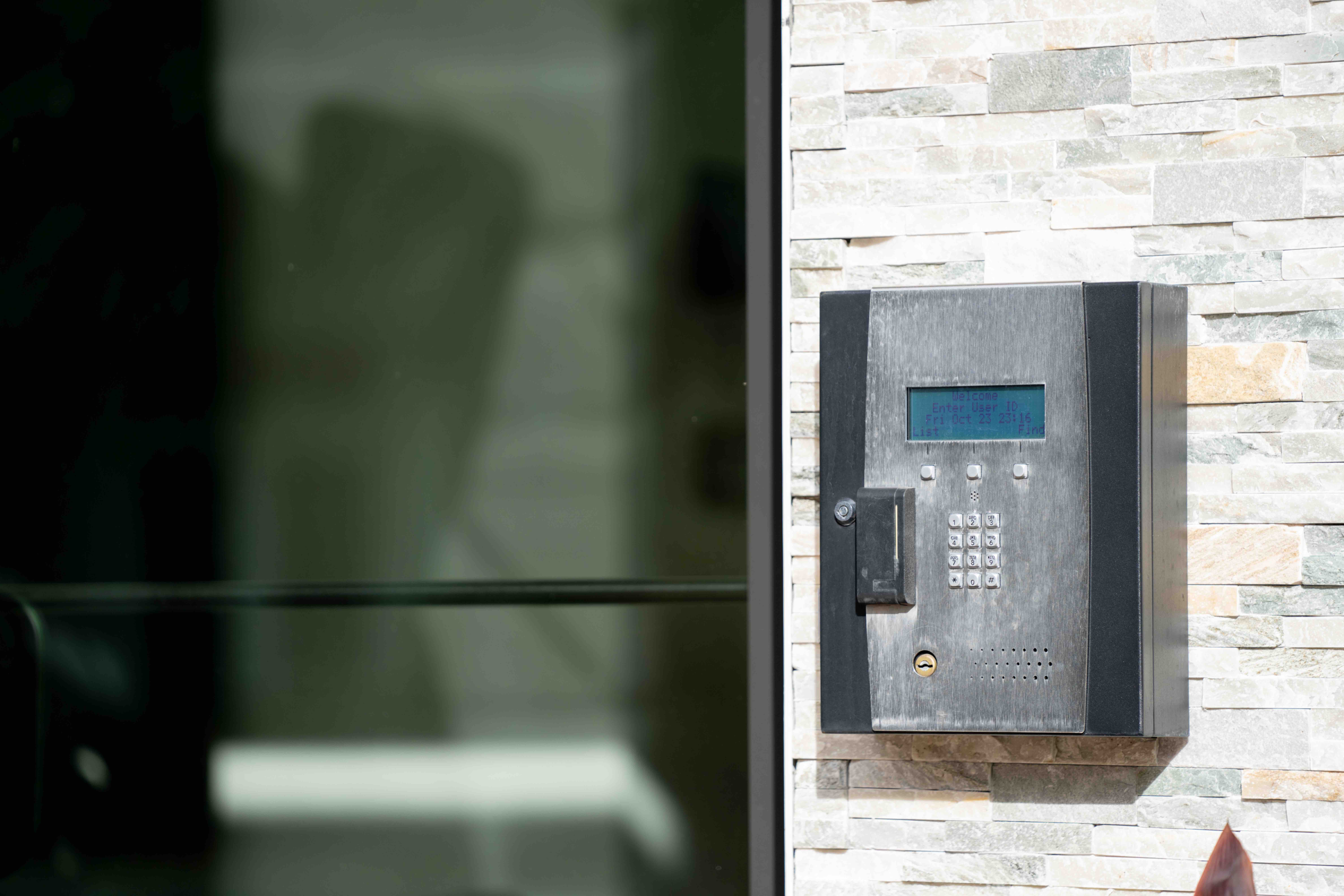
A call box is an entry communication device installed at a building, gate, parking area, or property entrance. Visitors use it to call a resident, tenant, or staff member, who can speak with them and remotely unlock the door or gate. Modern call boxes may include video, mobile app calling, cloud directories, PINs, and access logs.
Key Takeaways
- A call box is a mounted device that lets a visitor contact a resident or staff member, who can grant or deny access remotely.
- A call box number identifies who a visitor is trying to reach; a call box code is usually the PIN that unlocks a door or routes the call. The two aren’t always the same.
- Traditional telephone entry systems support phone-key door release but not app-based unlock, video verification, or cloud access logs.
- Costs range from a few hundred dollars for basic audio hardware to $5,000+ per entry point for a full video intercom system.
- Video intercoms close the security gaps of traditional call boxes with live video, remote unlock, cloud directories, and audit trails.
Table of Contents
- What Is a Call Box Number?
- What Is a Call Box Code?
- Understanding Call Boxes
- Call Box Systems: Wired vs. Wireless
- Types of Call Boxes
- How to Use a Call Box
- Limitations and Alternatives
- What Does It Cost
- Video Intercoms: A Modern Solution
- Summary
- Frequently Asked Questions
- Glossary
What Is a Call Box Number?
A call box number is the directory number, resident listing, phone number, or unit-linked contact a visitor uses to reach someone from the entry panel. In delivery instructions, “call box number” often means the number or listing a driver should use at the entrance.
What Is a Call Box Code?
A call box code is usually a PIN or access code used to unlock a door or gate, or to route a visitor to the right resident or staff member. It is not always the same as a call box number.
Call Box Number vs. Call Box Code
| Call Box Number | Call Box Code | |
| What it does | Reaches a specific resident, tenant, or listing | Unlocks a door/gate, or routes a visitor to the right person |
| Common context | Delivery instructions, directory listings | PIN-based entry, access control |
| Set by | Property manager or installer | Property manager or installer |
| Same thing? | Not always — depends on the system | Not always — depends on the system |
Understanding Call Boxes
Call boxes are communication devices installed at entrances of residential and commercial properties. They let visitors reach a resident or staff member without uncontrolled access and allow the person inside to verify who is there before unlocking.
They are commonly found at apartment building entrances, office lobbies, parking garage gates, gated communities, college campuses, highways, and hospital grounds where emergency communication is important.
Modern call boxes range from basic audio-only units to IP-based systems with video, mobile app integration, and cloud management. The right type depends on property size, infrastructure, and the level of control the operator needs over visitor access.
Definition of a Call Box
A call box is a mounted communication device, typically at a building entrance, gate, or perimeter, that connects a visitor to a resident, tenant, or staff member who can remotely grant or deny access.
The term covers a broad range of devices: from a simple keypad that dials a phone number to a video intercom that streams live footage to a smartphone. They all provide controlled, two-way communication at a point of entry.
Common Uses of Call Boxes
Call boxes serve two primary functions: access control and emergency communication.
For access control, they’re standard in:
- Apartment buildings and multifamily residential properties
- Office buildings and enterprise campuses
- Gated communities and HOAs
- Parking facilities and vehicle gates
For emergency communication, standalone call boxes, sometimes called blue light phones or emergency phones, are deployed in:
- College campuses and university parking lots
- Hospitals and healthcare facilities
- Highways and transit lines
- Airports and large public venues
The technology behind each type varies, but the core purpose is the same: a reliable, controlled point of contact between someone outside and someone with the authority to let them in.
Emergency Call Boxes vs. Entry Call Boxes
Emergency call boxes and entry call boxes share a name but serve different purposes. An entry call box connects a visitor to a specific resident or staff member so that person can decide whether to grant access. An emergency call box connects the caller to a monitoring point, campus security, a dispatch center, or local emergency services, rather than to an individual, and it doesn’t control door or gate access at all.
Where they’re used
Emergency call boxes are standard on college campuses and in parking structures, along highways and transit lines, and at hospitals and large public venues, places where someone may need to reach help quickly without a phone on hand.
How they connect
Most emergency call boxes route directly to a monitoring station rather than ringing a specific person, often over a dedicated line or cellular connection independent of the property’s main network, so the call box keeps working even if other building systems go down.
Identification and accessibility
These units are typically marked with a blue light or illuminated sign so they’re identifiable from a distance, day or night, and mounted at an accessible height so someone using a wheelchair or of shorter stature can reach the call button without assistance.
Call Box Systems: Wired vs. Wireless


Call box systems fall into two categories based on network connection: wired and wireless. Each suits different property infrastructure, installation constraints, and budgets.
Wired Call Boxes
Wired call boxes connect to the network via a CAT5/6 Ethernet cable and use VoIP (Voice over IP) to transmit audio and video. They can be integrated into an existing data network or operate on a dedicated line.
Because they use a physical connection, wired systems tend to be more stable and consistent, especially in high-traffic or high-security environments where reliability is essential.
Running Ethernet to an entry point, especially in older buildings or locations far from the network closet, adds labor and materials. Retrofits can be expensive.
Best for: New construction, properties with existing structured cabling, and high-security applications.
Wireless Call Boxes
Wireless call boxes connect to the network via radio frequencies such as WiFi or cellular (4G/LTE or 5G), depending on the system. They don’t require a physical cable run, making installation faster and cheaper, especially for retrofits or outdoor locations such as parking gates and perimeter fences.
The tradeoff is signal dependency. Wireless systems can be affected by interference, dead zones, or network outages. Cellular systems reduce this risk by avoiding public WiFi, but introduce carrier dependency and potential data costs.
Some wireless call boxes also support Bluetooth or NFC for credential presentation, letting a resident unlock with a phone or fob tap, but these are short-range credential technologies, not the network connection the call box relies on to place a call.
Best for: Retrofit installations, outdoor or remote entry points, properties without existing cabling infrastructure.
Wired vs. Wireless: How to Choose
| Factor | Wired | Wireless |
| Installation cost | Higher | Lower |
| Reliability | Higher | Depends on the signal |
| Retrofit friendliness | Lower | Higher |
| Maintenance | Lower long-term | Varies by tech |
| Best use case | New builds, high-security | Retrofits, outdoor gates |
Types of Call Boxes
Call boxes come in several forms, each suited to different property types and access control needs. The three main categories are traditional telephone entry systems, video intercom systems, and access control devices.
Traditional Telephone Entry Systems
Traditional telephone entry systems connect a visitor to a resident by dialing a pre-programmed phone number, a landline, or a mobile number. The visitor finds the resident in the directory, enters their code, and the system places the call. The resident speaks with the visitor and presses a key to release the door or gate.
They are straightforward to install and relatively inexpensive, making them the standard for apartment buildings and gated communities for decades. However, they have limitations: no video, no audit trail, dependence on phone lines or forwarding setups residents must maintain, and no way to verify who is at the door.
For properties still using these systems, they work, but leave security gaps that newer systems close.
Video Intercom Systems
Video intercom systems add a camera to the equation. When a visitor requests access, the system streams audio and video to a monitor or smartphone app, letting the resident see and speak with the visitor before deciding whether to unlock the door.
The security advantage over audio-only systems is significant: residents can visually confirm who is at the entry point instead of relying solely on voice. Video intercoms also log entry activity, creating an audit trail that traditional telephone entry systems lack.
Modern video intercom systems, including Swiftlane’s, integrate with mobile apps, support remote unlocking from anywhere, and connect to broader access control platforms covering multiple entry points across a property.
Access Control Devices
Access control devices regulate entry using credentials, keycards, PINs, mobile apps, biometrics, or combinations of these. They are often deployed alongside a call box or intercom rather than as replacements: the call box handles visitor communication, while the access control device manages credentialed access for residents, employees, or recurring visitors.
Together, they address both sides of access: known users enter with credentials, while unknown visitors use the call box workflow.
How to Use a Call Box
Using a call box follows a similar flow across most systems. Here is a typical visitor experience.
Step 1: Find the Tenant in the Directory
Most call boxes have a directory: a physical, scrollable list; a keypad to enter a unit number or name; or a touchscreen search. The visitor locates the resident or staff member, selects them, or enters their code.
Some newer IP-based systems display the directory on a screen and allow name search, speeding up access in larger buildings with many units.
Step 2: Enter the Call Box Code
Once the resident is selected, the visitor enters or confirms the call box code, if the system requires one. This triggers the system to call a dedicated intercom inside the unit or the resident’s smartphone via a mobile app.
Step 3: Communicate and Wait for Access
When the resident answers, the visitor states who they are and why they are there. The resident speaks back through the system and, if they choose, presses a button or taps their app to release the door or gate remotely.
If no one answers, most systems let the visitor try another resident or leave a message, depending on the setup.
Any call box or intercom connected to an electronic door or gate release should be installed with the correct door hardware, a backup power plan, and a life-safety review. Behavior during a power outage depends on backup power and door-hardware configuration—property teams should confirm power-loss and emergency-exit behavior with a licensed installer and local authority before installation.
Limitations and Alternatives
Traditional call boxes have served their purpose, but come with constraints that matter more as security expectations rise and building operations become more complex.
Challenges with Traditional Call Boxes
No video. Audio-only systems give residents no way to visually verify who is at the door. A visitor can claim to be a delivery person, a maintenance worker, or someone with a familiar name, and the resident cannot confirm it.
No audit trail. Traditional telephone entry systems do not log who called, when, or whether access was granted. This is a significant gap for property managers when issues arise.
Directory and code management. When residents move in or out, staff must update codes manually. In larger buildings, this is an ongoing administrative burden, and outdated codes pose a security risk.
Dependence on phone lines and forwarding. If a resident changes their number, cancels their landline, or forgets to update forwarding settings, visitors cannot reach them. The system fails quietly until it becomes a problem.
Vandalism and weather exposure. Entry-point hardware takes abuse. Traditional units with exposed keypads and older enclosures are more vulnerable to physical damage over time.
Accessibility. Many older call box installations weren’t designed with accessibility in mind, and newer installations must meet specific requirements under the 2010 ADA Standards for Accessible Design.
Reach range. Under ADA Standards #308, an unobstructed forward or side reach to an operable part, including a call box keypad or call button, must be no higher than 48 inches and no lower than 15 inches above the finished floor or ground. Where the reach is obstructed (for example, by a planter or low wall in front of the unit), the maximum reach height typically drops to 44 inches, depending on the obstruction’s depth.
Operable parts. Under ADA Standards #309, operable parts must be usable with one hand and must not require tight grasping, pinching, or twisting of the wrist. The force needed to activate a control is capped at 5 pounds.
Two-way communication. Under ADA Standards #708, two-way communication systems must provide both audible and visual signals, and any handset cord provided must be at least 29 inches long. The standard also notes that devices without handsets are easier to use for people with limited reach.
A point in favor of hands-free or touchscreen call box designs over legacy handset units.
What to Look for in a Modern Alternative
If the limitations above affect your property, you can usually close the gap by moving to a system that combines video, cloud-based directory management, mobile access, and an audit log. If your current system needs replacing rather than explaining, the next section covers video intercoms, the most common replacement for traditional call box systems in residential and commercial properties today.
What Does It Cost
Call box system costs vary widely depending on system type, number of entry points, and whether the property is new construction or a retrofit. The figures below are high-level estimates based on publicly available pricing and industry ranges as of 2026.
Hardware Costs
Traditional telephone entry systems: $500 to $2,000 per unit for hardware. Simple, single-entry installations are on the lower end; multi-tenant directories are on the higher end.
Wireless call boxes: $300 to $1,500 per unit, depending on connectivity and features.
Video intercom systems: $1,000 to $5,000+ per entry point. IP-based systems with mobile app integration, cloud management, and video are at the higher end.
Installation Costs
Wired systems: $500 to $2,500+ per entry point, depending on cabling distance, conduit needs, and labor rates. Retrofit installations in older buildings cost more.
Wireless systems: $200-$800 per entry point. Faster to install with no cable run required.
Software and Subscription Costs
Many modern video intercom and IP-based call box systems charge a monthly or annual software fee for cloud management, mobile app access, and audit logging. Expect $10-$50 per unit per month, depending on the platform and feature tier.
Total Budget Assumptions
For a mid-size multifamily property with two entry points, moving from a traditional telephone entry system to a video intercom:
- Hardware: $3,000 to $8,000
- Installation: $1,500 to $4,000
- Annual software: $1,500 to $5,000
- Total first-year cost: roughly $6,000 to $17,000 depending on system choice, property configuration, and local labor rates.
We recommend getting at least three installer quotes before committing to a system. For a full cost and timeline breakdown, see our guide to upgrading your apartment intercom.
How We Researched This
Cost ranges in this section are based on publicly available manufacturer pricing, installer quote data from industry sources, and feedback from property managers collected by the Swiftlane team through ongoing customer conversations as of early 2026.
As one industry data point among several, Complete Elite Tech reports that most residential access control systems in the DFW area cost between $300 and $1,500 installed. In contrast, commercial systems with card readers, intercoms, and multi-door management typically range from $1,500 to $8,000 or more. Individual quotes will vary depending on property size, location, existing infrastructure, and vendor selection.
Sources and further reading:
Video Intercoms: A Modern Solution
Video intercoms are the most common upgrade path from traditional call box systems. They address the core limitations of audio-only entry and, in most modern deployments, serve as the central hub for all visitor access at a property.
What Video Intercoms Do Differently
Two-way video and audio. Residents see and speak with visitors before deciding whether to grant access, from a monitor inside the unit or directly from their smartphone.
Remote unlock. Grant access from anywhere, not just inside the building. A resident traveling or working remotely can still let in a scheduled delivery or maintenance visit.
Cloud-based directory management. Add or remove residents in seconds from an admin dashboard, with no on-site reprogramming required.
Audit logs. Every call, access grant, and denial is time-stamped and logged, giving property managers a full record of entry activity.
Mobile app integration. Residents manage their own access from their phone, including temporary PIN codes for guests and delivery windows.
Scalability. A single platform can cover multiple entry points, buildings, or properties through a single dashboard.
Why It Wins Over Traditional Call Boxes
| Must-Haves | Traditional Call Box | Video Intercom |
| Visitor verification | Audio only | Live video |
| Remote access | Phone-key release only; usually no app-based unlock | Yes, via mobile app |
| Directory management | Manual, on-site | Cloud-based |
| Audit trail | No | Yes |
| Integration with access control | Limited | Full integration |
| Maintenance | Hardware-dependent | Cloud updates |
Swiftlane’s Video Intercom
Swiftlane’s video intercom system combines two-way video calling, remote unlocking, mobile app access, and a cloud-based dashboard into a single platform. It’s built for multifamily residential, office, and commercial real estate properties and integrates with Swiftlane’s broader access control suite, including face recognition, mobile credentials, and PIN access.
Swiftlane is not the cheapest fit for buildings that only need a basic audio telephone call box, and because it is cloud-connected, it requires proper internet/cellular connectivity planning.
Summary
Call boxes have been a staple of building security for decades, and they still serve a clear purpose: controlled, two-way communication between a visitor and the person who decides whether to let them in. The core function has not changed. What has changed is how well modern systems execute it.
If your property still uses a traditional call box system and the limitations covered in this guide are creating friction, a video intercom system is the most practical upgrade available today.
Frequently Asked Questions
What is a call box?
A call box is a mounted communication device installed at a building entrance, gate, or property perimeter that allows a visitor to contact a resident or staff member, who can then speak with the visitor and remotely grant or deny access.
What is a call box number?
A call box number is the code assigned to a specific unit or tenant in the call box directory. When a visitor enters the code, the system dials the tenant’s phone or intercom unit. In some systems, the call box number matches the unit number; in others, it is a separate assigned code.
What is a call box code?
A call box code is usually a PIN or access code that unlocks a door or gate, or routes a visitor to the right resident. It’s sometimes, but not always, the same as a call box number.
What is the difference between a call box and an intercom?
The terms are often used interchangeably, but they differ. A call box typically dials a phone number, connecting a visitor to a resident remotely. An intercom refers to a dedicated two-way communication system between a fixed outdoor unit and an indoor unit or panel. Modern video intercom systems combine both functions, blurring the line between the two terms.
How much does a call box cost?
Hardware ranges from $300 to $5,000+ depending on the system type, and installation ranges from $200 to $2,500+ per entry point. See the cost breakdown above for a full range by system type.
Does a call box work during a power outage?
It depends on backup power and door hardware configuration. Systems with battery backup can typically continue operating during short outages; without one, the call function and any electronic door release tied to it lose power along with everything else.
Can residents open the door remotely from their phone?
On video intercom and other IP-based systems with mobile app support, residents can unlock remotely via an app, verify visitors on video, and access cloud logs. Traditional telephone entry systems may allow phone-based door release by pressing a key during the call. Still, they typically don’t support app-based remote unlock, video verification, or cloud access logs.
Do call boxes still exist?
Yes. Call boxes are still widely used in apartment buildings, office complexes, gated communities, and parking facilities. Emergency call boxes also remain active on highways, campuses, and transit lines, though they are less common in areas with near-universal mobile phone coverage.
Glossary
Call box: A mounted communication device at a building entrance or gate that allows a visitor to contact a resident or staff member, who can remotely grant or deny access. Used interchangeably with intercom in many contexts, though the terms have distinct meanings (see below).
Intercom: A dedicated two-way communication system between a fixed outdoor unit and an indoor panel or unit. Traditional intercoms were hardwired and building-specific; modern systems transmit over IP and connect to smartphones.
Telephone entry system: A type of call box that places a call to a resident’s phone number when a visitor enters their code. The resident answers their phone and presses a key to release the door. Does not include video.
Video intercom: A call box or intercom system that includes a camera at the entry point, allowing the resident to see the visitor via a monitor or mobile app before granting access. Most modern video intercoms are IP-based and cloud-managed.
Access control: The broader category of systems and devices that manage who can enter a building or area, and when. Call boxes and intercoms handle visitor access; access control devices like keycards, mobile credentials, and biometrics handle credentialed access for known users. The two are often deployed together.


