

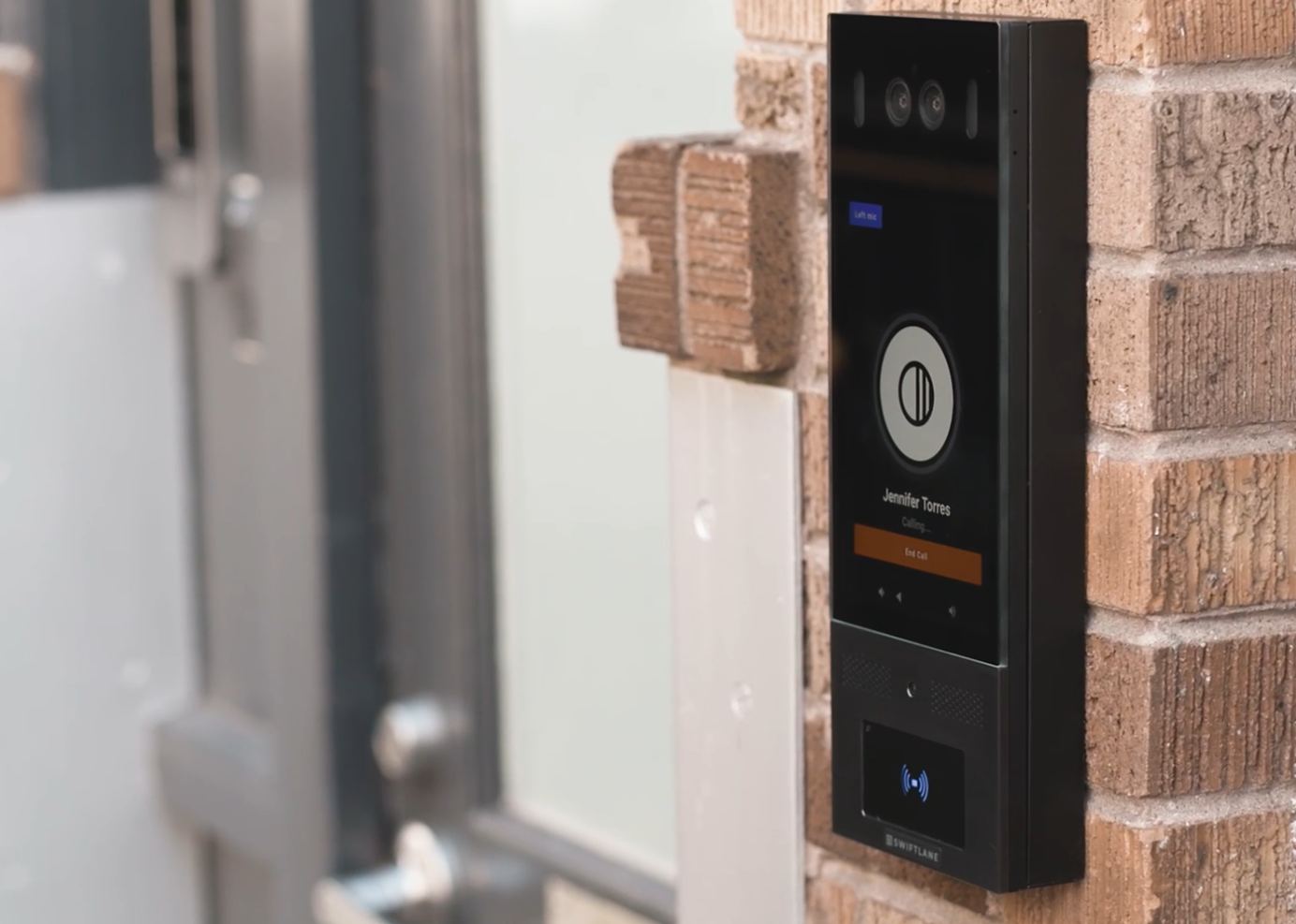
A wireless apartment intercom system lets residents answer visitor calls and unlock building doors from a mobile app, without relying on in-unit wiring or hardwired substations. These systems connect over Wi-Fi, cellular, or Ethernet, and are commonly used in multifamily buildings for retrofits, new construction, and properties replacing legacy telephone entry systems.
For property owners and managers, the real question isn’t which system has the longest feature list. It’s about whether the system fits how the building actually operates day-to-day, now and as tenant needs change.
Does this intercom system satisfy my building’s operational requirements now and in the future?
Based on Swiftlane’s experience supporting thousands of multifamily apartment properties, this guide breaks down what wireless apartment intercoms cost, when they make sense over wired systems, what can go wrong, and the questions to ask vendors before buying.
Key Takeaways
- Operational fit matters more than feature lists. The right wireless apartment intercom depends on your building’s connectivity, existing wiring, and day-to-day access needs.
- Cost and reliability are the two biggest buyer concerns. Budget for hardware, installation, software, and potential cellular backup costs, and confirm how the system behaves during a power or internet outage before committing.
- Wireless isn’t the right fit for every building. Buildings with poor Wi-Fi/cellular signal at entry points, strict hardwired requirements, or complex multi-floor integrations may be better served by a wired or hybrid approach.
- Evaluating vendors should rely on real operational questions — connectivity, backup plans, credential flexibility, and support. Use the vendor questions checklist below as a starting point.
Table of Contents: Quick Navigation
- What Is a Wireless Apartment Intercom System?
- Wireless vs. Wired Intercoms: When Each Makes Sense
- Cost: What Apartment Buildings Should Budget
- Reliability: Wi-Fi vs. Cellular vs. Ethernet Backup
- Security and Access Control Features Buyers Should Require
- 14 Vendor Questions Before Choosing a System
- Best-Fit Scenarios
- When Wireless Is NOT the Right Choice
- How Swiftlane Fits as a Wireless Apartment Intercom Option
- How We Researched This
- FAQs
What Is a Wireless Apartment Intercom System?


A wireless apartment intercom system connects using Wi-Fi, cellular, or Ethernet rather than dedicated in-building intercom wiring. Visitors use a device at the entrance to browse a resident directory and place a call directly to a resident’s phone. In many buildings, “wireless” refers to eliminating in-unit substations and legacy intercom wiring, not eliminating all wiring at the entry point itself.
How It Works
- A visitor approaches the entry device and selects a resident from the directory.
- The visitor places a call that rings on the resident’s mobile app.
- The resident verifies the visitor’s identity over two-way audio or video, then unlocks the door remotely.
Wireless vs. Wired Intercoms: When Each Makes Sense
“Wireless vs. wired” can mean different things depending on who’s using the term.
In most apartment buildings, “wireless” refers to the resident experience: calls go to a resident’s phone instead of relying on in-unit substations or building-wide intercom wiring. That’s separate from the question of how the entry device itself connects, which may be Ethernet (often PoE), Wi-Fi, or cellular (LTE), depending on the site.
The table below breaks down which approach tends to fit different building situations:
| Building Situation | Better Fit | Why |
| Retrofit, no existing low-voltage wiring | Wireless (Wi-Fi/cellular) | Avoids pulling new cable through finished walls |
| New construction | Either | Ethernet/PoE can be planned in from the start; wireless still simplifies in-unit wiring |
| Weak Wi-Fi or cellular signal at entry points | Wired (PoE) | More consistent connection where signal is unreliable |
| Multiple gates or entry points across a large site | Wireless | Faster, lower-cost deployment across scattered locations |
| Buildings prioritizing minimal ongoing connectivity dependency | Wired (PoE) | Less reliant on Wi-Fi/cellular network stability day to day |
| Properties needing battery/LTE failover during outages | Depends on vendor | Ask what backup options (battery, cellular failover) the specific system supports |
Ultimately, the right choice depends on what’s already in place at the door (power, Ethernet availability, Wi-Fi/LTE signal) and what you want to happen during an outage: whether the system has battery or UPS coverage, whether it can fail over to cellular, and how door locks behave if power or internet goes down.
Cost: What Apartment Buildings Should Budget
Pricing varies by building, but based on Swiftlane’s day-to-day deployments, most properties should expect the following cost ranges:
| Cost Component | Typical Range | Notes |
| Hardware per entry point | $1,500–$3,500 | Varies by device type (audio-only vs. video) |
| Installation per access point | $1,500–$6,000 | Site conditions (existing wiring, number of doors) drive the range |
| Software subscription | $30–$300/month | Covers cloud hosting, support, and updates for wireless/cloud-based systems |
Cloud-managed intercom subscriptions carry ongoing per-door or per-unit monthly fees that vary significantly by vendor, reflecting continuous software updates, remote management, and technical support, which is why this line item has the widest range of any cost component in this table. (Honor Security)
Ongoing maintenance: For wireless, cloud-based systems, ongoing support and maintenance are typically bundled into the software subscription above rather than billed as a separate line item, since these systems require minimal on-site servicing compared to wired intercoms.
Cost drivers that move these ranges in either direction:
- Intercom type (audio-only vs. video, single-door vs. multi-door)
- Required components and connectivity (Ethernet run vs. Wi-Fi/cellular)
- Number of access points and resident units
- Professional labor and site complexity
- Software subscription fees
Reliability: Wi-Fi vs. Cellular vs. Ethernet Backup
The most common concern buyers raise about wireless apartment intercoms is what happens during a power or internet outage. This is worth asking about directly, since backup capabilities vary significantly across vendors and system designs.
Questions to ask about outage resilience:
- Does the system have a battery backup, and how long does it last?
- Can the device fail over to cellular (LTE) if Wi-Fi or Ethernet goes down?
- Is there offline access functionality — can residents or staff still unlock doors if the system loses its connection entirely?
- Does the door default to fail-secure (locked) or fail-safe (unlocked) during a power loss?
Fail-secure vs. fail-safe: Fail-secure keeps doors locked during a power loss, protecting building assets. Fail-safe unlocks doors automatically, prioritizing safe egress. Which one is appropriate depends on local fire code and the specific door (entry doors vs. stairwell/egress doors often need different behavior).
This is a requirement to confirm with a fire safety professional or AHJ, not just the intercom vendor.
Connectivity type affects outage behavior differently:
- Wi-Fi: Depends on building internet staying up; battery backup on the device itself doesn’t help if the router or ISP goes down, unless the system can fail over to cellular.
- Cellular (LTE): More resilient to building-level internet outages, since it doesn’t depend on in-building Wi-Fi or Ethernet, but is still subject to cellular network outages or poor signal at the entry point.
- Ethernet (PoE): Reliable connectivity where wiring exists, but still dependent on building power and internet uptime unless paired with a UPS and cellular failover.
Security and Access Control Features Buyers Should Require
Beyond basic entry, a wireless apartment intercom system should provide property managers with visibility into and control over who accesses the building and when. Buyers should look for the following as baseline requirements, not optional add-ons.
Access Credentials and Flexibility
- Multiple credential types (mobile app, QR code, facial recognition, keycards/key fobs) so residents can use whichever method suits them — younger residents may prefer mobile unlock, while others may prefer hands-free recognition or a physical fob.
- Easy onboarding and credential removal as residents move in and out.
Access Logs and Reporting
- A full audit trail of who entered, when, and through which door or credential
- Reporting that flags unauthorized entry attempts, so property teams aren’t relying on manual review to catch issues.
Visitor and Delivery Access
- Temporary, time-limited credentials or PINs for visitors, maintenance staff, cleaning services, and deliveries, without requiring a resident to be physically present to let someone in.
- Role-based permissions so staff, vendors, and residents each have appropriately scoped access.
Data Protection
- Ask whether the vendor is SOC 2-certified — a common industry benchmark defined in AICPA’s 2017 Trust Services Criteria for how a company handles data security and privacy.
- Confirm how visitor and resident data (photos, access logs, contact info) is stored and who can access it.
14 Vendor Questions Before Choosing a System
Use this checklist when evaluating vendors. Where a topic is covered in more depth elsewhere in this guide, we’ve pointed to that section instead of repeating the explanation.
| # | Question | What to Listen For |
| 1 | What connections does the intercom require? | Wi-Fi, PoE, or cellular |
| 2 | What backup plans are available in the event of a power or internet outage? | Battery backup, cellular failover, fail-safe/fail-secure behavior |
| 3 | What credential types do residents use? | Mobile app, QR code, face recognition, fob/keycard — if face recognition is offered, confirm the vendor’s compliance with state biometric privacy laws (e.g., Illinois BIPA, Texas CUBI, Washington RCW 19.375), which govern consent, storage, and retention of biometric identifiers. |
| 4 | How user-friendly is the system for all residents? | Clear interface, stable two-way audio/video, accessible to residents with varying levels of tech comfort. |
| 5 | Are access logs and reporting available? | Full audit trail, unauthorized-entry alerts |
| 6 | How is tenant and visitor data protected? | SOC 2 certification, data storage and access policy |
| 7 | What infrastructure is required at entry points? | Power and connectivity needs; whether existing wiring can be reused. |
| 8 | How long does installation or replacement take? | Ask about phased transitions and whether the old system stays operational during install. |
| 9 | How does the system scale? | Whether adding doors, buildings, or units requires new hardware or just software changes. |
| 10 | Can the new system fully replace what we have today? | What legacy hardware (controllers, wiring, directories) the vendor keeps, removes, or integrates with. |
| 11 | How is day-to-day access management handled? | Single dashboard across buildings, remote management, software integrations/partnerships. |
| 12 | Does the system support unstaffed or partially staffed buildings? | Temporary/time-limited access for visitors, maintenance, deliveries |
| 13 | What are the support and maintenance inclusions? | How added costs are calculated— per door, per unit, or per credential. |
| 14 | How does the vendor provide support? | Availability (24/7 vs. business hours) and contact channels. |
Best-Fit Scenarios
Wireless apartment intercoms tend to work particularly well in these situations:
Older Buildings Without Existing Low-Voltage Wiring
Retrofitting a historic or older property is often simpler with a wireless system, since there’s no need to pull new cable through finished walls or shared corridors. The Schoolhouse Condos, a 29-unit historic residential building, upgraded from a legacy intercom system to a wireless setup for this reason.
Buildings Replacing Telephone-Entry or Callbox Systems
Properties moving away from an older telephone-entry callbox, where calls route through a landline rather than a resident’s phone, are common candidates for wireless upgrades. The Wellshire, managed by Seagate Properties, replaced its legacy callbox with a wireless intercom as part of a broader push toward a more modern resident experience.
Gated Communities and Multi-Entry-Point Properties
Larger properties with multiple gates or common-area entry points benefit from wireless deployment because it avoids running wiring to each access point individually. Gateway Park Apartments, a 436-unit community, replaced its legacy fob-and-shared-code system with a wireless intercom at its gates and common-area entry points.
When Wireless Is NOT the Right Choice
Wireless apartment intercoms aren’t the right fit for every building. It’s worth ruling out these situations before committing to a wireless system:
No reliable Wi-Fi or cellular signal at entry points
If the entry point sits in a location with consistently poor Wi-Fi coverage or a weak cellular signal. A below-grade entrance, a detached gate far from the building, or a location surrounded by thick masonry or metal. A wireless system may struggle to stay connected reliably. A wired Ethernet (PoE) connection is usually more consistent in these cases, assuming the wiring can be run.
Buildings with Strict Hardwired-Only Requirements
Some properties, particularly those with specific insurance, HOA, or ownership requirements, may mandate hardwired systems regardless of connectivity quality. Confirm any such requirements before evaluating wireless vendors.
Complex Elevator or Multi-Floor Access Integrations Without Planning
Buildings that need intercom access to control elevator floor restrictions or complex multi-door routing may require more upfront planning and vendor-specific integration work. Wireless doesn’t rule this out, but it’s worth confirming early with the vendor that the system supports the specific elevator or multi-floor setup required, rather than assuming compatibility.
High-Interference Environments
Properties near sources of significant radio interference, or with unusually dense construction materials that block signal between floors or wings, may see inconsistent wireless performance. A site survey before installation can identify this in advance.
In these situations, a wired or hybrid approach, or simply a site visit before choosing a system, is usually the more reliable starting point than assuming a wireless system will work as-is.
How Swiftlane Fits as a Wireless Apartment Intercom Option
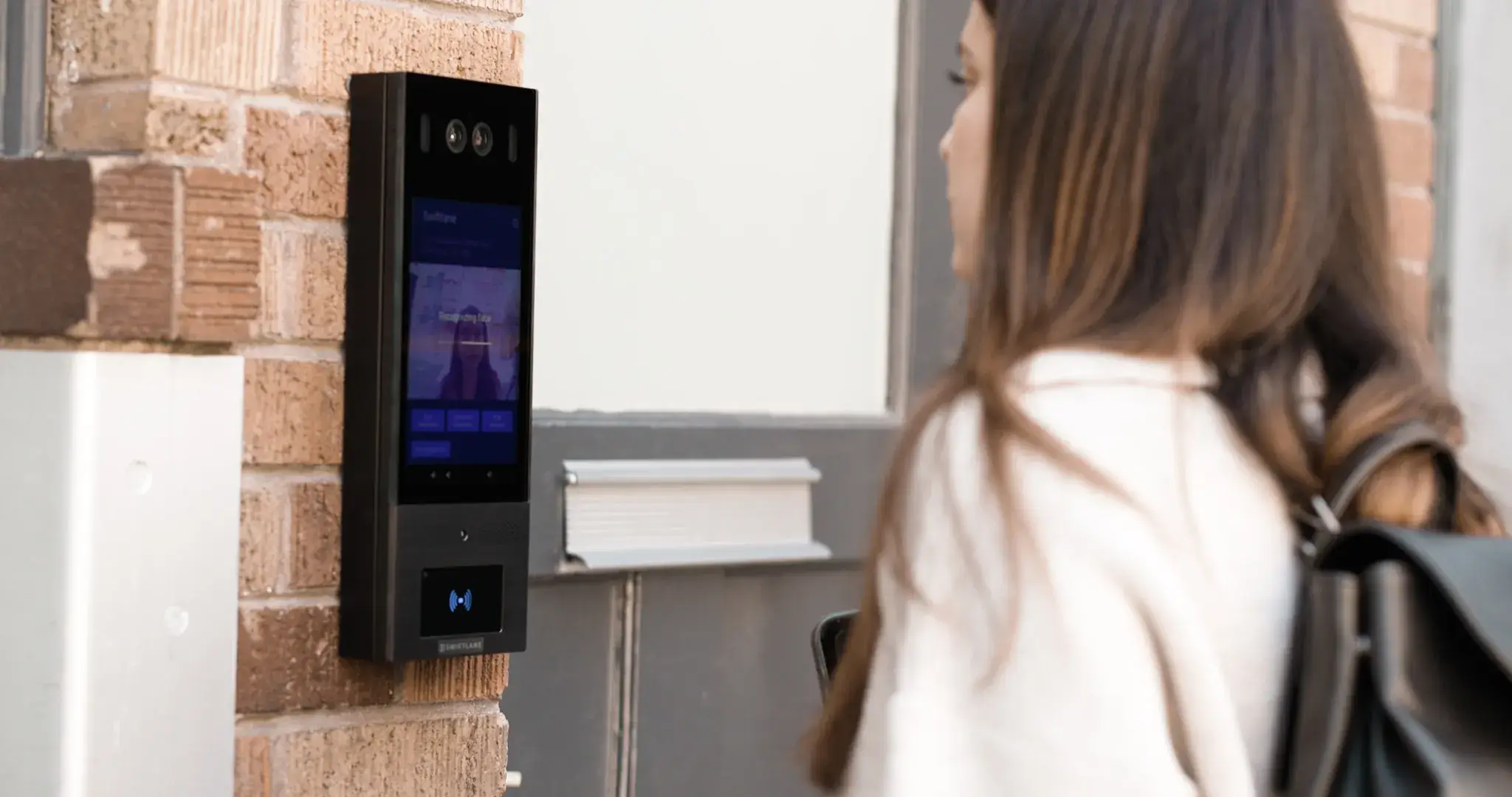
Swiftlane’s SwiftReader X is a cloud-based video intercom built for multifamily buildings, supporting two-way video calling, mobile app unlock, PIN access, key fob/card access, and face recognition.
All managed through a single cloud-based dashboard. It’s deployed across more than 3,000 buildings, in properties ranging from small retrofits to large multi-entry-point communities.
Where it fits well:
- Buildings replacing legacy callboxes or telephone-entry systems (see The Wellshire above)
- Multi-gate or multi-entry-point properties needing centralized management (see Gateway Park above)
- Older or historic buildings retrofitting without existing low-voltage wiring (see Schoolhouse Condos above)
- Properties wanting flexible resident credentials (mobile, face, fob, PIN) rather than a single access method
Worth confirming directly with Swiftlane:
- Cellular (LTE) failover availability for your specific hardware and site conditions
- Software subscription and support cost structure for your building size
- Whether your entry point’s connectivity (Wi-Fi/cellular signal strength) has been assessed, especially in the high-interference or low-signal scenarios covered above
As with any vendor, the right way to confirm fit is through a site assessment rather than assuming that any system, including Swiftlane, will work identically across all building types.
Our team can walk through your building’s specific setup, including power, connectivity, and entry-point layout, in a live demo.
How We Researched This
This guide was built and refreshed using the following process:
- Search query review: We reviewed live Google Search Console data for this page, including which queries it ranks for, average position, and click-through rate, to identify where the content and search intent were misaligned.
- Live page and competitor review: We audited the existing page against current search results for target queries to identify gaps in structure, depth, and directness of answers.
- Buyer-intent mapping: We mapped each section to the actual questions property managers and building owners ask when evaluating wireless intercom systems, based on real search queries this page already receives.
FAQs
What is the best wireless intercom system for an apartment building?
The right system depends on your building’s connectivity, existing wiring, and resident needs. Look for a system offering flexible credentials (mobile, fob, PIN, face recognition), reliable backup options during outages, and centralized management across entry points. See the vendor questions checklist above for what to evaluate.
Do wireless apartment intercom systems work without internet?
It depends on the system and its backup design. Some systems support battery backup and cellular (LTE) failover, allowing continued operation if Wi-Fi or building internet goes down. Ask vendors directly whether the specific hardware supports offline access or cellular failover.
How much does a wireless apartment intercom system cost?
Hardware typically runs $1,500–$3,500 per entry point, with installation commonly $1,500–$6,000 per access point, depending on site conditions. Software subscription, cellular data, and maintenance costs vary by vendor.
Can a wireless intercom unlock apartment building doors?
Yes. Residents can typically unlock doors remotely from a mobile app during a visitor call, and many systems also support mobile credentials, PINs, fobs, or face recognition for resident and staff entry without a phone call.
Is Wi-Fi reliable enough for apartment intercoms?
Wi-Fi can work well where the signal is strong and consistent, but it depends on the building’s internet staying up. For added reliability, look for systems that support cellular (LTE) failover or battery backup, especially in buildings with spotty Wi-Fi at entry points.
What is better for apartments: wireless or wired intercom?
Neither is universally better. It depends on the building. Wireless tends to work better for retrofits and multi-entry-point properties, while wired (PoE) can be more consistent in weak-signal environments. See the Wireless vs. Wired comparison table above.
Request a Free Demonstration
If you wish to see Swiftlane's cutting-edge wireless apartment intercom system in action, send in a request and our team will assist you.


