Hotel Access Control: Guest Rooms, Common Areas, and Back-of-House Systems
Hotel access control rarely runs on a single system. At most properties, guest-room doors use battery-powered locks tied to check-in and check-out. Exterior entrances, common areas, elevators, parking, and back-of-house staff doors run on a separate commercial access control system. Together, those two layers decide who can enter which doors, and when.
Most guides treat every hotel door as if it uses the same hardware. This guide separates the two layers and walks through five zones of a typical property. It also covers how needs shift by property type and the life-safety, accessibility, and cost questions to settle before specifying a system.
How We Researched This Guide
This guide draws on three sources:
- A review of how hospitality properties typically divide guest-room locking from perimeter and staff access control.
- The life-safety and accessibility frameworks that apply to hotel doors: NFPA 101, Life Safety Code, the International Building Code (IBC), and the ADA operable-parts guidelines.
- Swiftlane’s published product and data-sheet documentation.
Code requirements vary by jurisdiction and adopted edition. Any egress, fire alarm, elevator, or pool hardware decision should be confirmed with the local authority having jurisdiction (AHJ) and fire marshal, and, for pools, the local health department.
Key Takeaways
- Hotels typically run two access layers: guest-room locks tied to check-in and check-out, and hardwired access control for perimeter, common-area, elevator, and staff doors.
- The two layers can integrate, so one guest credential opens the lobby, elevator, gym, and room, or they can run side by side.
- Staff entrances and service corridors are often a hotel’s most exposed doors. Role-and-shift-based permissions and door-position monitoring matter most here.
- Boutique and limited-service hotels rely heavily on video intercoms, remote unlock, and scheduled PINs at the night entrance.
- Life-safety hardware, elevator fire recall, and pool barriers have code requirements, and the AHJ has the final word.
- Cost depends more on scope, door construction, and elevator or parking integration than on door count alone.
Table of Contents
- The Two-Layer Hotel Access Architecture: Guest Rooms vs. Perimeter and Back of House
- Access Control by Hotel Zone
- How Requirements Shift by Hospitality Property Type
- Life Safety, Egress, and Accessibility Considerations
- What Drives Hotel Access Control Cost
- Questions to Ask Before Specifying a Hotel System
- Where Swiftlane Fits
- FAQs
The Two-Layer Hotel Access Architecture: Guest Rooms vs. Perimeter and Back of House
A hotel isn’t one access control problem. Guest rooms need locks that work across many doors without running wire to each one. Exterior, elevator, and staff doors need real-time control, monitoring, and tie-in to the fire alarm system. That’s why most properties run two distinct layers.
| Factor | Layer 1: Guest-Room Locks | Layer 2: Perimeter, Common-Area & Staff |
|---|---|---|
| Door hardware | Battery-powered mortise or cylindrical locks | Electric strikes, maglocks, panic hardware |
| Wiring | None at the door | Wired to readers and door controllers |
| Credentials | Keycards, mobile keys, PINs | Cards, fobs, mobiles, PINs, vehicle tags |
| Credential life | Check-in to check-out | Role, shift, or schedule-based |
| System of record | Hotel PMS or reservation software | Commercial access control software |
| Typical doors | Guest rooms and suites | Entrances, elevators, amenities, staff doors |
When the Two Layers Integrate vs. Run Side by Side
Integrated. A guest credential issued at check-in can also open the night entrance, unlock the right elevator floors, and grant gym or pool access for the length of the stay. This works only when both systems share a credential format and exchange data, so confirm compatibility early in planning.
Side by side. The existing guest-room lock system stays in place, and a separate commercial system handles perimeter and back-of-house doors. This is often the simpler path in a retrofit. The trade-off is that staff may carry a multi-technology credential, and guests may use a separate method, such as a PIN or intercom call, at after-hours entrances.
For reader, lock, and controller fundamentals, see our door access control guide.
Access Control by Hotel Zone
| Zone | Typical Doors | Primary Users | Main Risk |
|---|---|---|---|
| Main entrance | Front and night entrances | Guests, visitors, couriers | Lobby left open overnight |
| Elevators | Cab readers, floor buttons | Guests, staff | Non-guests reaching room floors |
| Amenities and parking | Pool, gym, lounges, gates | Guests, staff | After-hours or non-guest use |
| Back of house | Staff entry, docks, IT, cash rooms | Staff, vendors | Propped doors, shared codes |
| Guest rooms | Room doors | Guests, housekeeping | Lost or unreturned keys |
1. Main Entrance and After-Hours Lobby
Main entrances usually stay unlocked while the front desk is staffed. They then switch on an automatic schedule to credential-only entry overnight.
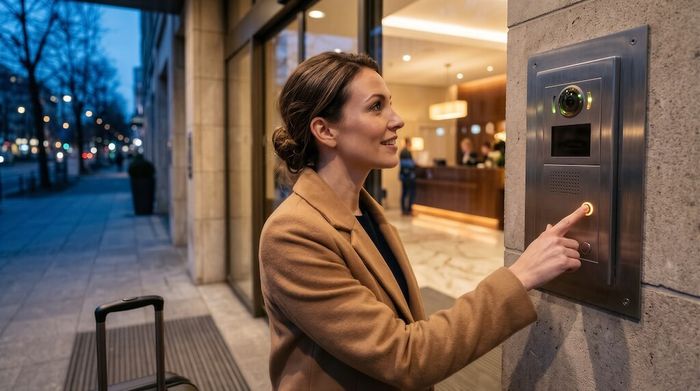
The challenge is everyone who still needs to get in after hours: late-arriving guests, food deliveries, and rideshare drop-offs. Pairing the night entrance with a two-way video intercom lets those visitors reach the night desk without leaving the lobby unlocked. Night staff or a remote manager can then see who’s at the door and unlock it, or the property can issue a scheduled PIN for an expected late arrival.
Registered guests can use their room credential or a mobile key at the entrance reader if the two layers are integrated.
2. Elevators and Guest-Floor Separation
Elevator floor control is one of the most effective ways to keep non-guests off room floors. A valid guest or staff credential at the cab reader unlocks only the floors that person can select. Lobby, restaurant, and conference levels can stay open during business hours.
Floor permissions can follow the guest’s stay or the staff member’s role. Housekeeping, for example, might reach every guest floor during a shift but not after it.
Compliance note: credential-based floor control needs to be coordinated with elevator fire service recall and other life-safety requirements. The design should be confirmed with the elevator contractor, the local AHJ, and the fire marshal.
3. On-Site Amenities and Parking (Pools, Fitness Centers, Lounges, and Garages)
Amenities are where time-of-day schedules do the most work. A property might:
- Keep a fitness center open to guests around the clock.
- Close pool access after evening hours.
- Limit a business lounge or spa to certain room types or loyalty tiers.
Readers at each door restrict access to registered guests and authorized staff, and the schedule decides when valid credentials release the door.
Pool compliance note: an access schedule only controls when a reader releases the gate. Pool barrier gates carry separate self-closing, self-latching, and enclosure requirements under local building and health codes. An electrified lock or schedule doesn’t satisfy those requirements on its own, so confirm pool gate hardware with the local AHJ and health department.
Hotel parking adds vehicle gates or garage entries, often with separate handling for guest self-parking, valet lanes, and staff parking. See our guide to commercial gate entry systems for gate hardware and vehicle credential options.
4. Back-of-House and Staff Entrances (Employee Entry, Housekeeping, Kitchens, Loading Docks, IT and Cash Rooms)
Employee entrances and service corridors are often a hotel’s most exposed doors. Delivery doors can be propped open, keypad codes can be shared across shifts, and physical cards or keys may not come back when seasonal or contract staff leave. These doors also open into areas guests never see, so problems can go unnoticed.
Commercial access control addresses this in four ways:
- Role-based permissions. Housekeeping, engineering, kitchen, and IT staff each reach only the areas their role needs. Cash offices and server rooms can be limited to a small group.
- Shift-based schedules. Credentials work only during assigned shifts, so access outside working hours is blocked automatically.
- Instant revocation. Removing a departing employee’s access from the software can take effect right away, without collecting keys or rekeying locks.
- Door-position monitoring and audit trails. Door-position sensors can flag a rear service door held open too long. Video-linked event logs show who entered, when, and through which door.
5. Guest Room Doors
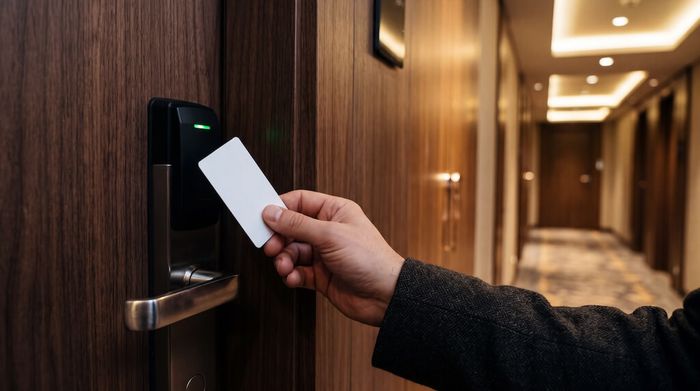
Guest-room locks are typically battery-powered and self-contained. Depending on the system, guests may open them with:
- An RFID keycard encoded at the front desk
- A mobile key stored in a phone wallet or hotel app
- A keypad PIN issued for contactless check-in
Credentials are generally valid from check-in to check-out. In many systems, encoding a new key for a room invalidates earlier ones, so staff can deactivate a lost keycard without rekeying a brass cylinder.
Many guest-room locks also keep an entry log showing whether a guest or staff credential opened the door and when. That record can help resolve guest complaints or security incidents.
Some systems are stand-alone and update only when a key is encoded, or the lock is serviced. Others are wireless and online, reporting
status back to the hotel system in near real time.
How Requirements Shift by Hospitality Property Type
| Property Type | Front Desk | Top Priorities |
|---|---|---|
| Full-service and resort | Staffed 24/7 | Staff zoning, docks, elevators, multi-site admin |
| Boutique and limited-service | Lean or unstaffed overnight | Night intercom, remote unlock, scheduled PINs |
| Extended-stay and aparthotel | Often limited hours | Visitors, packages, resident-style access |
Full-service hotels and resorts typically have a 24/7 front desk, multiple restaurants and event spaces, active loading docks, and large shift-based workforces. That puts the priority on:
- Back-of-house zoning and staff entrance monitoring
- Elevator floor restriction
- Amenity scheduling across pools, spas, and fitness areas
Groups managing several properties may also want cloud-based administration, so they can review permissions and audit logs across sites from one dashboard.
Boutique and Limited-Service Hotels
With lean or unstaffed overnight reception, boutique and limited-service hotels depend on the main entrance working well after hours. Common priorities include:
- Locking the front door on a schedule
- Routing visitor calls through a video intercom to night staff or an off-site manager
- Allowing remote mobile unlock
- Issuing scheduled PINs for expected late check-ins and recurring vendors
Extended-Stay Hotels and Aparthotels
Guests at extended-stay properties and aparthotels stay for weeks or months, and they receive packages and visitors much like apartment residents. Many of these properties use multifamily-style video intercoms, mobile access, and resident directories. For those requirements, see our apartment video intercom buyer’s guide and our overview of apartment intercom systems with mobile access.
Life Safety, Egress, and Accessibility Considerations
Hotel doors sit inside some of the most regulated parts of a building. Corridors, stairwells, assembly spaces, and exterior exits are governed by NFPA 101, the Life Safety Code, and the International Building Code (IBC), as adopted locally.
- Free egress and panic hardware. Doors in required exit paths generally need to allow immediate free egress from the inside. Assembly spaces such as ballrooms and restaurants may call for panic hardware. Access control can restrict entry, but it shouldn’t block exit.
- Stairwell re-entry. Stairwell doors that lock from the stair side often need to release on fire alarm so occupants can re-enter floors, subject to AHJ approval.
- Fire alarm release. Electrified locks on perimeter and egress doors are commonly tied to the building fire alarm system so they release when an alarm activates, as approved by the AHJ and fire marshal.
- Elevator recall. Elevator access relays need to be coordinated so fire service recall overrides credential restrictions.
- Power loss. Whether an electrified lock releases (fail-safe) or stays locked (fail-secure) when power drops depends on the door’s role and local code. The AHJ should make that decision.
- Accessibility. Readers, keypads, and intercoms at entrances and amenities fall under the ADA operable-parts guidelines for reach range and clear floor space, confirmed with the AHJ.
What Drives Hotel Access Control Cost
Hotel access control cost depends more on what the system has to touch than on door count alone.
| Cost Driver | Lower Complexity | Higher Complexity |
|---|---|---|
| Scope | Perimeter and staff doors only | Full property, including elevators and gates |
| Door construction | Existing electrified doors, conduit | Masonry, glass, or historic openings |
| Elevators | No floor control | Multiple banks with floor control |
| Parking | No gates | Gated garages or valet lane |
| Credential mix | One or two types | Cards, mobile, PINs, vehicle tags |
| Layer integration | Systems run side by side | Shared guest credential across layers |
| Portfolio | Single property | Multiple properties, central admin |
For how controller and per-door costs scale, see our breakdown of multi-door access control costs by door count. For per-door hardware basics, see the door access control guide.
Questions to Ask Before Specifying a Hotel System
- How will the commercial access control system coexist with the existing guest-room lock system? Will the layers share a credential, or run side by side?
- What happens at each door if the internet connection drops? Do controllers keep working and logging offline?
- Can staff permissions follow roles and shifts, and can access be revoked instantly when someone leaves?
- How will after-hours visitors, couriers, and late check-ins reach the night desk or get in?
- Which credentials will guests, staff, and vendors actually use: cards, mobile, PINs, or vehicle tags?
- How do electrified locks and elevator controls tie into the fire alarm and fire service recall?
- Are reader and intercom mounting heights within ADA operable-parts guidelines?
- Has the design been reviewed with the local AHJ and fire marshal, and with the health department for pool gates?
Where Swiftlane Fits
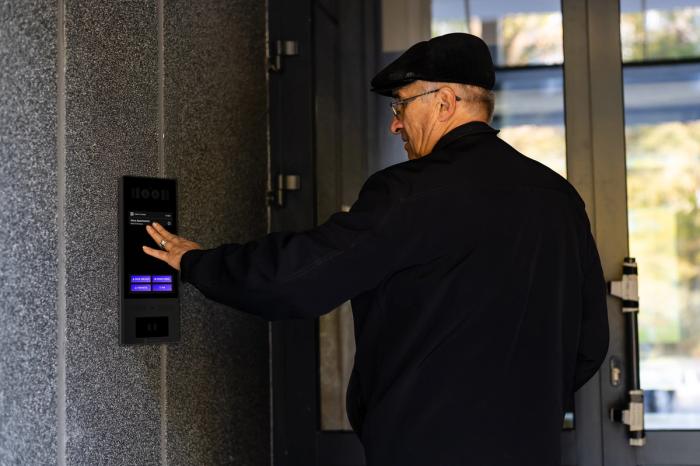
Swiftlane doesn’t make guest-room locks or front-desk keycard encoders. It covers Layer 2: the perimeter entrances, night-locked lobbies, amenities, elevators, parking gates, and back-of-house doors around a hotel’s existing guest-room lock system. It can also serve as the main access system at extended-stay and boutique properties where resident-style access fits.
- Door control. Door Controller 5.2 is UL 294-compliant and supports up to four entrances. It offers request-to-exit, door-position, and fire alarm inputs, and it works with existing electrified locks, elevators, turnstiles, vestibules, and parking gates. See the hardware data sheets.
- Offline resilience. The Access Control Unit, also UL 294 compliant, stores credentials and events locally so doors keep working if the internet connection drops.
- Night entrance. Swiftlane video intercoms let night staff or remote managers see callers and unlock doors from the app or dashboard. Visitor PIN Access issues multi-use PINs scheduled for a set timeframe, such as recurring vendors or an expected late arrival, with a visitor photo log.
- Credentials and elevators. Readers support encrypted 13.56 MHz cards and fobs, mobile unlock (including NFC with Apple and Google Wallet and Bluetooth Low Energy on SL-Z10 and SL-Z20 readers), and PINs. Smart elevator access adds floor-level control.
- Parking. Long-range vehicle readers read windshield tags from up to 20 feet, a fit for staff or extended-stay parking.
- Video records. Motion detection video clips record automatically when motion is detected at the door, useful at night entrances and service doors.
Everything is managed from one cloud-managed door access control system. To see how it fits a specific property, request a demo.
FAQs
What is hotel access control?
Hotel access control combines locks, credentials, and software that manages who can enter guest rooms, entrances, elevators, amenities, and staff areas. Most hotels run guest-room locks and a commercial access control system as two separate layers.
What is the difference between guest-room lock systems and hotel perimeter access control?
Guest-room locks are typically battery-powered, tied to check-in and check-out, and managed through the hotel’s reservation software. Perimeter access control uses hardwired readers and controllers on entrances, elevators, amenities, and staff doors, with role- and schedule-based permissions.
How do boutique or limited-service hotels handle after-hours guest entry without a 24/7 front desk?
Many lock the main entrance on a schedule and add a video intercom so late arrivals can reach night staff or a remote manager. Scheduled PINs and mobile unlock can let expected guests and vendors in without leaving the door open.
How can hotels secure staff entrances and back-of-house areas across rotating shifts?
Role- and shift-based credentials limit each employee to the areas and hours their job needs, and access can be revoked instantly when someone leaves. Door-position sensors and video-linked logs help catch propped doors and show who entered.
What happens to hotel access control doors and elevators during a fire alarm or power outage?
Electrified locks on egress paths are commonly tied to the fire alarm so they release, and elevator fire service recall overrides credential restrictions. Power-loss behavior depends on each door’s role and local code, so it should be confirmed with the AHJ and fire marshal.
What drives the cost of a hotel access control system?
Scope, door construction, elevator and parking integration, credential mix, and whether the system shares credentials with guest-room locks drive cost more than door count alone. Multi-property administration adds further planning.