

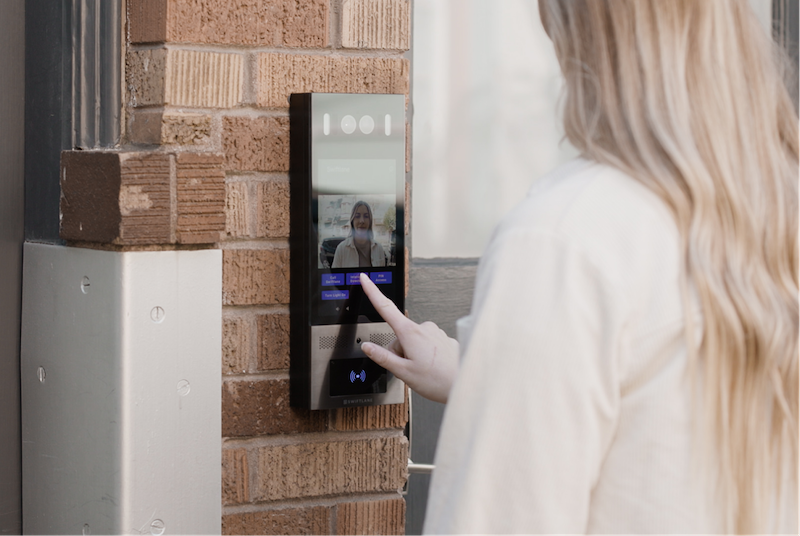
A cloud intercom system is a building entry system whose door station routes visitor calls through a cloud platform to residents’ smartphones, apps, or desk phones and releases doors remotely, replacing on-site servers and in-unit wiring with internet-connected management from any browser.
That definition hides the real buying decision. “Cloud” describes where the system’s brain lives and how it’s managed, not what the panel at the door looks like. Two intercoms with identical touchscreens can behave very differently during an internet outage, cost very differently over five years, and give your team very different levels of control.
This guide is for property managers, building owners, and facilities or IT directors choosing an intercom architecture in 2026. It covers how cloud intercoms work, what they cost, where on-premise systems still win, and how to evaluate vendors before you sign.
The Four Intercom Architectures at a Glance
Most proposals you receive will fall into one of these four models.
| Architecture | How calls route | Data location | Internet dependency | Upfront | Ongoing | Best for |
| Cloud intercom | Door station → cloud → phone or app | Vendor cloud | Required for remote features; local fallback varies by vendor | Moderate | Subscription, per door or per unit | Multifamily, mixed-use, multi-site portfolios |
| On-premise | Door station → local server → indoor station | On-site server | None | Higher | Maintenance contracts | Single buildings; air-gapped or data-residency requirements |
| Hybrid (cloud + local fallback) | Cloud-managed, with credentials cached locally | Both | Local credentials keep working during an outage; remote features pause until it ends | Moderate to high | Subscription plus local maintenance | Retrofits and resilience-critical entries |
| Hosted VoIP / SIP | SIP call to a desk phone, softphone, or app | PBX or hosted PBX | Required | Moderate | SIP trunk plus licensing | Offices with existing VoIP phone systems |
2026 Pricing Snapshot
Cloud intercom pricing has two parts: what you pay once at the door, and what you pay every month for the platform. Ranges below come from Swiftlane’s August 2026 pricing guide and a Chicago-area integrator’s October 2026 buyer’s guide. Full tables and a five-year cost model are in the cost section.
- Entry hardware: Swiftlane’s published figures put cloud-managed video entry hardware at $2,000 to $5,000 or more per entry door (Swiftlane, Aug 2026). Umbrella Security Systems, a Chicago integrator, quotes $1,800 to $5,000 per opening for a video entry panel, installed (Umbrella, updated Oct 2026).
- Platform subscription: Umbrella’s Chicago-market range is $15 to $50 per controlled opening per month. Swiftlane’s guide reports $30 to $100 per door per month, or $5 to $15 per apartment unit per month, depending on how the vendor bills.
- What cloud usually removes: wired in-unit video stations, which Umbrella prices at $300 to $800 per unit installed in Chicago-area buildings.
Local labor rates move these numbers, so treat them as planning ranges rather than quotes.
How We Researched This
Cost figures in this guide combine Swiftlane’s own published pricing data (labeled as Swiftlane’s wherever it appears) with independently published 2026 ranges from two security integrators, one in Chicago and one in New York City. Because integrator pricing reflects local labor markets, each figure is labeled with its region. Life-safety and accessibility guidance is drawn from the 2024 International Building Code, NFPA 101 and NFPA 72, and the 2010 ADA Standards for Accessible Design. Telecom context comes from the Federal Communications Commission’s March 2026 order on legacy copper networks. The evaluation questions reflect the issues property teams most often raise when comparing intercom proposals.
Key Takeaways
- A cloud intercom moves call routing, user management, and updates off-site, so property teams can manage entry from any browser instead of a control room.
- The real architecture choice is between cloud, on-premise, hybrid, and hosted VoIP/SIP, and each behaves differently during an internet or power outage.
- Cloud hardware typically runs $1,800 to $5,000+ per entry, plus a subscription that can be billed per door or per unit; the billing unit can change five-year costs more than the hardware does.
- On-premise still makes sense for air-gapped sites, buildings with no reliable broadband, data-residency requirements, or owners who prefer capital spending over subscriptions.
- Before signing, get written answers on outage behavior, billing unit, data export, and contract exit.
Table of Contents
- What is a Cloud Intercom System?
- What is an On-Premise Intercom System?
- Cloud vs. On-Premise Intercom Systems: Key Differences
- Cost Differences: Upfront Vs. Long-Term Costs
- Use Cases: When Each Intercom Makes Sense
- Decision Checklist
- How Swiftlane Supports Modern Intercom Needs
- Summary
- FAQs
Related Posts
- Best Cloud-Based Access Control Systems: Property Manager’s Guide
- SIP Intercom Systems: How They Work, Benefits, and Limitations
- Door Phone Intercom System: How It Works and Buyer’s Guide
How Cloud Intercom Systems Work
Every cloud intercom has four layers, and a weakness in any one of them shows up at the front door. Knowing the layers makes proposals easier to compare, because vendors often describe the same layer in different words.
Layer 1: The Door Station
The door station is the panel visitors see: a camera, microphone, speaker, directory, and usually a keypad or credential reader. It also triggers the door release, typically through a relay or door controller wired to an electric strike or magnetic lock. Hardware quality matters here more than anywhere else, since this is the only layer exposed to weather, vandalism, and daily wear.
Layer 2: The Network Path
The network path carries calls and commands between the door station and the cloud. Most commercial-grade stations run on Power over Ethernet (PoE or PoE+), which delivers power and data over one cable. Others connect over Wi-Fi or a built-in cellular modem, and some use cellular as a backup when the building’s internet drops. Wireless connection options are covered in more depth in our guide to wireless intercom systems for apartments.
Layer 3: The Cloud Platform
The cloud platform is the system’s brain. It stores the resident directory, routes each call to the right person, logs entries, and pushes software updates to the door station. Property staff reaches it through a web dashboard or admin app, so adding a resident or revoking a code doesn’t require a site visit.
Not every “cloud” product works this way. Some are on-premise systems with a web interface added, where the server still sits in the building, and remote access depends on a VPN or port forwarding. Ask vendors where call routing and the user database actually live.
Layer 4: The Answering Endpoint
The answering endpoint is wherever the call lands: a resident’s smartphone app, a regular phone line, a front-desk tablet, or a SIP desk phone. Stronger systems let each resident choose, and fall back to a voice call if the app doesn’t answer. Remote answering is one benefit of this layer; our remote intercom system guide covers it in detail, and the broader feature set of connected intercoms is covered in our smart intercom system guide.
For a primer on intercom types beyond cloud architecture, including audio, video, wired, and Internet Protocol (IP) systems, see our video intercom systems guide.
Cloud vs. On-Premise Intercoms: The Real Differences
Cloud and on-premise intercoms do the same job at the door, but they differ in who runs the system, how it changes over time, and what happens when something breaks. The six differences below matter most in day-to-day operations.
| Category | On-premise intercom | Cloud intercom |
| Architecture | Server, controller, and software installed in the building | Software hosted by the vendor; door hardware connects over the internet |
| Administration | Changes made at an on-site panel or local server, or remotely through a VPN your IT team maintains | Changes made from a web dashboard or app, from anywhere |
| Cost structure | Higher upfront spend; repairs and upgrades paid as they come | Lower or similar upfront spend; recurring subscription that usually covers hosting, updates, and support |
| Feature velocity | New features usually mean new hardware or a technician visit | Features and security patches arrive through remote updates |
| Integration depth | Integrates well with on-site systems such as a building PBX or local access panels | Integrates through APIs with property management software (PMS), mobile credentials, and other cloud tools |
| Resilience | Keeps working without internet; vulnerable to local hardware failure | Remote features need internet; local behavior during an outage varies by vendor |
In practice, the biggest differences show up in daily administration and during outages. Cloud systems let staff change access from anywhere and pick up new features through remote updates, and they connect easily to property management software. On-premise systems keep routing calls without the internet, which is their clearest advantage, but changes usually require someone on site or a VPN your IT team maintains. What a cloud intercom still does locally during an outage varies by vendor, which is why outage behavior is the second question in the vendor checklist below.
2026 Cloud Intercom Costs
A cloud intercom’s total cost comes down to three numbers: hardware and installation at each entry, the subscription, and how that subscription is billed. The billing unit is the one buyers most often overlook, and over five years it can outweigh everything else.
The ranges below come from three published 2026 sources: Swiftlane’s own pricing guide (labeled as Swiftlane data), Umbrella Security Systems in the Chicago area, and Vertex Security in New York City. Integrator figures reflect their local labor markets, so expect lower labor costs in many other regions and higher costs in dense urban markets.
Table 1: One-Time Costs Per Entry
| Line item | Typical range | Source and region |
| Cloud-managed video entry hardware | $2,000 to $5,000+ per entry door (hardware) | Swiftlane pricing guide, Aug 2026 (Swiftlane data) |
| Video entry panel, installed | $1,800 to $5,000 per opening | Umbrella Security Systems, Chicago area, updated Oct 2026 |
| Cloud IP entry terminal with touchscreen | $1,500 to $5,000 per terminal | Vertex Security, New York City, updated Aug 2026 |
| Electric strike and door release, installed | $250 to $800 per door | Vertex Security, New York City |
| In-unit wired video station (not needed with app-based cloud systems) | $300 to $800 per unit, installed | Umbrella Security Systems, Chicago area |
| Retrofit cable and pathway to units | $250 to $1,500 per unit | Umbrella Security Systems, Chicago area |
The last two rows explain most of the cost gap between architectures. An app-based cloud intercom answers calls on residents’ phones, so it skips in-unit stations and the cabling to reach them.
Table 2: How Cloud Subscriptions Are Billed
| Billing model | Published 2026 range | Source | What it would cost a 200-unit building with 2 entries |
| Per controlled opening | $15 to $50 per opening per month | Umbrella Security Systems, Chicago area | $360 to $1,200 per year |
| Per door | $30 to $100 per door per month | Swiftlane pricing guide (Swiftlane data) | $720 to $2,400 per year |
| Per apartment unit (monthly) | $5 to $15 per unit per month | Swiftlane pricing guide (Swiftlane data) | $12,000 to $36,000 per year |
| Per apartment unit (annual plans) | From $12 (basic) or $32 (advanced) per unit per year | BAS-IP U.S. pricing, as of July 2026 | $2,400 to $6,400 per year |
The same building can see more than a tenfold difference in annual software cost depending on how the vendor counts. Per-door pricing favors buildings with many units and few entrances; per-unit pricing favors small buildings with many doors.
Table 3: What Subscriptions Include and What to Confirm
| Item | Usually part of the subscription | Confirm before signing |
| Cloud hosting and software updates | Yes | Whether major new features cost extra |
| Mobile app calling and in-call door release | Yes | How many phones each unit can connect |
| Remote unlock without an incoming call | Varies by plan | BAS-IP, for example, includes it only in its higher-tier plan |
| Visitor codes, QR passes, and delivery access | Varies by plan | Which credential types each tier includes |
| Entry logs and photo or video history | Usually | Retention period and export format |
| PMS integration | Varies | Which platforms, and whether there’s a setup fee |
| Cellular backup connectivity | Varies | Whether the data plan is bundled or billed separately |
| Hardware warranty and vandal coverage | Separate from software | Term length, and what voids it |
| Support | Usually | Hours, response times, and who handles resident calls |
Budget Ranges by Project Scope
Swiftlane’s August 2026 guide groups hardware and installation costs (before software) into three project sizes:
- Small property, one entry: $1,500 to $6,000
- Mid-size multifamily, one to two entries with mobile access and door release: $8,500 to $34,000
- Large or mixed-use property with multiple entries and integrations: $30,000 to $50,000 or more
These are Swiftlane’s planning figures, not quotes. Your actual price depends on wiring condition, door hardware, and local labor.
Table 4: Five-Year Cost Model for a 200-Unit Building
This illustrative model compares intercom-specific costs for a 200-unit building with two controlled entries. It uses the published ranges above. Door release hardware, network equipment, permits, and internet service are excluded because every option needs them.
| Scenario | Entry panels (2) | In-unit stations and cabling | 5 years of software or service | 5-year total |
| Cloud, billed per door ($15 to $100 per door per month) | $3,600 to $10,000 | $0 | $1,800 to $12,000 | $5,400 to $22,000 |
| Cloud, billed per unit ($5 to $15 per unit per month) | $3,600 to $10,000 | $0 | $60,000 to $180,000 | $63,600 to $190,000 |
| On-premise wired video, existing wiring reusable | $3,600 to $10,000 | $60,000 to $160,000 | $2,000 to $10,000 | $65,600 to $180,000 |
| On-premise wired video, new cabling required | $3,600 to $10,000 | $110,000 to $460,000 | $2,000 to $10,000 | $115,600 to $480,000 |
Assumptions: Entry panels use Umbrella’s $1,800 to $5,000 installed range. In-unit stations use Umbrella’s $300 to $800 per unit, plus $250 to $1,500 per unit for new cabling where required. On-premise service assumes two to four service calls a year (an illustrative assumption, not a sourced figure) at Vertex’s New York City rate of $200 to $500 per call. Cloud hardware service is assumed to be covered by warranty during the five years.
Two results stand out. A cloud intercom billed per door is the lowest-cost option by a wide margin at this size. Billed per unit, it lands in the same five-year range as an on-premise system on reusable wiring, and the model doesn’t capture every cost on either side. It leaves out staff time spent on directory changes and site visits, which differs by architecture, and hardware replacement as on-premise equipment ages. When the totals are this close, the deciding factors are operational: how often your access list changes, how many buildings you manage, and whether you need to make changes remotely. Ask every vendor for a five-year total at your actual unit and door counts, and ask whether per-door billing is available.
When On-Premise Still Makes Sense
Cloud is the better fit for most multifamily and multi-site properties, but not all of them. On-premise intercoms remain the right call in five situations.
Air-Gapped or Highly Restricted Networks
Some facilities, such as certain government, utility, or research sites, prohibit building systems from connecting to outside networks. A cloud intercom can’t operate under that rule. An on-premise system that routes calls entirely within the local network can.
Data-Residency Requirements
Some owners, tenants, or contracts require that entry logs, video, and resident data stay on hardware the owner controls, or within a specific jurisdiction. Some cloud vendors can say where data is hosted, but if the requirement is “never leaves the building,” on-premise is the straightforward answer.
An Existing PBX or SIP Phone System
Offices that already run a well-maintained phone system can route intercom calls to desk phones over SIP, with no separate platform. This is the hosted VoIP/SIP model from the architecture table. It works best where staff, not residents, answer the door.
No Reliable Broadband
A cloud intercom is only as reliable as its connection. Rural sites, buildings awaiting a fiber upgrade, or properties with frequent outages may be better served by a system that doesn’t depend on the internet for basic calling. Cellular-connected door stations can close part of this gap, so ask about signal strength at the entrance before deciding.
One caution for buildings in this group: many older telephone-entry systems rely on copper landlines. On March 26, 2026, the FCC adopted an order streamlining how carriers retire copper networks and grandfather legacy voice service. If your current intercom dials out over a copper line, confirm its future with your carrier. Our guide to what to do with an old intercom system covers repair, retrofit, and replacement options.
A Preference for Capital Spending
Some owners and boards prefer a one-time capital expense they can depreciate over a recurring operating expense. Others simply want no ongoing vendor relationship. An on-premise system fits that preference, as long as the budget also covers the repairs and service calls it will need as hardware ages.
If none of these apply, the operational advantages of cloud management usually outweigh the benefits of keeping everything on site.
Deployment Patterns by Building Type
The same cloud architecture gets configured differently depending on who answers the door and how many entrances there are. Here’s how it typically maps to five common property types.
Multifamily
In apartment and condo buildings, calls route to residents’ phones, and the property team manages the directory, visitor codes, and delivery access from one dashboard. The main design question is billing: buildings with many units and few entrances usually benefit from per-door pricing. Our apartment video intercom buyer’s guide covers multifamily selection in depth.
Commercial Offices
In offices, calls usually route to a front desk, a tenant’s suite, or a group of staff rather than to individuals. That makes the hosted VoIP/SIP model and multi-tenant directories more relevant than they are in residential buildings. See our guide to wireless intercom systems for commercial buildings.
Mixed-Use Properties
Mixed-use buildings combine resident, tenant, retail, and staff access, often across shared lobbies and elevators. A single cloud platform lets one team set different rules for each group from the same dashboard. Floor-level control is handled by elevator access control, and doors beyond the main entrance by a cloud access control platform.
Gates and Perimeter Entries
Vehicle gates and pedestrian gates are often far from the building’s network closet, so the network path layer matters most. Cellular-connected stations or a dedicated network run are common answers. Confirm the gate operator and safety devices are in good condition before adding new entry electronics.
Retrofits
In existing buildings, the deciding factor is usually the wiring already in the walls. App-based cloud systems avoid running cable to each unit, while some retrofit systems reuse existing two-wire runs to keep in-unit stations. Our 2-wire video intercom guide explains when reusing legacy wiring makes sense.
Resilience, Outages, and Life Safety
An intercom controls a door, so its failure modes matter as much as its features. Four areas deserve written answers before you buy: internet outages, power outages, fire alarm and egress rules, and accessibility. A fifth, cybersecurity, applies to every connected system.
Internet Outages
When the internet drops, a cloud intercom loses its link to the platform. What still works depends on the design:
- Remote features usually pause. App calls, remote unlocks, and live directory changes need the cloud.
- Local credentials may keep working. Hybrid designs cache authorized credentials on the door station or controller, so codes, cards, or fobs still open the door. One manufacturer, BAS-IP, states that its hardware keeps accepting locally stored credentials when its cloud is unavailable (BAS-IP, Aug 2026). Not every vendor works this way.
- Cellular backup can keep calls flowing. Some door stations switch to a built-in cellular connection when the building’s internet fails.
Ask each vendor to describe outage behavior in writing, feature by feature.
Power Outages
A door station, door controller, network switch, and internet modem all need power to keep the intercom running. Put them on a UPS or battery backup sized for the outage length you want to cover.
Also decide what each lock does when power is lost. A fail-safe lock unlocks without power; a fail-secure lock stays locked from the outside. Electric strikes on building entrances are commonly fail-secure, keeping the building secured during an outage. Either way, people inside must always be able to exit. Free egress is normally provided by mechanical hardware, such as a lever or panic bar, that works with or without power.
Fire Alarm Integration and Egress Codes
Which doors must unlock in a fire, and how, is set by the building and life safety codes your jurisdiction adopts, not by the intercom vendor.
- Electrified hardware that only controls entry and doesn’t restrict exit, such as an electric strike paired with free-egress hardware, generally falls outside the code sections for special egress locking (Allegion’s I Dig Hardware).
- Locks that do restrict exit, such as magnetic locks, must follow specific provisions. In the 2024 IBC, these are Section 1010.2.10 (door hardware release) and Section 1010.2.11 (sensor release). The equivalent provisions in NFPA 101, Life Safety Code are in Section 7.2.1.6 (I Dig Hardware code reference). Sensor-release systems must unlock on loss of power and on activation of the building’s fire alarm or sprinkler system, where provided.
- NFPA 72, the National Fire Alarm and Signaling Code, governs how the fire alarm system triggers that unlocking. Chapter 21 treats door unlocking as an “emergency control function” and sets rules for the interface between the fire alarm and the lock power.
- NFPA 72, the National Fire Alarm and Signaling Code, governs how the fire alarm system triggers that unlocking.
Your integrator, fire alarm contractor, and local authority having jurisdiction (AHJ) should confirm the sequence of operation for each door. Check whether your jurisdiction has adopted the 2021 or 2024 IBC, since the section numbers changed between editions.
Accessibility
Under the 2010 ADA Standards, operable parts of an entry panel, such as call buttons, keypads, and touchscreens, must sit within the accessible reach range. That range is 15 to 48 inches above the floor for an unobstructed forward or side reach (§308). Controls must be operable with one hand, without tight grasping, pinching, or twisting, and with no more than 5 pounds of force (§309.4) (U.S. Access Board guide). Placement rules can be stricter where obstructions or local codes apply, so confirm mounting heights with your installer.
Cybersecurity
A cloud intercom is a networked device that unlocks doors, so treat it like any other critical IT system. Ask vendors to document:
- Encryption in transit (which TLS version, and whether TLS 1.3 is supported) and at rest (for example, AES-256)
- Whether the door station can run on its own VLAN, separated from resident and office networks
- An independent security audit, such as a SOC 2 Type II report
- Multi-factor authentication for admin accounts
- How firmware updates are signed and delivered, and how quickly vulnerabilities are patched
Vendor Evaluation Checklist: 10 Questions to Ask
Ask every vendor these ten questions and get the answers in writing. Vague answers are a signal in themselves.
| # | Question | Why it matters | What a strong answer includes |
| 1 | Is this a true cloud system, or an on-premise system with a web interface? | Web-interface systems keep the server on site and often rely on VPNs or port forwarding for remote access | Where call routing and the user database live, and what equipment, if any, sits in the building |
| 2 | What exactly happens during an internet outage, and during a power outage? | Outage behavior varies widely between vendors | A feature-by-feature list: what keeps working, what pauses, and how long backup power and cellular last |
| 3 | How are calls routed if a resident doesn’t answer the app? | Missed app notifications mean missed visitors and deliveries | Fallback to a phone or landline call, call groups, and front-desk routing options |
| 4 | Which PMS do you integrate with? | Manual directory updates create errors at move-in and move-out | Named platforms, whether sync is automatic, and any setup fees |
| 5 | What’s the billing unit, and what’s the five-year total at our unit and door counts? | Per-door and per-unit billing produce very different totals | A written five-year figure, the renewal escalator, and what’s included in each tier |
| 6 | Which credentials do you support? | Not every resident or vendor will use an app | Mobile, PIN, card or fob, and visitor codes; confirm which work during an outage |
| 7 | Where’s video and entry data stored, for how long, and who can access it? | Entry photos and video may be needed for disputes, and are subject to privacy rules | Retention settings, export format, hosting location, and access roles; if facial recognition is offered, how it complies with state biometric privacy laws such as Illinois’ BIPA |
| 8 | What are the door station’s weather and vandal ratings? | The entry panel takes the abuse | An IP rating for dust and water resistance and an IK rating for impact resistance, both from the manufacturer’s datasheet, plus the operating temperature range |
| 9 | How are software and firmware updates delivered? | Updates fix vulnerabilities and add features | Automatic remote updates, how often they ship, and whether updates ever require a site visit |
| 10 | What happens when the contract ends? | Exit terms decide whether you own a working system or a locked box | Contract length, cancellation terms, data export, and whether the hardware works with another platform or locally |
For broader access control evaluation criteria beyond the intercom, see our guide to cloud-based access control systems.
Where Swiftlane Fits
Swiftlane is a cloud intercom built for multifamily, mixed-use, and commercial properties that want the intercom and access control on one platform. It’s cloud-managed with local fallback, which places it in the hybrid row of the architecture table.
Here’s how it maps to the four layers, based on Swiftlane’s product documentation:
- Door station: The Swiftlane Video Intercom runs on PoE, carries an IK10 impact rating, and supports face recognition mobile access, PIN codes, and voice-enabled unlock at the same panel.
- Network path and outages: Credentials and access decisions are stored locally at the door controller, so during an internet outage authorized users can generally keep entering with PINs, fobs, mobile credentials, and face recognition. Cloud management, event syncing, and some remote or intercom features may be limited until the connection returns. Cellular fallback and battery backup are available, depending on the deployment.
- Cloud platform: Property teams manage residents, visitor codes, and entry logs for multiple buildings from one dashboard. Swiftlane states that its platform is SOC 2 Type II certified and uses encrypted communications. It integrates with property management platforms including Yardi, RealPage, and Entrata.
- Answering endpoint: Residents can answer by video in the Swiftlane app, and calls can also ring a regular phone line, so visitors still get through when an app notification is missed.
Swiftlane also connects the intercom to cloud access control for other doors and elevator access, so a single platform handles more than the front entrance.
Swiftlane is likely a strong fit for multifamily operators managing several buildings, retrofits where wiring each unit is impractical, and teams that want intercom and access control in one system. It’s a weaker fit for air-gapped sites or owners who want no recurring software cost; in those cases, an on-premise system is the better match. Pricing is quoted per project.
Want to see how a cloud intercom would work in your building? Talk to a Swiftlane specialist about your entrances, unit count, and outage requirements.
FAQs
What is a cloud intercom system?
A cloud intercom system is a building entry system whose door station routes visitor calls through a cloud platform to residents’ phones or apps. Property staff manage the directory, access codes, and settings from a web dashboard instead of an on-site server.
How is a cloud intercom different from an on-premise intercom?
An on-premise intercom runs its software on a server inside the building and is usually managed on site. A cloud intercom keeps only the door hardware on site, with call routing, user management, and updates handled by the vendor’s platform and accessible from anywhere.
How much does a cloud intercom system cost?
Published 2026 ranges put cloud video entry hardware at about $1,800 to $5,000 or more per entry, plus a subscription. Subscriptions are billed per door (roughly $15 to $100 per door per month) or per unit, and the billing unit can change five-year costs dramatically.
Does a cloud intercom work when the internet goes down?
It depends on the vendor. Remote calls, app unlocks, and live updates usually pause. Hybrid designs keep locally stored credentials such as PINs, cards, or fobs working, and some door stations switch to a cellular connection. Ask for outage behavior in writing.
What happens to a cloud intercom during a power outage?
Without backup power, the door station and network equipment shut down. A UPS or battery backup keeps them running. The lock’s behavior depends on whether it’s fail-safe (unlocks without power) or fail-secure (stays locked), but free exit from inside must always be preserved.
Are cloud intercoms secure?
They can be, when the vendor encrypts data in transit and at rest, supports network segmentation, requires multi-factor authentication for admins, and patches firmware promptly. Ask for an independent audit such as a SOC 2 Type II report rather than relying on marketing claims.
Do cloud intercoms require wiring to each apartment?
App-based cloud intercoms don’t, because residents answer on their own phones. The entry panel still needs power and a network connection, usually a single PoE cable, or a cellular or Wi-Fi link.
Can I upgrade from an on-premise intercom to a cloud intercom?
Yes. Most upgrades replace the entry panel and door controller while reusing the door’s existing lock hardware where it’s in good condition. Buildings with usable legacy wiring can also choose retrofit systems that keep in-unit stations.
Do intercom-controlled doors have to unlock during a fire alarm?
It depends on the lock and your local code. Locks that restrict exit, such as magnetic locks on egress doors, generally must release on fire alarm activation and loss of power. Your fire alarm contractor and local AHJ confirm the requirements for each door.
Can residents without smartphones use a cloud intercom?
Yes, on systems that support alternatives. Many cloud intercoms can ring a regular phone line and accept PIN codes, cards, or fobs, so residents who don’t use the app can still answer visitors and enter the building.


